Table formula calculations are broken when you bind tables to large data source

Posted by: jeff on 22 November 2019, 1:00 am EST

    • Post Options:
    • Link

    Posted 22 November 2019, 1:00 am EST - Updated 3 October 2022, 10:31 am EST

    Guys,

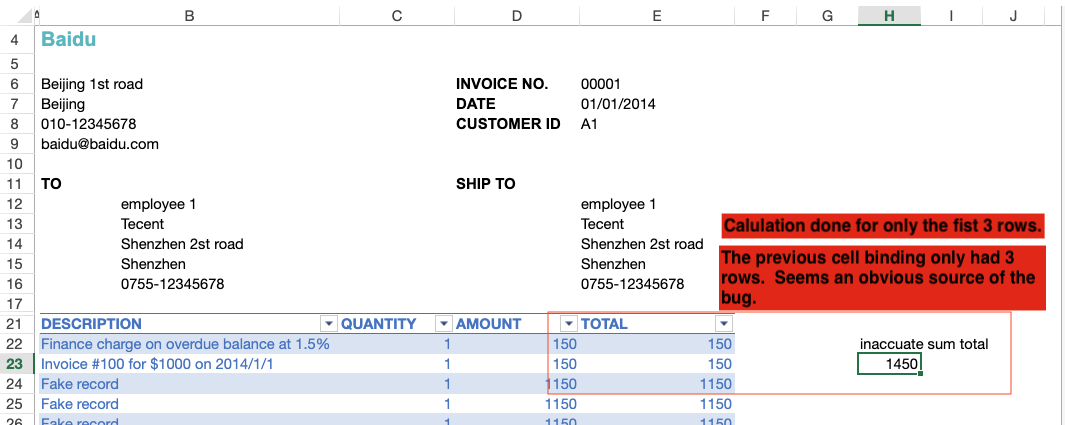
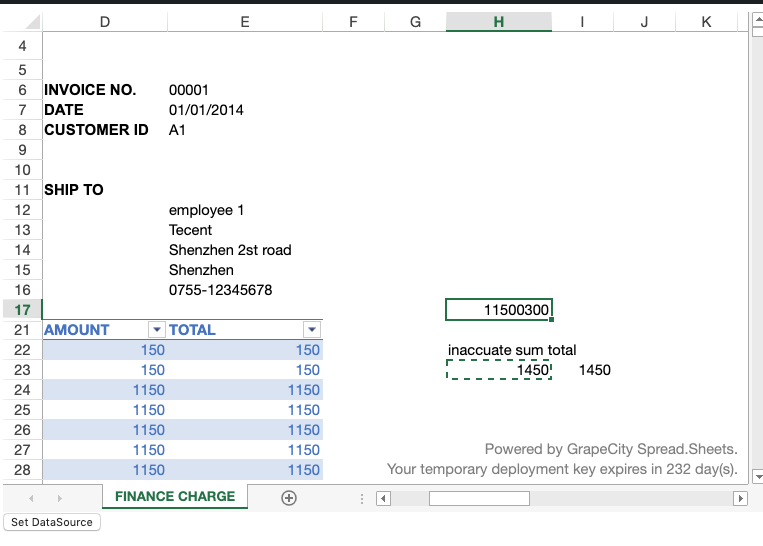
    Table formula calculations are broken when you bind tables to large data sources. Use this codesandbox and set the data source. One of the sources has 10,000 rows. The calculation after you bind the data source is wrong. Look for the cell titled “inaccurate sum total”

    Now try copying the formula to another cell after the data bind… This new cell calculates the formula correctly. We now have two cells with the same formulas and references and two different calculated values.

    https://codesandbox.io/s/spread-js-error-total-data-formula-guiow
  • Posted 22 November 2019, 1:05 am EST - Updated 3 October 2022, 10:31 am EST

    Note: Seems to be something to do when tables grow in row size with new bindings. The calculation is done on the first three rows. The previous size of the last table binding.

  • Posted 25 November 2019, 4:48 am EST

    Hi Jeff,

    We are able to replicate the issue at our end and hence we have forwarded it to the concerned team for further investigation of the issue(SJS-2648). We will let you know about any updates regarding the same.

    In the meantime, you may use the recalcAll() method of the worksheet to recalculate the formulas and fix the issue at your end. Please refer to the following code snippet:

    var sheet = spread.getActiveSheet();
          sheet.suspendPaint();
          if (sheet.getDataSource() === dataSource1) {
            sheet.setDataSource(dataSource2);
          } else {
            sheet.setDataSource(dataSource1);
          }
          sheet.recalcAll(true);
          sheet.resumePaint();
    

    Regards

    Sharad

  • Posted 26 November 2019, 11:54 pm EST

    Thanks Sharad.

  • Posted 7 February 2020, 7:11 am EST

    Hi Jeff,

    This issue is fixed in the SJS version 13.0.3. Please update to the latest build and let us know if the issue persists for you.

    Regards

    Sharad

Need extra support?

Upgrade your support plan and get personal unlimited phone support with our customer engagement team

Learn More

Forum Channels