Posted 4 November 2022, 2:30 am EST - Updated 4 November 2022, 2:39 am EST
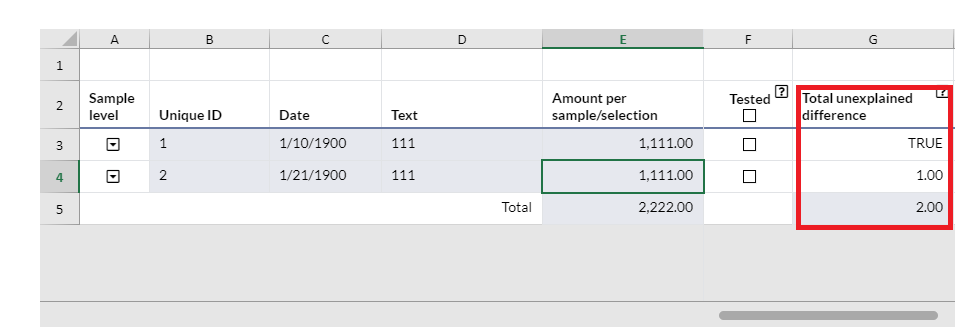
Sum total except cell have type boolean
Posted by: nguyenthanhtuu1995 on 4 November 2022, 2:30 am EST
-

nguyenthanhtuu1995
-

ankit.kumar

Posted 7 November 2022, 5:41 am EST
Hi,
My understanding is that you have specified the Checkbox cell type, and when you use the =SUM() function, the checkbox value is determined based on whether the checkbox is checked or not. When a checkbox is selected, the result is increased by 1.
If this is the use case, you could create a custom formula that, when a value is a number, assesses the total on a range and disregards boolean or other values.
Please take a look at the example I made for you below: https://jscodemine.grapecity.com/share/1W7IZOhneEGqX_G3APD10Q/
If you have a different use case, please let us know.
References:
Custom Functions Demo: https://www.grapecity.com/spreadjs/demos/features/calculation/custom-functions/purejs
Function Class: https://www.grapecity.com/spreadjs/api/classes/GC.Spread.CalcEngine.Functions.Function
Regards,
Ankit