Posted 20 August 2026, 9:46 am EST
Spreadjs PivotBy formula not producing same results as Excel
Posted by: dean.kinnear on 20 August 2026, 9:46 am EST
-

dean.kinnear
-

priyam.kushwaha

Posted 21 August 2026, 5:38 am EST
Hi,
We were able to replicate the behavior on our end. However, we are not yet sure whether this behavior is expected.
We have therefore discussed the issue with our development team for further clarification. The internal tracking ID is SJS-35708.
We will update you as soon as we receive any further information from the development team.
Regards,
Priyam -
priyam.kushwaha
Posted 31 August 2026, 3:17 am EST - Updated 31 August 2026, 3:22 am EST
Hi,
Thank you for your patience while we investigated the reported PIVOTBY behavior.
We discussed this with our development team, and they confirmed that the behavior shown in the attached examples is by design in SpreadJS.
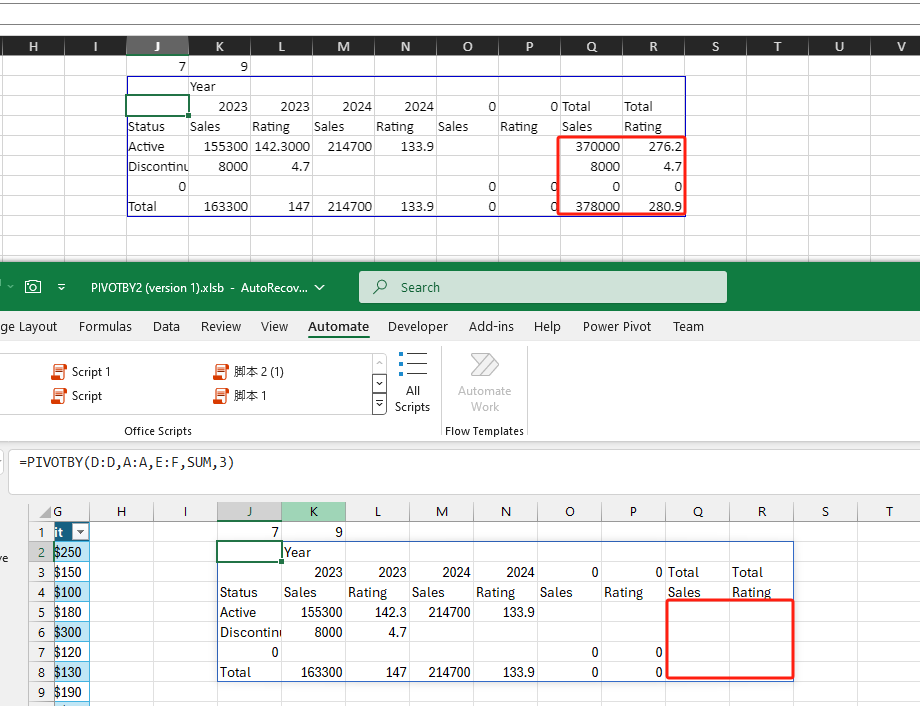
Regarding the Total column, the development team confirmed that SpreadJS is calculating and displaying the Total value correctly. In the corresponding Excel result, the Total column appears blank. Based on dev’s investigation, this appears to be an Excel issue, rather than an issue with the SpreadJS implementation.
Therefore, the difference between the SpreadJS and Excel results in this case is due to Excel displaying a blank value, while SpreadJS evaluates the Total column correctly according to the PIVOTBY specification.
Please refer to the attached image for comparison between the Excel and SpreadJS results.
Regards,
Priyam