Spread V11 Contextmenu is not wall bouncing if size of the container is chnaged

Posted by: viswanath.malepati on 5 June 2018, 8:07 am EST

    • Post Options:
    • Link

    Posted 5 June 2018, 8:07 am EST

    Hi,

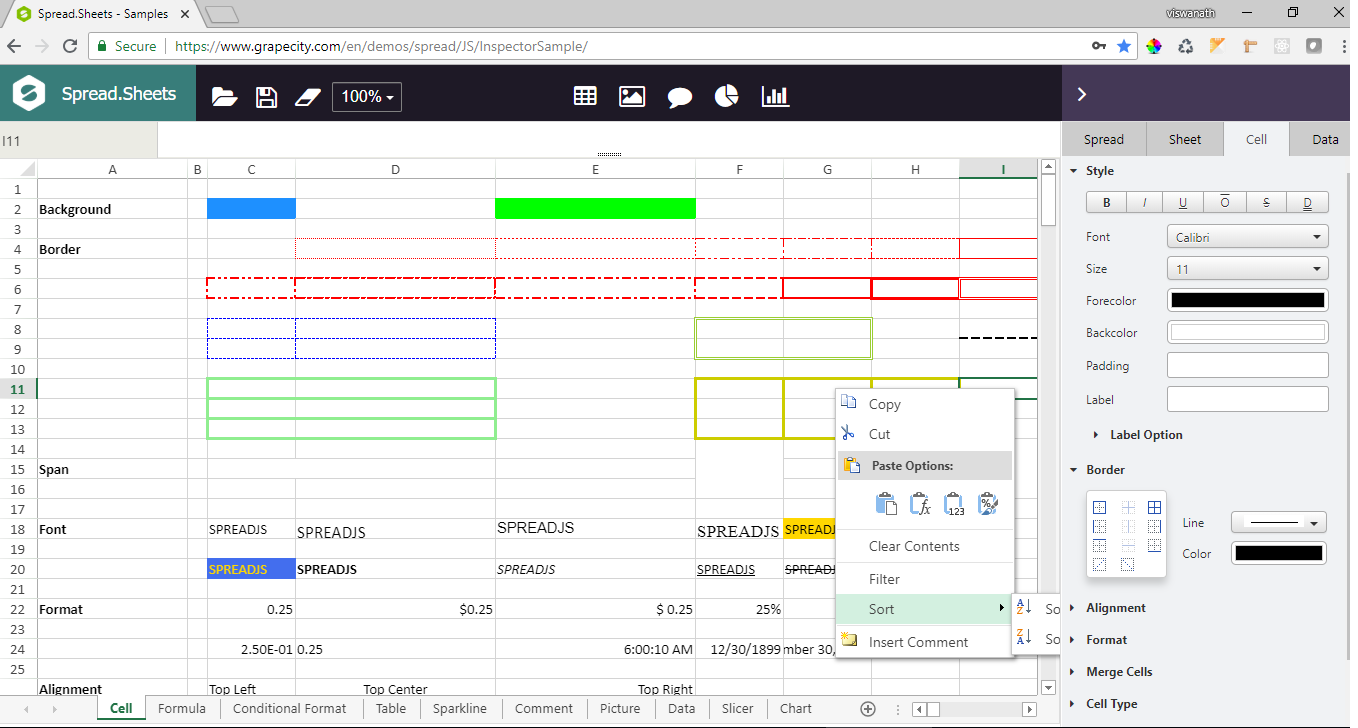
    we are trying to resize the spread container after sheet is loaded, as we have to show a side bar with some setting options. But the context menu is going below that side bar instead of wall bouncing, because of which unable to see the context menu.

    Steps to reproduce:

    1st way:

    "

    2nd way:

    $("#ss").css({
                width: 300,
                float: "right"
            });
    
    spread.refresh()
    

    "

    • “Now try to right click on any right most cell”

    "

    How to fix this, so that i can see context menu even on the right most cell?

  • Posted 7 June 2018, 7:14 am EST

    Hello,

    We are unable to replicate the issue at our end using Microsoft Edge IE browser and Chrome browser following your steps.

    Please have a look at attached screenshots for the same and let us know what are we missing to replicate the issue at our end and further please share exact browser and its version so that we can investigate this issue further.

    Thanks,

    Reeva

    Images.zip

  • Posted 11 June 2018, 2:15 am EST - Updated 3 October 2022, 11:16 am EST

    Hi Reeva,

    Problem is with sub menus. In your screenshots you only tried 1st level… Can you please hover on SORT sub menu and see that its going below the side settings bar. Please refer to the screenshot attached please.

    Thanks,

    Viswanath

  • Posted 12 June 2018, 12:12 am EST

    Hello,

    We are able to replicate the issue with sub-menus now and hence we are escalating the same to the concerned team for the fix.

    We will update you as soon as we hear anything from them.

    Tracking id for your issue is #259427

    Thanks,

    Reeva

  • Posted 12 June 2018, 1:43 am EST

    Hello,

    Our developers have confirmed that it is a demo issue and here you could specify the “overflow” value of style to “visible” on ‘inner-content-container’ div element to avoid the issues as shown in attached screenshot.

    Hope it helps.

    Thanks,

    Reeva

    ChangeThis.zip

Need extra support?

Upgrade your support plan and get personal unlimited phone support with our customer engagement team

Learn More

Forum Channels