Set all unknown fonts to fallback to specified font in PDF export

Posted by: adisa.craig on 10 December 2019, 2:27 pm EST

  • Posted 10 December 2019, 2:27 pm EST

    I would like to set all unrecognized fonts when doing a PDF export to fallback to a single font.

    I tried using

    
    GC.Spread.Sheets.Print.PDFFontsManager.fallbackFont = function (font) {
        return response.encodedFont;
    }


    But the font still shows as a different one

  • Posted 11 December 2019, 7:06 am EST

    Hi,

    While using the fallbackFont, the font should be either Base64 string or ArrayBuffer. For reference, please refer to the following demo sample:

    https://www.grapecity.com/demos/spread/JS/TutorialSample/Features/Pdf/customFontExportPdf/purejs

    If the issue persists, please share a demo sample depicting your issue.

    Regards,

    Manish Gupta

  • Posted 12 December 2019, 5:50 pm EST - Updated 3 October 2022, 10:35 am EST

    Hi,

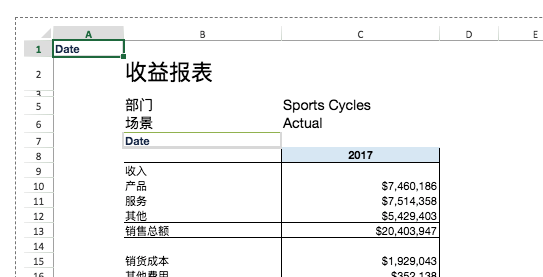
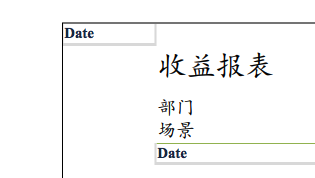
    I still have the same issue, and I see the same issue in the demo sample that you have provided. If a user copies some text into the sheet, and then when I use the getCell().font() method the value returned is “normal bold 14.7px Helvetica Neue”. I have attached screenshots of what the cell looks like in the spread and then how it looks in the PDF export. As you can see they are different. How do we fix this issue to get the export output to look the same as the spread

  • Posted 13 December 2019, 8:12 am EST

    Hi,

    Please find the attached sample it converts the Arial font to “MTCORSVA.TTF” in an exported PDF file using fallBackFont.

    Hope it helps!

    Regards,

    Manish Gupta

    Features_Pdf_customFontExportPdf (2).zip

Need extra support?

Upgrade your support plan and get personal unlimited phone support with our customer engagement team

Learn More

Forum Channels