Scrollbar not reflecting hidden or collapsed columns

Posted by: frederik.beaudry on 23 August 2022, 8:51 am EST

  • Posted 23 August 2022, 8:51 am EST - Updated 3 October 2022, 9:05 am EST

    Hello,

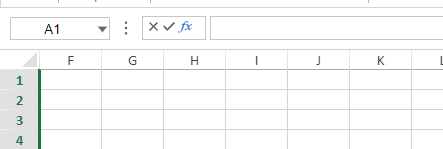
    I realized that when there are hidden or collapsed columns, the horizontal scrollbar doesn’t allow to go to the complete left because it seems to take the hidden columns into account.

    For example, my columns A to E are hidden.

    I cannot fully scroll to the left.

    Is this by design? Or is it something that you can fix?

    Thanks

  • Posted 24 August 2022, 10:59 pm EST

    Hi,

    This behavior is by design. By default, both Excel and SpreadJS scroll only by rows or columns. You can enable the pixel scrolling and it will do the work for you.

    spread.options.scrollByPixel = true;
    

    You can refer to the following docs on Scroll by Pixel: https://www.grapecity.com/spreadjs/docs/features/workbook/scrollbar/scroll-by-pixel

    Regards

    Ankit

Need extra support?

Upgrade your support plan and get personal unlimited phone support with our customer engagement team

Learn More

Forum Channels