Saving erroneous values

Posted by: tovarnakm on 30 July 2021, 11:08 am EST

    • Post Options:
    • Link

    Posted 30 July 2021, 11:08 am EST - Updated 3 October 2022, 9:41 am EST

    Hello,

    Can you help me with saving erroneous values? How to display an error in a cell when the formula has incorrect parameters, etc.?

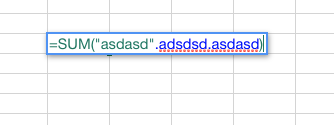
    After submitting formula in attachment, I‘m getting blank cell.

  • Posted 2 August 2021, 5:24 am EST

    Hi Martin,

    To display error messages for the invalid formulas you may handle the InvalidOperation event and display the message. Please refer to the following code snippet and the sample demonstrating the same:

    spread.bind(GC.Spread.Sheets.Events.InvalidOperation, (e, args) => {
          if (
            args.invalidType === GC.Spread.Sheets.InvalidOperationType.setFormula
          ) {
            alert("Invalid formula");
          }
        });
    

    https://codesandbox.io/s/smoosh-sun-peg5n?file=/src/index.js

    API reference:

    https://www.grapecity.com/spreadjs/docs/v14/online/SpreadJS~GC.Spread.Sheets.InvalidOperationType.html

    https://www.grapecity.com/spreadjs/docs/v14/online/SpreadJS~GC.Spread.Sheets.Events~InvalidOperation_EV.html

    Regards

  • Posted 3 August 2021, 5:50 am EST

    Thank you for your reply.

    Is there a way how can we make the cell keep its value? For example when I type =SUM() and hit Enter, cell is blank. I would like it to keep its value (in this case =SUM()), so that I can edit this cell and correct it without typing the whole formula once again. Thank you in advance.

  • Posted 4 August 2021, 7:37 am EST

    In this case, you may handle the EditEnding event and cancel the even if formula is invalid. You may refer to the following code snippet and the sample:

    spread.bind(GC.Spread.Sheets.Events.EditEnding, (e, args) => {
          let text = args.editingText;
          // not formula
          if (!text || !text.startsWith("=")) {
            return;
          }
    
          // check if formula is valid
          try {
            var res = GC.Spread.Sheets.CalcEngine.evaluateFormula(
              args.sheet,
              text,
              args.row,
              args.console,
              false
            );
          } catch (err) {
            // invalid formula, maintain edit mode
            args.cancel = true;
            alert("Invalid formula");
          }
        });
    

    https://codesandbox.io/s/hidden-http-ssc7z?file=/src/index.js

Need extra support?

Upgrade your support plan and get personal unlimited phone support with our customer engagement team

Learn More

Forum Channels