Posted 23 December 2021, 10:44 pm EST - Updated 3 October 2022, 9:29 am EST
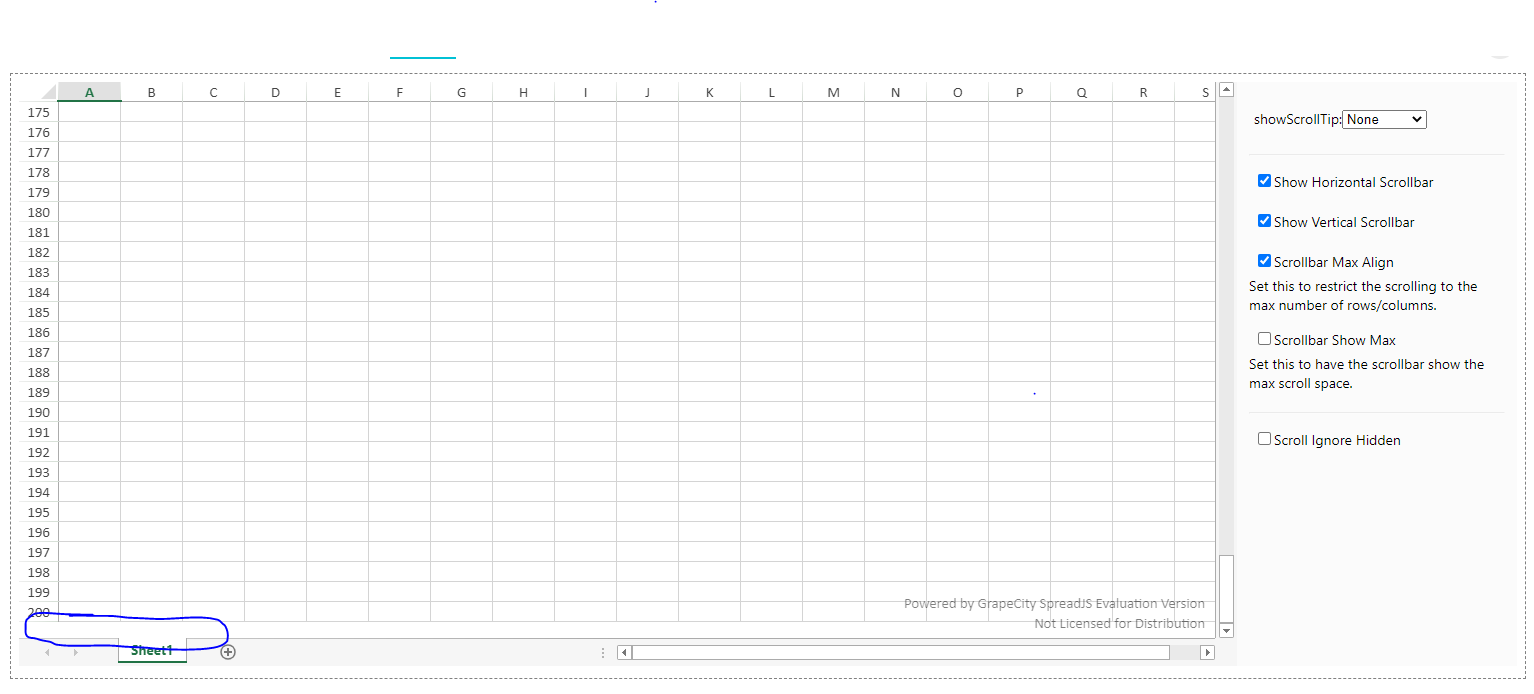
Remove 100% blank space of scrollbar after apply Scrollbar Max Align
Posted by: gunmap08 on 23 December 2021, 10:44 pm EST
-

gunmap08
-

avinash.pathak
Posted 27 December 2021, 1:11 am EST
Hi,
Scollbar Max Align prevent scrolling past the last row or column. However, the blank space is generated due to scrolling (default scrolling by rows and columns) because the viewport’s height is greater than the height of all rows fitting inside the viewport.
In addition to the default scrolling by rows and columns, SpreadJS provides the option for precise scrolling by pixel horizontally or vertically. This allows cells to be partially visible.
For your case, you can enable the pixel scrolling and it will remove all the blank space. Use the code to enable pixel scrolling:spread.options.scrollByPixel = true;Demo on Pixel Scrolling: https://www.grapecity.com/spreadjs/demos/features/workbook/scrollbars/pixel-scrolling/purejs
Thanks.
-
gunmap08
Posted 27 December 2021, 5:32 am EST
Thanks so much for your support,
It’s already work well in my system.