Posted 3 October 2019, 4:23 am EST
When using workbook.print() method (even when defining printInfo with fitPagesWide, fitPagesTall, useMax options) the last page is always a blank page.
I used chrome printing.
Is there a way to fix this?
Forums Home / Spread / SpreadJS
Posted by: guy.g on 3 October 2019, 4:23 am EST

guy.g
Posted 3 October 2019, 4:23 am EST
When using workbook.print() method (even when defining printInfo with fitPagesWide, fitPagesTall, useMax options) the last page is always a blank page.
I used chrome printing.
Is there a way to fix this?
guy.g
Posted 28 October 2019, 8:39 am EST
Is there any response on the matter?

sharad.tomer

Posted 30 October 2019, 2:59 am EST
Hi Guy,
We are sorry for the delayed response. Somehow, this thread remained unnoticed for a long time.
Regarding the issue, we are unable to replicate it at our end, please have a look at the following sample and let us know if we are missing something to replicate the issue: https://codesandbox.io/s/spread-js-starter-2v63k
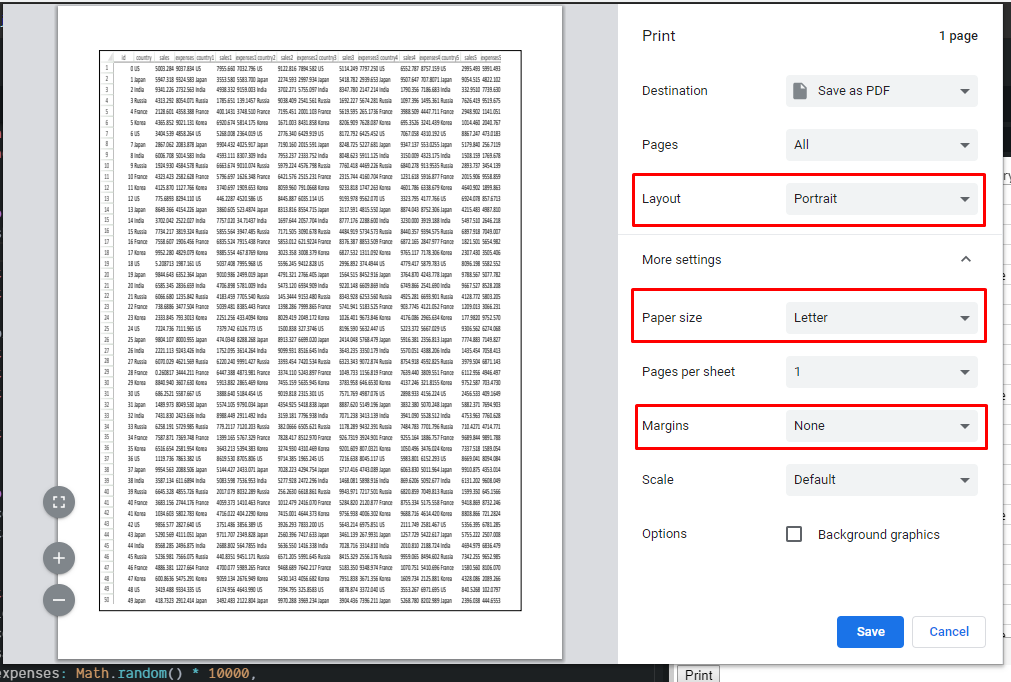
Also, please make sure the correct paper size(default paper size for SJS Letter), Layout is selected in Browser print settings. Also please make sure that margins are set to ‘none’ in browser print settings.
If the issue persists, please share a small sample replicating the issue so that we could further investigate it.
Regards
Sharad
guy.g
Posted 30 October 2019, 6:08 am EST
Thank you for your response.
I used the example you linked and removed some of the bottom lines (I left India as the last row)
Then, I hit the print button. A blank page appeared at the start and at the end of the print preview.
https://imgur.com/a/w6z6a82
All of the settings you mentioned were set correctly
sharad.tomer
Posted 31 October 2019, 12:55 am EST - Updated 3 October 2022, 10:39 am EST
In the shared screenshot we could observe that the layout is set to “Landscape” whereas it should be “Portrait”. If you would like to print in “Landscape” then you need to specify the orientation using the orientation method of the print info. Please refer to the following code snippet:
var printInfo = new GC.Spread.Sheets.Print.PrintInfo();
printInfo.orientation(GC.Spread.Sheets.Print.PrintPageOrientation.landscape);
activeSheet.printInfo(printInfo);
Also, please test the previously shared sample with the print settings as shown in the attached sample and let us know if the issue persists for you.
guy.g
Posted 31 October 2019, 3:25 am EST
I changed the code in the sample code you shared and used landscape (I our application it was already set to landscape) and it seems to be working.
It seems like the only setting I was missing is paperSize set to letter/
Thanks, I will try it in my code.
sharad.tomer
Posted 3 November 2019, 11:47 pm EST
We are glad that you were able to resolve the issue. Please let us know if you face any further issues.