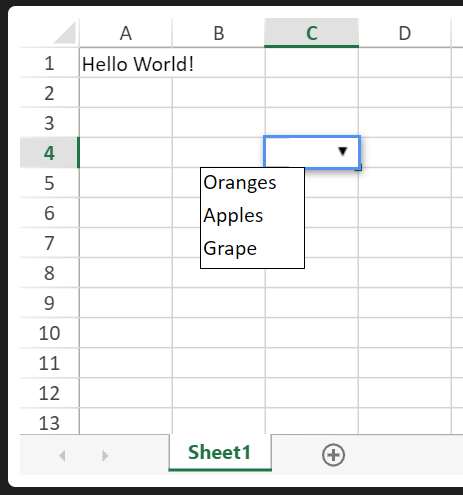
Padding Combobox

Posted by: ngocnguyen09910060 on 8 July 2022, 12:10 am EST

    • Post Options:
    • Link

    Posted 8 July 2022, 12:10 am EST - Updated 3 October 2022, 9:06 am EST

    Hi teams,

    On my web application, i have a combobox cell. In this cell, i want to add padding left. I’m using:

    sheetInitData.getCell(0, 3, GC.Spread.Sheets.SheetArea.viewport).cellPadding('0 0 0 15');
    

    But editor of combobox cell is also padding left.
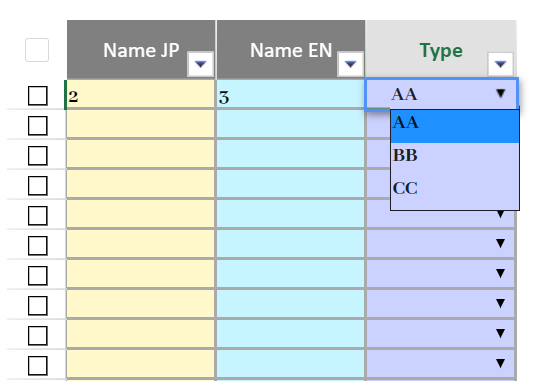


    I want editor is displayed at default position (at left border of cell).

    Please help me.

  • Posted 11 July 2022, 6:11 am EST

    Hi,

    To achieve the required functionality you may update the updateEditorContainer method of the ComboBox cell type as follows:

    var oldUpdateFn = GC.Spread.Sheets.CellTypes.ComboBox.prototype.updateEditorContainer;
    GC.Spread.Sheets.CellTypes.ComboBox.prototype.updateEditorContainer = function(editorCtx){
    	oldUpdateFn.apply(this, arguments);
    	var eCtx = editorCtx.parentElement;
    	var ddContainer = eCtx.querySelector('[gcuielement="gcDropDownWindow"]');
    	ddContainer.style.width = (parseInt(ddContainer.style.width) + parseInt(eCtx.style.left)) + "px";
    	queueMicrotask(() => {
    		ddContainer.style.left =  "-" + eCtx.style.left;
    		ddContainer.style.minWidth = eCtx.parentElement.style.width;
    	});
    };
    

    You may also refer to the following sample demonstrating the same:

    https://jscodemine.grapecity.com/share/PppBfbKwoE6H5rgHfq3iaQ/

    Regards

  • Posted 12 July 2022, 4:38 am EST

    Hi sharad.tomer,

    I have implemented your suggestion and it works well.

    Thank you very much.

  • Posted 13 August 2022, 1:47 pm EST - Updated 3 October 2022, 9:07 am EST

    Hi sharad.tomer,

    In your sample demonstrating, everytime i double click combobox cell, editor is moved to left and out of combobox cell.


    Please tell me how to fix this issue.

  • Posted 17 August 2022, 5:53 am EST

    Hi,

    For this, you may need to use the mutation observer. Please refer to the following updated code snippet and sample that explains the same.

    
    var oldUpdateFn = GC.Spread.Sheets.CellTypes.ComboBox.prototype.updateEditorContainer;
    GC.Spread.Sheets.CellTypes.ComboBox.prototype.updateEditorContainer = function (editorCtx,
    	editorBounds,
    	cellStyle) {
    	var eCtx = editorCtx.parentElement;
    	var ddContainer = eCtx.querySelector('[gcuielement="gcDropDownWindow"]');
    	let paddings = cellStyle.cellPadding ? cellStyle.cellPadding.split(" ") : [];
    	if (paddings.length ===4) {
    
    		ddContainer.style.width = (parseInt(ddContainer.style.width) + parseInt(eCtx.style.left)) + "px";
    		queueMicrotask(() => {
    			ddContainer.style.left = -1*paddings[3]+"px";
    			ddContainer.style.minWidth = eCtx.parentElement.style.width;
    			const callback = (mutationList, observer) => {
    				ddContainer.style.left = -1*paddings[3]+"px";
    			};
    			observer = new MutationObserver(callback);
    			observer.observe(ddContainer, config);
    		});
    	}
    
    };


    sample: https://jscodemine.grapecity.com/share/HKxnB30Ny0efCrGRtDwMSA/

    Regarfds,

    Avinash

Need extra support?

Upgrade your support plan and get personal unlimited phone support with our customer engagement team

Learn More

Forum Channels