
Override Column Sorting Behaviour with NULL values

Posted by: nmohammad on 23 September 2019, 3:44 pm EST

  • Posted 23 September 2019, 3:44 pm EST - Updated 3 October 2022, 10:42 am EST

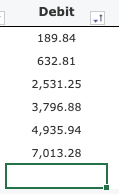
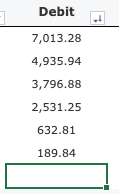
    Problem: When sorting columns that have a null value, the row with that null value is always at the bottom regardless of whether it is ascending or descending.

    Goal: I would like null to be first when ascending, and last when descending (like a negative infinite) - for letter based sorting as well.

    I understand there is this method: http://help.grapecity.com/spread/SpreadJSWeb/webframe.html#JavascriptLibrary~GcSpread.Sheets.Sheet~sortRange.html that you I could override, but I can’t really wrap my head around it (new to SpreadJS).

    Thank you.
  • Posted 24 September 2019, 2:26 am EST

    Hi Nasir,

    This is the default behaviour by design which is the same as in MS Excel.

    Further, we have asked the dev team to confirm if there is a way to specify custom sort comparer. We will update you as soon as we hear from them. Internal tracking id for the issue is SJS-1777.

    Regards

    Sharad

Need extra support?

Upgrade your support plan and get personal unlimited phone support with our customer engagement team

Learn More

Forum Channels
