Issue with deleting multiple cell values after applying filter

Posted by: msharma on 27 June 2022, 1:49 am EST

  • Posted 27 June 2022, 1:49 am EST

    I am facing an issue with deleting multiple cell values after the filter is applied.

    Please do the following steps

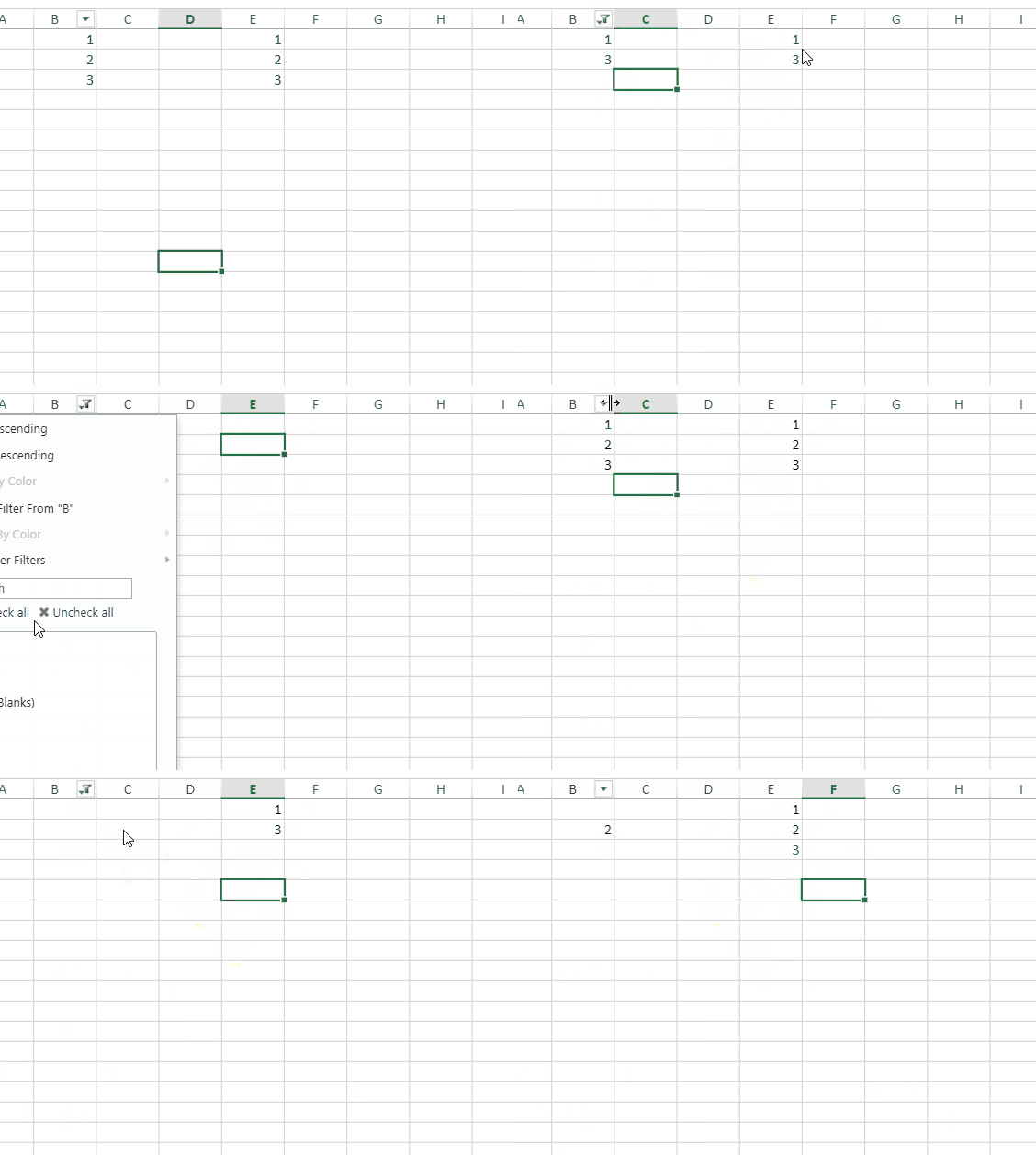
    1. Select a column X in the sheet and apply a filter such that ex: out of rows 1,2,3 only 1 & 3 are visible.
    2. Now on some other columns Y, delete cell values by selecting rows 1 & 3 together.
    3. Remove the filter and we are observing that column Y’s row 2 cell value is also removed.

  • Posted 28 June 2022, 5:38 am EST - Updated 3 October 2022, 9:11 am EST

    Hi,

    We are sorry but we are unable to replicate the issue on our end. Could you please refer to the following gif of steps that we performed and let me know if we missed any steps.

    Regards,

    Avinash

  • Posted 5 July 2022, 9:10 am EST

    That’s my bad. We have some custom logic that is causing this issue.

    I have another query though. Is there a way for getSelections API of spreadjs to skip hidden rows and columns and return the selections? Any other API that would help me to fulfill this requirement also would help.

  • Posted 6 July 2022, 12:46 am EST

    Hi,

    We are sorry but currently, we don’t have such an API. You need to reverse the selection nd ignore and find the hidden rows/cols by yourself. Please refer to the following code snippet and let me know if you face any issues.

    
    let sel = sheet.getSelections()[0];
      /* traverse the rows only */
      for (let row = sel.row; row <= sel.row + sel.rowCount; row++) {
        console.log(sheet.getRowVisible(row));
      }


    Regards,

    Avinash

  • Posted 6 July 2022, 12:59 am EST

    Thanks for your response. Please let me know when are you planning to include this API.

    Thanks,

    Mitra

  • Posted 6 July 2022, 1:36 am EST

    Hi,

    We are sorry but this is by design. when we get a selection it returns the entire sheet range if you are changing the selection you need to make sure of hidden rows and columns spreadJs actions also do the same.

    for example, when a user pastes on selection it pastes on the entire range but if make pasteSkipInvisibleRange to true then spreadJS first get selection and adjust the paste logic by ignoring the hidden rows.

    so it s totally upon the business usecase what actually you want to do with the range.

    that is why we do not have plans to add such an API. We are sorry for the inconvenience.

    Regards,

    Avinash

Need extra support?

Upgrade your support plan and get personal unlimited phone support with our customer engagement team

Learn More

Forum Channels