
Inject Formatting UI

Posted by: davide.vago on 9 December 2019, 11:30 am EST

  • Posted 9 December 2019, 11:30 am EST - Updated 3 October 2022, 10:36 am EST

    Good morning/afternoon

    I’m reaching you out as I would like to understand if SpreadJS has the capability to enable some sort of UI for users to permit classic excel operations like formatting cells.

    What I’m currently having in mind is things like (see attachment)
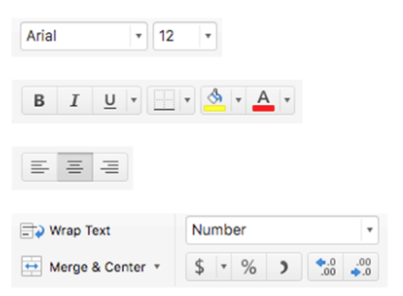
    I was going through the documentation but as far I can see there is nothing out of the box.

    looking forward to hearing from you.

  • Posted 10 December 2019, 1:47 am EST

    Hi Davide,

    SpreadJS do not provide any default UI but the API provides enough functions and commands that you could use to create UI according to your requirement.

    We also provide some samples that you could use as a quick start.

    As per your requirement you may use the following sample:

    https://www.grapecity.com/spreadjs/spreadsheet/

    The source code for the above sample is shipped with the spread bundle. After downloading and extracting the spread bundle, you may find the sample in “path_to_extract_location/SpreadJS/Samples/CustomToolbars”

    If you need to create an excel-like application, then you may also use the designer sample: https://www.grapecity.com/spreadjs/designer/content/index.html

    Please note that unlike the CustomToolbars sample, the Spread designer sample is not included with the regular SpreadJS license you need to purchase a designer source code license to use the Designer sample.

    Regards

    Sharad

Need extra support?

Upgrade your support plan and get personal unlimited phone support with our customer engagement team

Learn More

Forum Channels