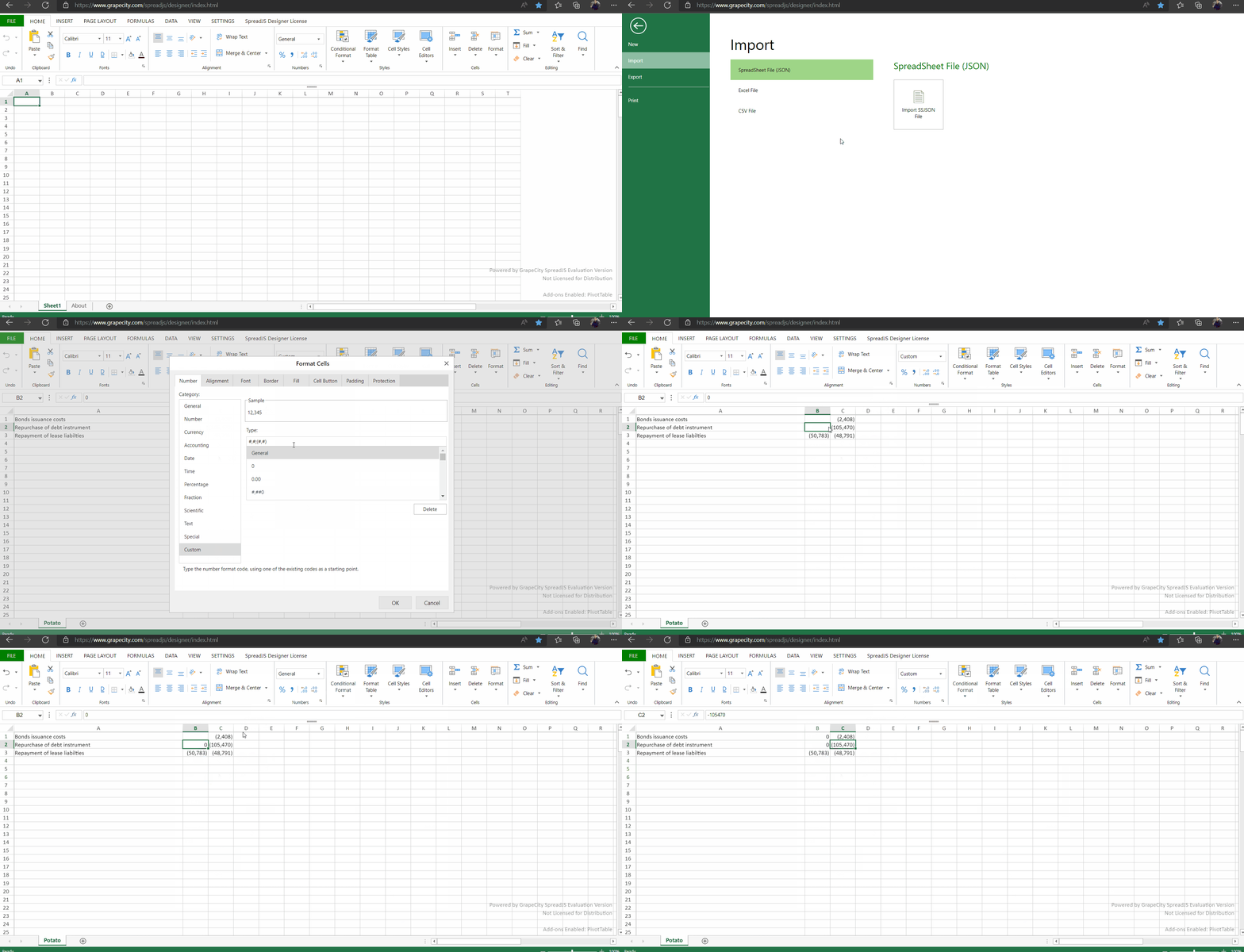
Importing 0 values displays empty cells

Posted by: davide.vago on 31 March 2022, 6:59 am EST

  • Posted 31 March 2022, 6:59 am EST

    Steps to reproduce the bug:

    Import a SSJSON with values set to 0

    Please see the attached json file

    Actual result:

    Cells which have values set to 0 are empty despite the FormulaBox showing 0 as value.

    Expected result:

    Cells which have values set to 0 should display 0 within the cell

    You can even validate it here:

    https://www.grapecity.com/spreadjs/demos/features/workbook/incremental-loading/purejs

  • Posted 31 March 2022, 11:58 pm EST

    Hi Davide,

    We couldn’t find any attached json file. We tested with the latest Version of SpreadJS(V15.0.5) and it seems to be working fine at our end. You can find the attached json file that we used for testing. It is also working fine with incremental loading.

    If the issue still persists for you, please share a working sample and the steps you have followed so that we can investigate it at our end and assist you accordingly. Also could you share how you have generated the json file?

    SpreadJS Designer: https://www.grapecity.com/spreadjs/designer/index.html

    Regards

    Ankit

    JSON File: samplejson.zip

  • Posted 1 April 2022, 4:00 am EST

    Dear Ankit,

    Thanks for your reply, please find in attachment what we currently generate salt-a3f685b6.json.zip

    We still see the problem within your Demos pages.

    Looking forward to hearing from you

  • Posted 2 April 2022, 7:54 am EST - Updated 3 October 2022, 9:21 am EST

    Hi Davide,

    The above behavior is expected because Custom Formatter is applied on the cells with values 0(Cell B1, Cell B2).

    The formula box shows unformatted values, therefore it is showing 0 in the Cells B1, B2. This behavior is same as that of Excel(when formatting #,#;(#,#) applied on Value 0).

    If you change the formatting, say to General Formatter, it will show the values. You can also get the unformatted value by double clicking on the cell.

    I hope this clarifies your issue. Please let us know if you need further assistance.

    Regards

    Ankit

Need extra support?

Upgrade your support plan and get personal unlimited phone support with our customer engagement team

Learn More

Forum Channels