How to use evaluateFormula function on GETPIVOTDATA formula

Posted by: adisa.craig on 14 March 2022, 3:51 pm EST

    • Post Options:
    • Link

    Posted 14 March 2022, 3:51 pm EST - Updated 3 October 2022, 9:23 am EST

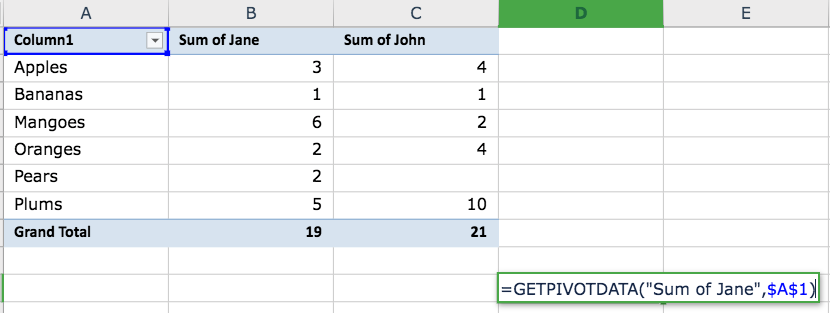
    We run the GC.Spread.Sheets.CalcEngine.evaluateFormula(sheet, formula) function to evaluate formulas entered by the user and provide user friendly messages, however in the case of the function GETPIVOTDATA the evaluateFormula function returns an invalid ref error (#REF!) even though the parameters for the function were entered correctly.

    I believe this is due to the fact that the context provided to the function is the sheet. What would be the proper context to get the correct output from evaluateformula when the user input the GETPIVOTDATA function?

  • Posted 15 March 2022, 8:27 am EST

    Hi Adisa,

    We have tested with the latest Version V15.0.4 and it seems to be working fine at our end. Please find the attached sample that demonstrates the same.

    In general, the evaluation context takes the active sheet object. You can bind the workbook with RangeChanged Formula to get the sheet that triggered the event:

    spread.bind(GC.Spread.Sheets.Events.RangeChanged, function(sender, args) {
        if(args.action === 6) {
           console.log(GC.Spread.Sheets.CalcEngine.evaluateFormula(args.sheet, formula, 0, 0));
       }
    })
    

    If the issue still persists for you, please share a working sample and the steps you have followed so that we can investigate at our end and assist you accordingly. You can also modify the attached sample.

    Regards

    Ankit

    pivot table.zip

Need extra support?

Upgrade your support plan and get personal unlimited phone support with our customer engagement team

Learn More

Forum Channels