Posted 18 July 2022, 4:15 pm EST - Updated 3 October 2022, 9:11 am EST
Hello,
When adding a filter in a cell of the spread, according to the image.

Is it possible to change the icons and texts of each filter field? could you show me an example?
Forums Home / Spread / SpreadJS
Posted by: pedro.moraes on 18 July 2022, 4:15 pm EST

pedro.moraes
Posted 18 July 2022, 4:15 pm EST - Updated 3 October 2022, 9:11 am EST
Hello,
When adding a filter in a cell of the spread, according to the image.
Is it possible to change the icons and texts of each filter field? could you show me an example?

ankit.kumar

Posted 19 July 2022, 1:38 am EST
Hi Pedro,
You can change the text of filter fields by changing the resource of the culture. Please refer to the following code snippet:
    let resources = GC.Spread.Common.CultureManager.getResources();
    resources.Filter.SortAscending = "Custom Sort Ascending";
    resources.Filter.SortDescending = "Custom Sort Descending";
    resources.Filter.TextFilter = "Custom Text Filters";
    resources.Filter.CheckAll = "Custom Check All";
    GC.Spread.Common.CultureManager.addCultureInfo("custom", null, resources);
    GC.Spread.Common.CultureManager.culture("custom");
Custom Localization Demo: https://www.grapecity.com/spreadjs/demos/features/culture/custom-localization/purejs
For changing the icon, you can achieve that by using the following css:
// Sort Ascending
.gc-filter-function-tr:first-child .gc-layout-table-first-column img {
   content: url();
   background-image: round;
}

// Sort Descending
.gc-filter-function-tr:nth-child(2) .gc-layout-table-first-column img {
   content: url();
   background-image: round;
}
For example, you can refer to the following sample that I have created for you: https://jscodemine.grapecity.com/share/eKvzTS3PEE2YQwo8-4vl7w/
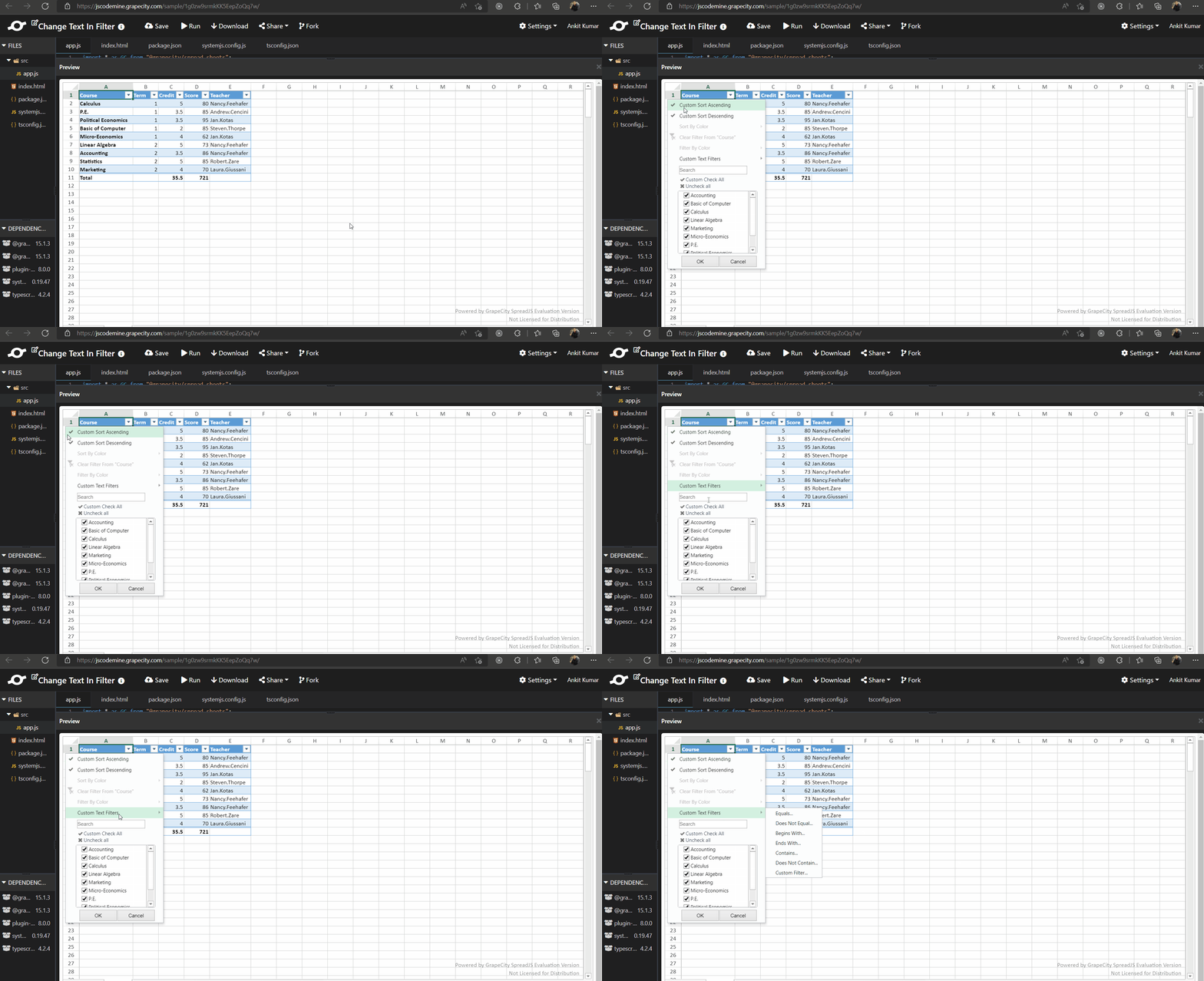
In the sample, I have changed the icon of “Sort Ascending” and “Sort Descending” to that of “tick” icon. Also, the text is changed to “Custom Sort Ascending”, “Custom Sort Descending”, “Custom Text Filters”, “Custom Check All”.
API Docs:
getResoruces method: https://www.grapecity.com/spreadjs/docs/latest/online/SpreadJS~GC.Spread.Common.CultureManager~getResources.html
addCultureInfo method: https://www.grapecity.com/spreadjs/docs/latest/online/SpreadJS~GC.Spread.Common.CultureManager~addCultureInfo.html
culture method: https://www.grapecity.com/spreadjs/docs/latest/online/SpreadJS~GC.Spread.Common.CultureManager~culture.html
Please let us know if you need further assistance on this query. We would be happy to help you.
Regards
Ankit
ankit.kumar
Posted 19 July 2022, 1:39 am EST - Updated 3 October 2022, 9:11 am EST
pedro.moraes
Posted 20 July 2022, 10:14 am EST
thanks!
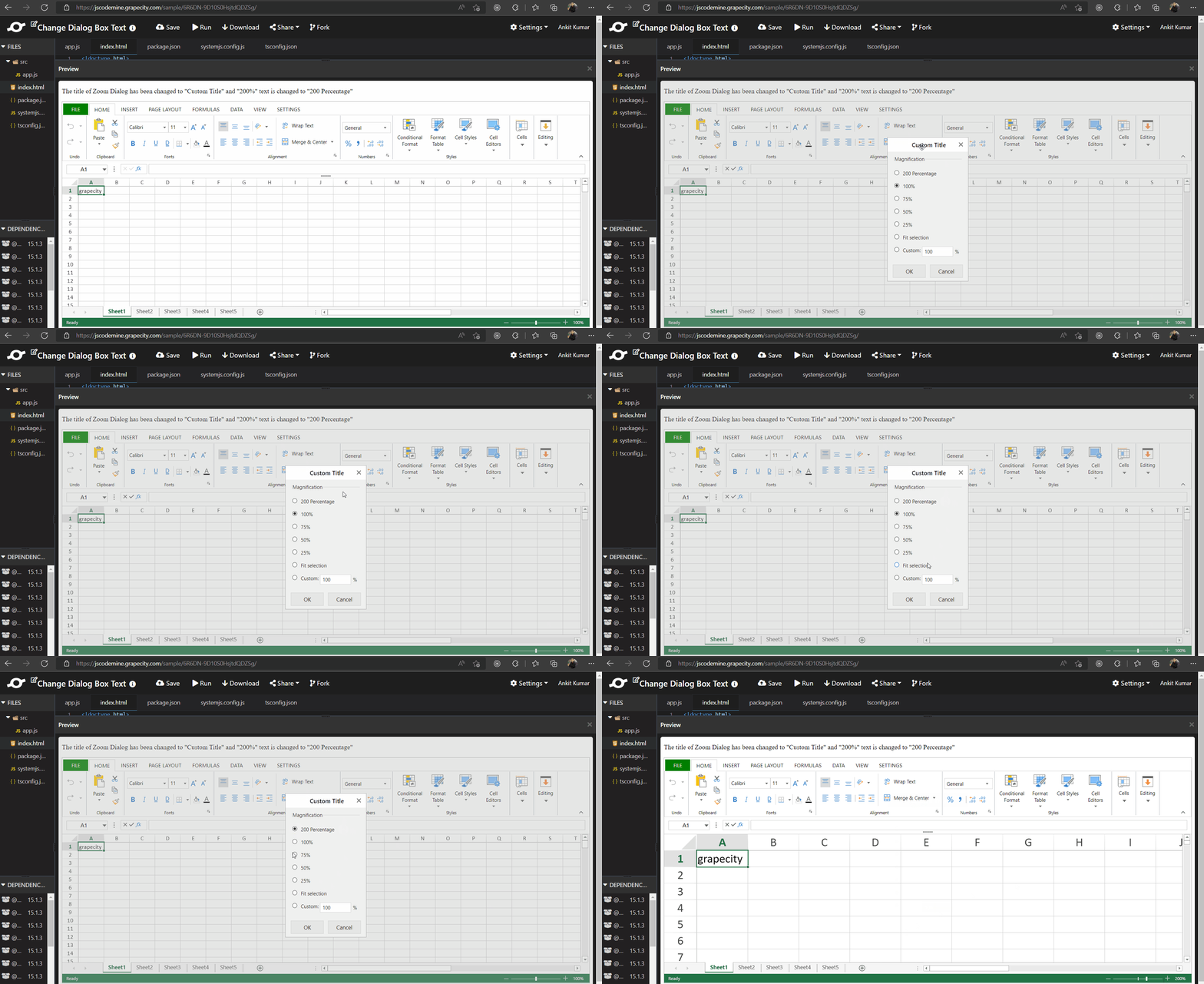
Can you tell me where I change the texts in the dialog boxes? (eg zoom). It’s not on the resourses.
ankit.kumar
Posted 22 July 2022, 3:35 am EST - Updated 3 October 2022, 9:11 am EST
Hi Pedro,
As per my understanding, you want to change the text inside the Zoom Dialog Box. If this is the case, you can get the zoom dialog template using getTemplate method, change the text of template, and register the template with the same name using registerTemplate method:
//Get the ZoomDialogTemplate by the template name.
var template = GC.Spread.Sheets.Designer.getTemplate(GC.Spread.Sheets.Designer.TemplateNames.ZoomDialogTemplate);
// Change the text of template
template.content[0].children[1].items[0].text = "200 Percentage";

// Change the title of the Dialog
template.title = "Custom Title";
GC.Spread.Sheets.Designer.registerTemplate(GC.Spread.Sheets.Designer.TemplateNames.ZoomDialogTemplate, template);
API Docs:
registerTemplate method: https://www.grapecity.com/spreadjs/docs/latest/online/SpreadJSDesigner~GC.Spread.Sheets.Designer~registerTemplate.html
getTemplate method: https://www.grapecity.com/spreadjs/docs/latest/online/SpreadJSDesigner~GC.Spread.Sheets.Designer~getTemplate.html
TemplatesNames Type: https://www.grapecity.com/spreadjs/docs/latest/online/SpreadJSDesigner~GC.Spread.Sheets.Designer.TemplateNames.html
ZoomDialogTemplate Field: https://www.grapecity.com/spreadjs/docs/latest/online/SpreadJSDesigner~GC.Spread.Sheets.Designer.TemplateNames~ZoomDialogTemplate.html
Please let us know if you have a different use case.
Regards
Ankit