Hidden row/column header ui

Posted by: adisa.craig on 4 December 2018, 12:10 pm EST

    • Post Options:
    • Link

    Posted 4 December 2018, 12:10 pm EST - Updated 3 October 2022, 11:02 am EST

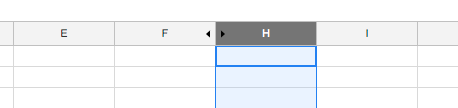
    Is there a way to modify the column and row headers when a row/column is hidden to show that it hidden, such as the arrows in the screenshot (G column is hidden). Is there a way to get that result programmatically?

  • Posted 5 December 2018, 8:19 am EST

    Hi Adisa,

    You may set the column width to ‘0’ instead of making it hidden. For example:

    sheet.getCell(-1, 1).width(0);

    It shows the resize arrow for hidden column(column 1 in this case).

    Thanks,

    Deepak Sharma

Need extra support?

Upgrade your support plan and get personal unlimited phone support with our customer engagement team

Learn More

Forum Channels