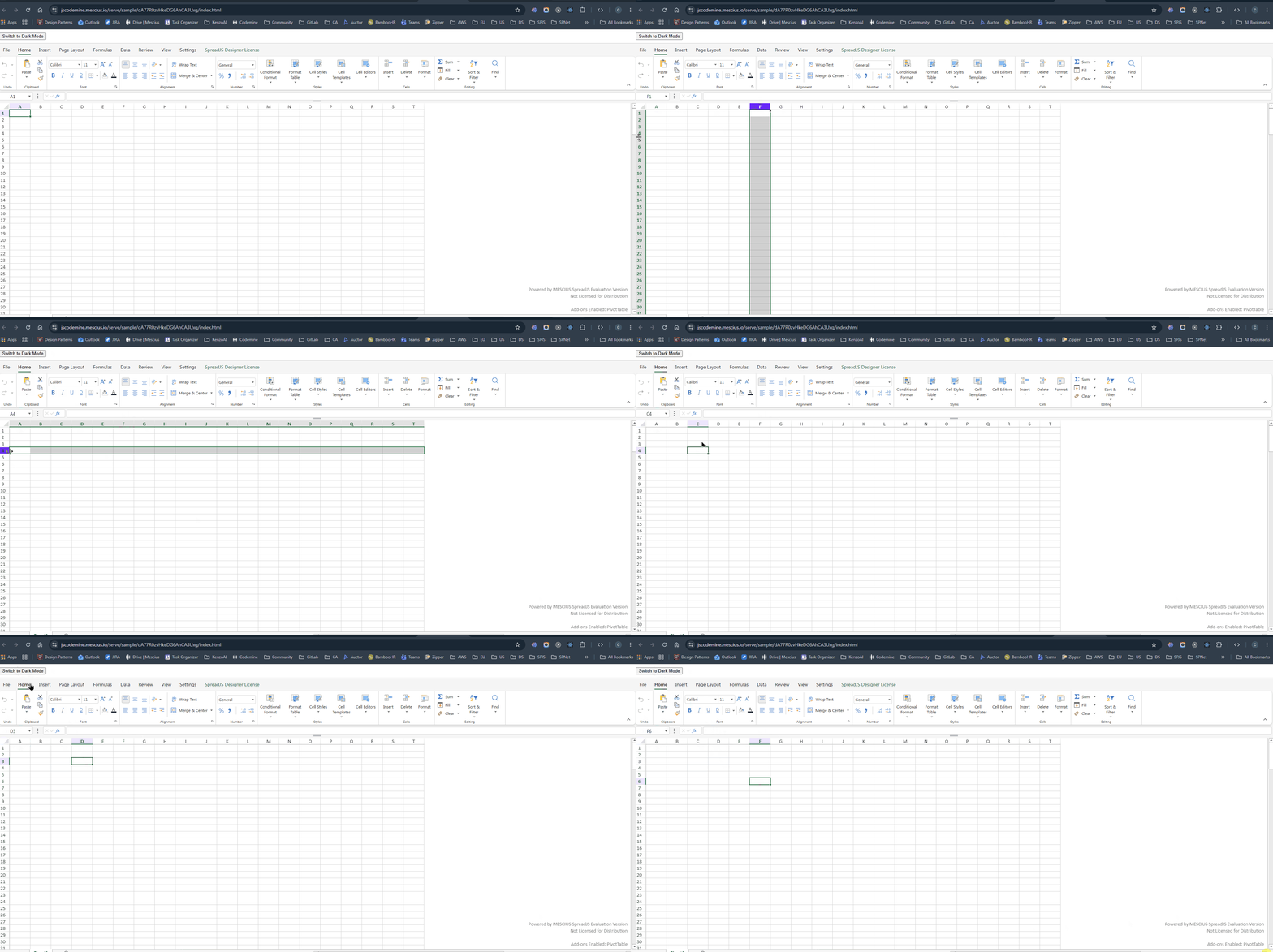
Header row/column highlight on cell selection

Posted by: averma on 5 August 2026, 9:42 am EST

  • Posted 5 August 2026, 9:42 am EST

    Expected

    • Select cell/range → intersecting row + col headers →
      #EDE6FF
      (light) /
      #FFFFFF12
      (dark)
    • Click col header → only col headers for that column →
      #5F2BFF
      /
      #FFFFFF
      (light),
      #5F2BFF
      /
      #0A0618
      (dark)
    • Click row header → only row headers for that row → same selected colors
    • Hover over already-selected header → color must NOT revert to hover color

    Actual

    • CSS class approach (
      .gc-columnHeader-selected
      ,
      .gc-columnHeader-highlight
      ): SpreadJS swaps classes on hover — selected class is removed when cursor enters the header cell, hover class replaces it.
      :not()
      selector trick ineffective.
    • JS
      SelectionChanged
      handler with
      setStyle
      on headers: fires one selection behind — by the time handler runs,
      sheet.getSelections()
      still returns the previous selection.
    • Axis isolation (row-click vs col-click): impossible at CSS level — SpreadJS applies same classes regardless of which axis triggered selection.

    What we tried

    1. CSS vars on
      .gc-columnHeader-selected
      /
      .gc-rowHeader-selected
      — works for color but hover swaps class, losing selected color while cursor is on header
    2. :not(.gc-columnHeader-selected)
      on hover rule — SpreadJS doesn’t co-apply classes, swaps them
    3. SelectionChanged
      +
      setStyle
      in hook (
      bindHeaderHighlight
      ) — one frame behind
    4. SelectionChanged
      +
      setStyle
      inline in component — still one frame behind

    Questions for SpreadJS support

    1. Is there a synchronous callback that fires AFTER the selection is committed and AFTER the header DOM classes are applied, so
      sheet.getSelections()
      reflects the new selection?
    2. Is there an API to suppress SpreadJS’s own header class application so we can fully own the header paint?
    3. Does
      SelectionChanging
      (pre-commit) give us the incoming selection coords reliably?
    4. Is there a supported way to differentiate “user clicked row header” vs “user clicked col header” vs “user selected a range” in the event args?
    5. Is there a canvas paint hook /
      CustomPainter
      for row/col header cells that would let us paint header background per-cell without DOM class conflicts?
  • Posted 6 August 2026, 10:25 am EST - Updated 6 August 2026, 10:30 am EST

    Hi Ashish,

    After reviewing your observations, the behavior can be achieved using the SelectionChanging event together with dynamic CSS updates.

    Regarding your questions:

    • Is there a synchronous callback that fires after the selection is committed?: For this scenario, SelectionChanging or SelectionChanged are the appropriate events to use. They provide the incoming selection through args.newSelections, allowing you to determine the selection before the header styles are updated.

    • Does SelectionChanging provide the incoming selection reliably?: Yes. The args.newSelections collection contains the new selection.

    • Is there a supported way to differentiate row header, column header, and range selections?: Yes. By inspecting the first item in args.newSelections, you can identify the selection type using the row and col values (for example, row === -1 for column selections and col === -1 for row selections).

    • How can the hover state be preserved?: Instead of relying on the default header classes, dynamically regenerate the CSS rules based on the current selection type:

      • For a range selection, apply the highlight color to both the *-highlight and *-hover classes.
      • For a column selection, apply the selected color to both the gc-columnHeader-selected and gc-columnHeader-hover classes.
      • For a row selection, apply the selected color to both the gc-rowHeader-selected and gc-rowHeader-hover classes.
      • Replace the previously generated stylesheet each time the selection changes and refresh the workbook so the updated styles are applied immediately.

    This approach also supports both light and dark themes by regenerating the stylesheet with the appropriate color palette whenever the theme changes.

    Please refer to the attached sample application - HeaderCustomization implementing this approach for your reference.

    Please let us know if you have any questions.

    Kind Regards,

    Chirag

    Working:

Need extra support?

Upgrade your support plan and get personal unlimited phone support with our customer engagement team

Learn More

Forum Channels