Posted 27 March 2019, 12:01 pm EST - Updated 3 October 2022, 10:55 am EST
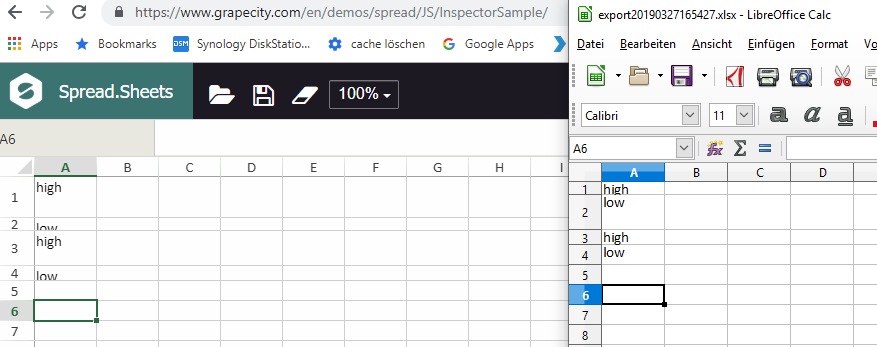
Export to Excel - Row Height mixed up
Posted by: martin.mayr on 27 March 2019, 12:01 pm EST
-

martin.mayr
-

reeva.dhingra

Posted 28 March 2019, 7:08 am EST
Hello,
We could replicate the issue at our end using Chrome browser on Ubuntu machine and using LibreOffice.
Hence, we are escalating the same to the concerned team for further investigation.
Tracking id for your issue is #271138
We will get back to you as soon as we hear anything from them.
Thanks,
Reeva -
reeva.dhingra
Posted 2 April 2019, 5:46 am EST
Hello,
Our developers looked into your issue and according to them this works fine with MS Office and Mac Numbers. Given that it is an Excel file being exported and opens fine in MS Excel but not in LibreOffice, This is an issue with LibreOffice and not with SpreadJS.Hope it clarifies.
Thanks,
Reeva -
martin.mayr
Posted 5 April 2019, 3:48 am EST
Works after i installed LibreOffice Update Version: 6.1.5.2
-
reeva.dhingra
Posted 5 April 2019, 4:28 am EST
Hello,
We are glad to know that it was Libre Office issue which is resolved after updating it.
Thanks,
Reeva