
Detect filter dialog items upon click and check

Posted by: jerome on 18 February 2020, 2:48 pm EST

    • Post Options:
    • Link

    Posted 18 February 2020, 2:48 pm EST - Updated 3 October 2022, 10:30 am EST
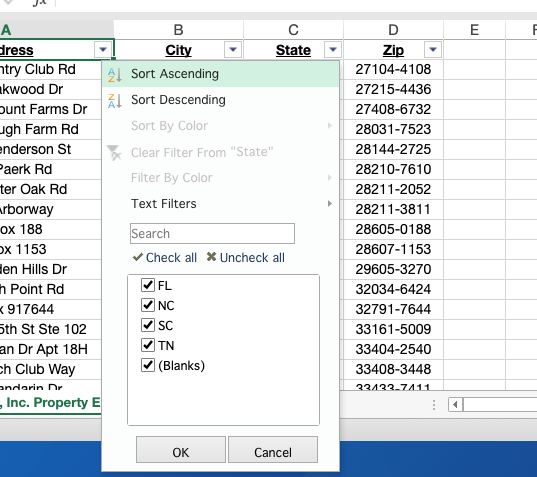
    hello , im creating a filter on the custom button and thankful cause the arrow pops up on the sheet, now, can i detect which items on the filter dialog will be click and checked ? is there any listener to do this ? thanks

  • Posted 19 February 2020, 5:31 am EST

    Hi,

    We are sorry, any method to detect the selected item or checked item is unavailable. It would be great if you may share your use case why you are trying to use the custom filter dialog and trying to detect the selected or checked item.

    Regards,

    Manish Gupta

  • Posted 19 February 2020, 10:06 am EST

    cause im creating a test for the ms excel and this beautiful plugin spreadsheet is my great tool for that, hence, my concern is about the detection of the action per click on the mouse and keyboard to interact the user on the spreadsheet

  • Posted 20 February 2020, 7:33 am EST

    Hi,

    Since the SpreadSheet is created using the canvas. Hence, it is not easy to access the clicked or selected items in Spread or filter dialog because it is also made up of canvas.

    However, you may get the information for the applied filter items using the RangeFiltering event.

    Please refer to the following documentation for reference:

    http://help.grapecity.com/spread/SpreadSheets12/webframe.html#SpreadJS~GC.Spread.Sheets.Events~RangeFiltering_EV.html

    Regards,

    Manish Gupta

  • Posted 24 February 2020, 10:04 am EST

    hello thanks for the reply , i try this one first

Need extra support?

Upgrade your support plan and get personal unlimited phone support with our customer engagement team

Learn More

Forum Channels