
Designer Component - Named Cells

Posted by: mhill on 23 July 2021, 10:16 am EST

    • Post Options:
    • Link

    Posted 23 July 2021, 10:16 am EST - Updated 3 October 2022, 9:42 am EST

    Hi,

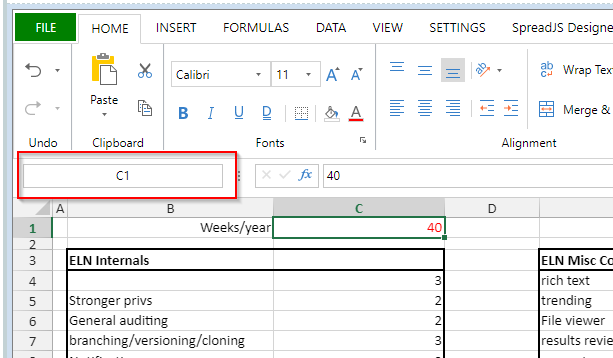
    I have created named cells in my spreadsheet, however when I give that cell focus, the Designer Component does not display name of the cell (or range) in the “Cell name” area (to the left of the formula field - see image). In Excel the name is displayed when a named cell has focus.

    Thanks!

    spreadsheet

  • Posted 26 July 2021, 2:31 am EST

    Hi,

    We are able to replicate the issue at our end and hence we have escalated it to the concerned team for further investigation(Internal tracking Id: SJS-9467). We will keep you posted with updates regarding the same.

    Regards

    Sharad

  • Posted 29 July 2021, 4:59 am EST

    Hi,

    DevTeam has informed us that this is actually a missing feature that currently isn’t supported. We have added this to our backlog but currently, there is no ETA for the same.

    Regards

Need extra support?

Upgrade your support plan and get personal unlimited phone support with our customer engagement team

Learn More

Forum Channels