
Designer Component - Dropdown Combo in Dialogs

Posted by: mhill on 16 March 2022, 1:26 pm EST

    • Post Options:
    • Link

    Posted 16 March 2022, 1:26 pm EST - Updated 3 October 2022, 9:23 am EST

    Hi,

    I am running with SpreadJS 14.2 with the Designer Component. I have run into a serious bug that I’m hoping you can provide a fix for.

    The bug is that many of the input fields in the dialogs do not allow the user to select or type-in a value - rendering the feature useless.

    A couple of examples:

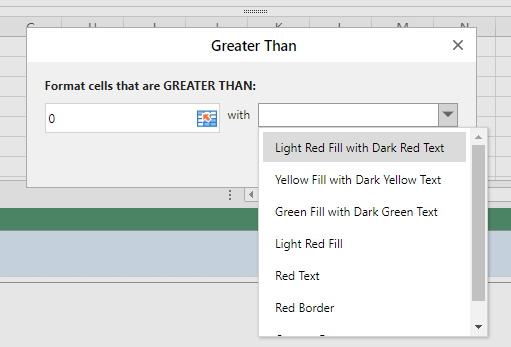
    1. Styles → Conditional Formatting → Highlight Cell Rules → Greater Than → The format option can not be selected
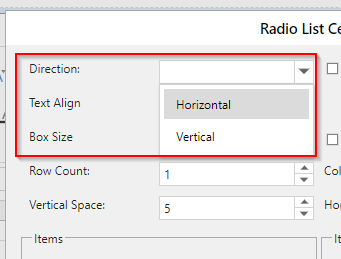
    1. Cell Type → Radio Button List → The Direction or Alignment cannot be selected
    I’m hoping you can provide me with a fix or workaround for version 14.2.

    Thank you.

    Mark

  • Posted 17 March 2022, 3:40 am EST

    Hi,

    This issue has been fixed in the Version 14.2.5. Please upgrade to Version 14.2.5.

    You can also verify the same on the attached sample using Designer Component V14.2.5

    Please let us know if you face any further issues.

    Regards

    Ankit

    Designer Component V14.2.5.zip

Need extra support?

Upgrade your support plan and get personal unlimited phone support with our customer engagement team

Learn More

Forum Channels