Custom number format for date time

Posted by: adisa.craig on 27 July 2021, 5:59 pm EST

    • Post Options:
    • Link

    Posted 27 July 2021, 5:59 pm EST

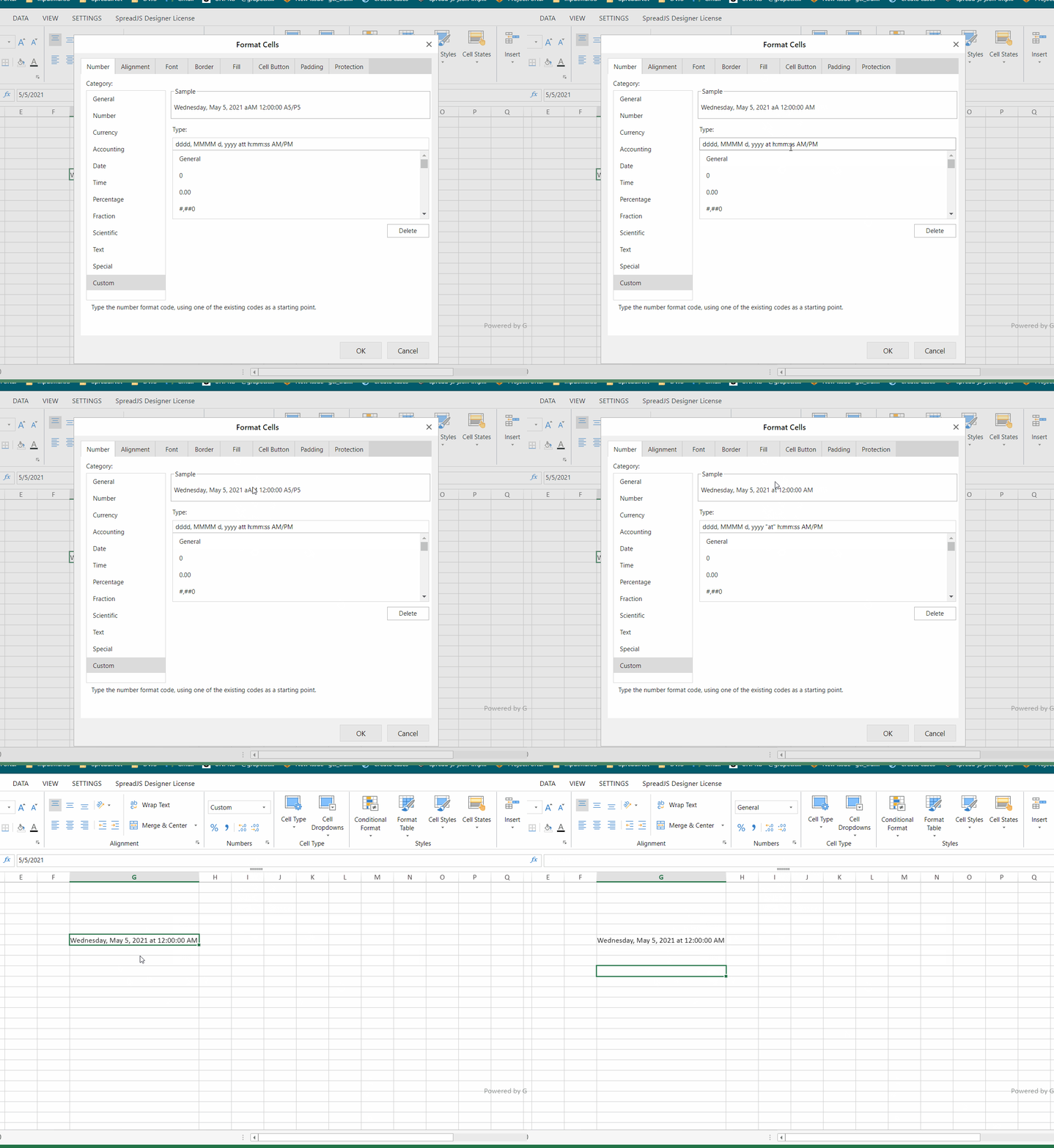
    Hi I am attempting to add a custom number format using the following format

    dddd, MMMM d, yyyy at h:mm:ss AM/PM
    ``` however the text "at" is getting messed up when displayed in the spread. What is the correct format?[img]https://gccontent.blob.core.windows.net/forum-uploads/file-d0659b57-b22e-4ba0-8ebb-030b2c3422c5.png[/img]

  • Posted 28 July 2021, 4:48 am EST - Updated 3 October 2022, 9:42 am EST

    Hi,

    This is expected behavior. In the Format string, the ‘t’ denotes time period(am/pm) which is why it is showing the A at the place of ‘t’. For this, you need to add a custom string inside the double-quotes. Please refer to the following code snippet and attached gif that explains the same.

    
    sheet.setFormatter(0,0,'dddd, MMMM d, yyyy "at" h:mm:ss AM/PM')


    Regards

    Avinash

Need extra support?

Upgrade your support plan and get personal unlimited phone support with our customer engagement team

Learn More

Forum Channels