
Custom logic for sampling, etc with custom button/dialog

Posted by: ivaylo.kostov on 4 January 2022, 4:39 am EST

    • Post Options:
    • Link

    Posted 4 January 2022, 4:39 am EST - Updated 3 October 2022, 9:29 am EST

    Hello,

    We aim to implement some custom logic for sampling of data. For example, a set amount of random rows or rows filtered by the value in a specific cell, etc.

    But i am having trouble figuring out how to do this even with referencing the documentation, if it is possible.

    So far i have the button and dialog added.
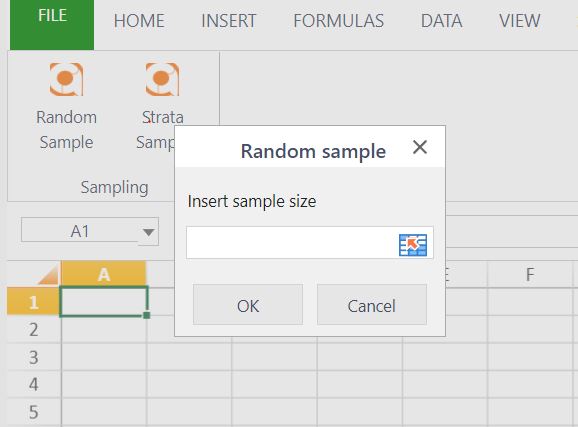


    But i have no idea how to add other fields in the dialog like a column selection (entering the letters, for example), i cant seem to find the available field types. And after that how can i get the values from the dialog fields to initiate some custom logic to calculate/filter out the sample rows and insert them into a new sheet?

  • Posted 5 January 2022, 11:29 pm EST

    Hi,

    showDialog Method takes bindingData as the second argument where you can pass the data to bind with the dialog controls(checkbox, text editor, etc.).

    Also, showDialog Method takes successCallback as the third argument that is executed after the dialog is closed. If the OK button is selected, the dialog data is returned, and if cancel or ‘X’ is selected, null is returned.

    Please refer to the attached sample that I have created for you: https://jscodemine.grapecity.com/share/3jygK57d-0C5th-eKSCw8Q/

    showDialog Method: * “https://www.grapecity.com/spreadjs/docs/v14/online/SpreadJSDesigner~GC.Spread.Sheets.Designer~showDialog.html

    Thanks.

Need extra support?

Upgrade your support plan and get personal unlimited phone support with our customer engagement team

Learn More

Forum Channels