
Custom content with Automatic fit logic question

Posted by: kwallace on 21 July 2021, 8:52 am EST

    • Post Options:
    • Link

    Posted 21 July 2021, 8:52 am EST - Updated 3 October 2022, 9:43 am EST

    Hello,

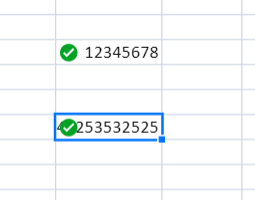
    I have a question regarding the fact that we are using some custom content in cells that conflicts with the Automatic Fit logic and are wondering if this is something that needs to be addressed on our end or if you have a suggestion for us? For example we have a mark cell reviewed icon that we add to a cell, but if this gets added it goes over top of the content and clicking the column to get it to auto fit ignores the symbol and fits it to the main content within the cell. So the only way to have it fit is to manually resize each column. Any suggestions here would be appreciated.

    Thanks,

    Keith

  • Posted 22 July 2021, 6:57 am EST

    HI,

    For this, you need to override the getAutFiy Width method and return the width according to the text and image width. Please refer to the following code snippet and attached sample that demonstrates the same.

    
      getAutoFitWidth(value, text, cellStyle, zoomFactor, context) {
        return this.getTextlength(text, cellStyle.font);
      }
    
      getTextlength(text, font) {
        let context = document.createElement("canvas").getContext("2d");
        context.font = font;
        return context.measureText(text).width + this.imageWid;
      }


    sample: https://codesandbox.io/s/bold-fire-i72t1?file=/src/app/customCell.ts:1175-1335

    Regards

    Avinash

Need extra support?

Upgrade your support plan and get personal unlimited phone support with our customer engagement team

Learn More

Forum Channels