Custom cells for columns in a TableSheet view

Posted by: ichioka.yuji on 28 February 2026, 4:37 am EST

    • Post Options:
    • Link

    Posted 28 February 2026, 4:37 am EST

    I’m building a data‑editing application using SpreadJS TableSheet.

    Is there a way to implement custom cell rendering and a custom cell editor for columns in a TableSheet view, similar to custom cell types in a Worksheet?

  • Posted 2 March 2026, 1:54 am EST - Updated 2 March 2026, 2:27 am EST

    When generating a view, I realized that the issue could be resolved by setting a style — one that specifies a certain cell type — on the column.

            table.fetch().then(() => {
              const cellType = new GC.Spread.Sheets.CellTypes.ComboBox();
              const style = new GC.Spread.Sheets.Style();
              style.cellType = cellType;
    
              const view = table.addView(
                'myView',
                [
                  { caption: 'Options', value: 'options', style: style as never },
                ]);
              tableSheet.setDataView(view);
            });

    However, one question remains.

    According to the contents of the gc.spread.sheets.d.ts file, the second argument of the addView method is of type GC.Data.IColumn, but the style property of IColumn is of type GC.Data.StyleOptions. Because of this, assigning a GC.Spread.Sheets.Style object to the style property results in a TypeScript syntax error: TS2322 (TS) Type ‘Style’ is not assignable to type ‘StyleOptions’.

    addView(name: string, columnInfos?: string[] | GC.Data.IColumn[], includeDefaultColumns?: boolean, options?: GC.Data.ViewOptions): GC.Data.View;
    export type IColumn =
    {
        /**
         * The unique name of the column.
         */
        name?: string;
        /**
         * The value of the column, could be a field name of table from database, or formula which uses the fields names.
         */
        value?: string;
        /**
         * The column type, any of "Number", "Text", "Formula", "Checkbox", "Date", "Currency", "Percent", "Phone", "Email", "URL", "Lookup", "CreatedTime", "ModifiedTime", "Attachment", "Select", "Barcode"
         */
        type?: string;
        /**
         * The caption of the column.
         */
        caption?: string | string[];
        /**
         * The width of the column, support number in pixel, or star size.
         */
        width?: number | string;
        /**
         * The style of the column.
         */
        style?: GC.Data.StyleOptions;
        /**
         * The conditional formats array of the column.
         */
        conditionalFormats?: Array<GC.Data.CellValueRuleOptions | GC.Data.SpecificTextRuleOptions | GC.Data.FormulaRuleOptions | GC.Data.DateOccurringRuleOptions | GC.Data.Top10RuleOptions | GC.Data.UniqueRuleOptions | GC.Data.DuplicateRuleOptions | GC.Data.AverageRuleOptions | GC.Data.TwoScaleRuleOptions | GC.Data.ThreeScaleRuleOptions | GC.Data.DataBarRuleOptions | GC.Data.IconSetRuleOptions>;
        /**
         * The data validator of the column.
         */
        validator?: GC.Data.NumberValidatorOptions | GC.Data.DateValidatorOptions | GC.Data.TimeValidatorOptions | GC.Data.TextLengthValidatorOptions | GC.Data.FormulaValidatorOptions | GC.Data.FormulaListValidatorOptions | GC.Data.ListValidatorOptions;
        /**
         * Mark the column as primary key column.
         */
        isPrimaryKey?: boolean;
        /**
         * Mark the column is readonly.
         */
        readonly?: boolean;
        /**
         * Mark the column is required when insert a new row.
         */
        required?: boolean;
        /**
         * Provide the default value when insert a new row, could be a const or a formula.
         */
        defaultValue?: any;
        /**
         * The header style of the column.
         */
        headerStyle?: GC.Data.HeaderStyleOptions;
        /**
         * Mark the column is visible.
         */
        visible?: boolean;
        /**
         * The header fit mode, any of the "normal", "vertical" or "stack". The default value is "normal".
         */
        headerFit?: "normal" | "vertical" | "stack";
        /**
         * The actual data type of original value, any of "string", "number", "boolean", "object", "formula", "array", "date" or "rowOrder". It is useful for a Date because a Date is a string in JSON data and need be converted.
         */
        dataType?: "string" | "number" | "boolean" | "object" | "formula" | "array" | "date" | "rowOrder" | "TaskStartDate" | "TaskFinishDate" | "TaskDuration" | "TaskSubject" | "TaskSchedulingMode" | "TaskComplete" | "TaskPredecessor";
        /**
         * The data pattern for parsing string to value, such as formatter "dd/MM/yyyy" for a date string, truthy and falsy value pairs "Yes|No" for a boolean string, decimal separator "," for a numeric string.
         */
        dataPattern?: string;
        /**
         * A simple map to display the original value more meaningful, its key could be a number or string, and its value could be a number, string or Date.
         */
        dataMap?: any;
        /**
         * Whether to spread a column when its value is an object.
         */
        spread?: boolean;
        /**
         * The original name of the table field, using this property to map the original name to the specified name.
         */
        dataName?: string;
        /**
         * Weather need to create the filter cache while creating the table.
         */
        indexed?: boolean;
        /**
         * Whether show sort after opening filer dialog.
         */
        allowSort?: boolean;
        /**
         * Whether show filter by value after opening filer dialog.
         */
        allowFilterByValue?: boolean;
        /**
         * Whether show filter by list after opening filer dialog. If allowSort, allowFilterByValue and allowFilterByList are all false, not show the filter button in this column.
         */
        allowFilterByList?: boolean;
        /**
         * The cross options of the column.
         */
        cross?: string | GC.Data.ICrossOptions;
        /**
         * Define the lookup for the column, only be used in the columns of the schema of the data source.
         */
        lookup?: string | (string | number | boolean | Date)[] | GC.Data.ILookupOptions;
        /**
         * Define the outline column only when the data be the hierarchy data.
         */
        outlineColumn?: boolean | GC.Data.IOutlineColumnOptions;
        /**
         * The trigger formula of the column.
         */
        trigger?: GC.Data.ITriggerFormulaOption;
    }

  • Posted 2 March 2026, 2:07 am EST

    Hi,

    gc.spread.sheets.d.ts contains another point that I would like to see improved.

    In the definition of IMenuItemVisibility, each property’s type is not boolean but false, which means there are situations where I am forced to write true as never in order to assign a value, as shown below.

            const tableSheet: TableSheet.TableSheet = workbook.addSheetTab(0, 'MyTableSheet', Sheets.SheetType.tableSheet);
            tableSheet.options.menuItemVisibility = {
              promoteMenuItemVisible: false,
              demoteMenuItemVisible: false,
              expandToLevelMenuItemVisible: false,
              expandAllLevelMenuItemVisible: false,
              collapseAllLevelMenuItemVisible: false,
              moveUpMenuItemVisible: true as never,
              moveDownMenuItemVisible: true as never,
              addBeforeMenuItemVisible: true as never,
              addAfterMenuItemVisible: true as never,
              addAboveMenuItemVisible: false,
              addBelowMenuItemVisible: false,
            };
                    export interface IMenuItemVisibility{
                        /**
                         * Whether promoting menu item to show
                         */
                        promoteMenuItemVisible: false,
                        /**
                         * Whether demoting menu item to show
                         */
                        demoteMenuItemVisible: false,
                        /**
                         * Whether moving up menu item to show
                         */
                        moveUpMenuItemVisible: false,
                        /**
                         * Whether moving down menu item to show
                         */
                        moveDownMenuItemVisible: false,
                        /**
                         * Whether adding before menu item to show
                         */
                        addBeforeMenuItemVisible: false,
                        /**
                         * Whether adding after menu item to show
                         */
                        addAfterMenuItemVisible: false,
                        /**
                         * Whether adding above menu item to show
                         */
                        addAboveMenuItemVisible: false,
                        /**
                         * Whether adding below menu item to show
                         */
                        addBelowMenuItemVisible: false,
                        /**
                         * Whether expanding all level menu item to show
                         */
                        expandAllLevelMenuItemVisible: false,
                        /**
                         * Whether collapsing all level menu item to show
                         */
                        collapseAllLevelMenuItemVisible: false,
                        /**
                         * Whether expanding to level menu item to show
                         */
                        expandToLevelMenuItemVisible: false,
                    }
  • Posted 2 March 2026, 5:18 am EST

    Hi,

    Yes, you can assign a custom cell type through the style property for a column in a TableSheet. Please refer to the following documentation for more details:

    https://developer.mescius.com/spreadjs/docs/features/tablesheet/tablesheet-views#cell-types-and-dropdowns

    We have reviewed both of the TypeScript definition issues you reported in gc.spread.sheets.d.ts.

    #1 — IColumn.style

    You are correct that the style property on IColumn is currently typed as GC.Data.StyleOptions, which does not accept a GC.Spread.Sheets.Style instance. This results in a TypeScript error when assigning a Style object with a custom cellType in addView(). We have escalated this to the concerned team. In the meantime, the as never cast workaround you identified is the appropriate temporary solution.

    #2 — IMenuItemVisibility

    You are also correct that all properties in IMenuItemVisibility are typed as the literal false instead of boolean. This is clearly a type definition issue, and we have logged it for correction. The properties will be updated to optional boolean so that both true and false can be assigned without requiring a type cast. The as never workaround is also the correct temporary solution here.

    Please note that both fixes are related only to TypeScript type definitions and will not affect runtime behavior. We have escalated this to the concerned team under the internal tracking ID “SJS-34005”. We will update you as soon as we receive further information.

    Best regards,

    Priyam

  • Posted 2 March 2026, 9:15 pm EST - Updated 2 March 2026, 9:20 pm EST

    Thank you. Until the TypeScript type definition file is improved, I’ll handle it with as never.

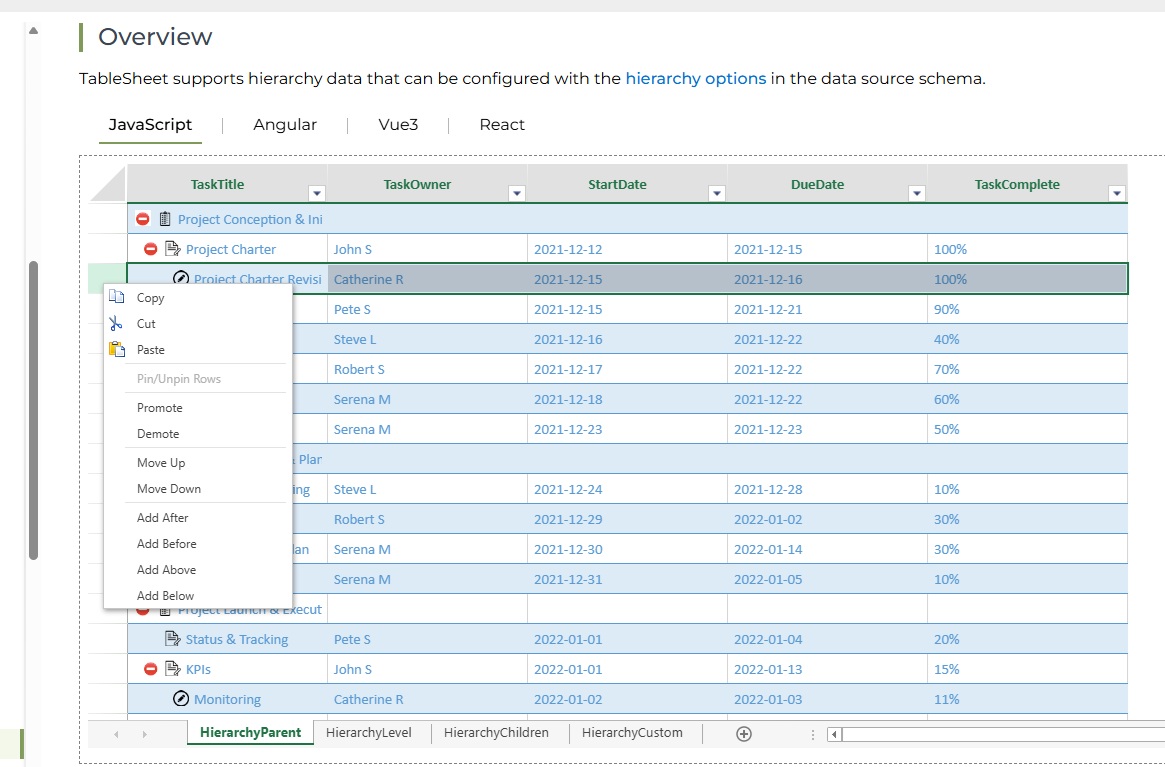
    Regarding IMenuItemVisibility, I have an additional question. In a TableSheet that handles hierarchical data, the Pin/Unpin Rows menu item is always disabled. I couldn’t find any property in IMenuItemVisibility that hides this menu item. Is there another way to hide it?

  • Posted 3 March 2026, 6:58 am EST

    Hi,

    The Pin/Unpin Rows option is part of the context menu, so it is not controlled through the TableSheet IMenuItemVisibility options.

    If you would like to hide this option, you need to modify the context menu’s menuData, remove the corresponding command, and then update the menu data. Please refer to the snippet and sample below:

    // Get the existing menu data
    let menuData = spread.contextMenu.menuData;
    
    // Remove the pin/unpin rows option
    let updatedMenuData = menuData.filter(
      item => item.command !== "gc.spread.contextMenu.pinRows"
    );
    
    // Update the context menu with the modified menu data
    spread.contextMenu.menuData = updatedMenuData;

    Sample: Sample.zip

    Reference:

    Regards,

    Priyam

  • Posted 3 March 2026, 9:18 am EST

    Thank you very much.

  • Posted 13 March 2026, 2:33 am EST

    Hi Yuji,

    Thank you for your patience.

    Regarding the style definitions, the TypeScript error occurs because TableSheet (DataManager) and Worksheet APIs are designed as separate layers. For this reason, the style property of GC.Data.IColumn is typed as GC.Data.StyleOptions rather than GC.Spread.Sheets.Style.

    Although assigning a GC.Spread.Sheets.Style instance may work at runtime, it is not part of the intended DataManager API surface, which is why TypeScript reports the TS2322 error.

    To avoid this issue, we recommend defining the cell type using the DataManager style options instead of the Worksheet

    Style
    class.

    For example:

    const radioButtonListStyle = {
      cellType: {
        type: "radioButtonList",
        items: [
          { text: "Tailspin Toys (Head Office)", value: "Tailspin Toys (Head Office)" },
          { text: "Wingtip Toys (Head Office)", value: "Wingtip Toys (Head Office)" }
        ]
      }
    } as GC.Data.RadioButtonCheckboxListOptions;

    You can then assign this object directly to the style property when creating the view.

    For custom cell types, you can also use GC.Data.CustomCellTypeOptions by registering the cell type class globally and referencing it via typeName.

    Additionally, the bug related to IMenuItemVisibility has been fixed in SpreadJS v19.0.5. The build for this version can be downloaded from the SpreadJS downloads page.

    Please refer to the updated sample attached below, which demonstrates the correct configuration.

    Kind Regards,

    Chirag

    References:

    1. GC.Data.IColumn: https://developer.mescius.com/spreadjs/api/modules/GC.Data#icolumn
    2. GC.Data.StyleOptions: https://developer.mescius.com/spreadjs/api/modules/GC.Data#styleoptions
    3. GC.Spread.Sheets.Style: https://developer.mescius.com/spreadjs/api/classes/GC.Spread.Sheets.Style
    4. IMenuItemVisiblity: https://developer.mescius.com/spreadjs/api/interfaces/GC.Spread.Sheets.TableSheet.IMenuItemVisibility#interface-imenuitemvisibility
    5. SpreadJS Download Page: https://developer.mescius.com/spreadjs/download

    Attachment: sample.zip

  • Posted 14 March 2026, 5:57 am EST - Updated 14 March 2026, 6:10 am EST

    Thank you for the update and the sample.

    Unfortunately, I could not find any information in the SpreadJS API documentation or in your sample regarding how to register custom cell types globally. Could you please clarify how a custom cell type class should be registered?

    For additional context:

    In my application, I am using SpreadJS TableSheet to visualize and edit an array of JSON objects.

    Each element has the structure { name: string, type: ‘folder’ | ‘item’, level: number }.

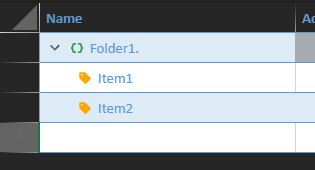
    My custom cell type is used in the TableSheet’s outline column to display the name together with an icon that depends on the ‘type’ field.

    Because of this, the custom cell type receives a reference to the data source in its constructor.

    Given this usage pattern, I would like to understand the correct and officially supported way to register such a custom cell type globally in SpreadJS.

  • Posted 16 March 2026, 5:09 am EST

    Hi,

    To register a custom cell type for use in a TableSheet column, you need to register the class on the window object and reference it by name using GC.Data.CustomCellTypeOptions. This is the officially supported approach for custom cell types in TableSheet.

    Step 1 — Define and register your custom cell type globally:

    class CompanyNameCellType extends GC.Spread.Sheets.CellTypes.Base {
        paint(ctx, value, x, y, w, h, style, context) {
            // your custom rendering logic here
        }
        getEditorValue(editorContext) {
            return editorContext ? editorContext.value : "";
        }
        setEditorValue(editorContext, value) {
            if (editorContext) editorContext.value = value;
        }
    }

    // Must be registered on window BEFORE fetch/addView is called

    (window as any)["CompanyNameCellType"] = CompanyNameCellType;

    Step 2 — Reference it by typeName in the column style:

    const companyNameStyle: GC.Data.StyleOptions = {
        cellType: {
            typeName: "CompanyNameCellType"
        } as GC.Data.CustomCellTypeOptions
    };

    Step 3 — Assign to the column in addView():

    myTable.fetch().then(function () {
        var view = myTable.addView("myView", [
            {
                value: "CompanyName",
                width: 200,
                caption: "Company Name",
                style: companyNameStyle 
            },
            // ... other columns
        ]);
        sheet.setDataView(view);
    });

    Important notes:

    • The typeName string must exactly match the name under which the class is registered on window.
    • The class must be registered on window before fetch().then() executes, so that TableSheet can resolve it by name when building the view.
    • This approach compiles cleanly without any as never cast, since GC.Data.CustomCellTypeOptions is the correct type for cellType within GC.Data.StyleOptions.
    • You can implement your rendering logic in the paint method and access the full row data via the context parameter, which suits your use case of displaying icons based on the type field.

    Please refer to the attached sample for a full working demonstration: Sample.zip

    Best regards,

    Priyam

Need extra support?

Upgrade your support plan and get personal unlimited phone support with our customer engagement team

Learn More

Forum Channels