Posted 13 August 2026, 8:19 am EST
Hi,
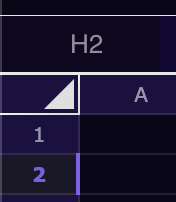
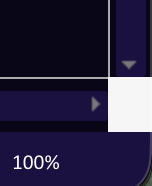
Regarding the two areas you mentioned, we have checked the SpreadJS styles and identified the CSS classes responsible for these UI elements:
Arrow icon / top-left corner triangle
.gc-corner-triangle-normal
.gc-corner-triangle-hover
.gc-corner-triangle-selected
Intersection of the vertical and horizontal scrollbars
.gc-footer-corner
You can override these classes in your application CSS to customize their appearance for dark mode.
For example:
.gc-corner-triangle-normal {
  /* Customize the normal state */
}

.gc-corner-triangle-hover {
  /* Customize the hover state */
}

.gc-corner-triangle-selected {
  /* Customize the selected state */
}

.gc-footer-corner {
  /* Customize the scrollbar intersection */
}
Best regards,
Priyam