Posted 20 August 2026, 1:48 am EST - Updated 20 August 2026, 1:53 am EST
PRODUCT: SpreadJS v18.2.3 (@mescius/spread-sheets)
ISSUE:
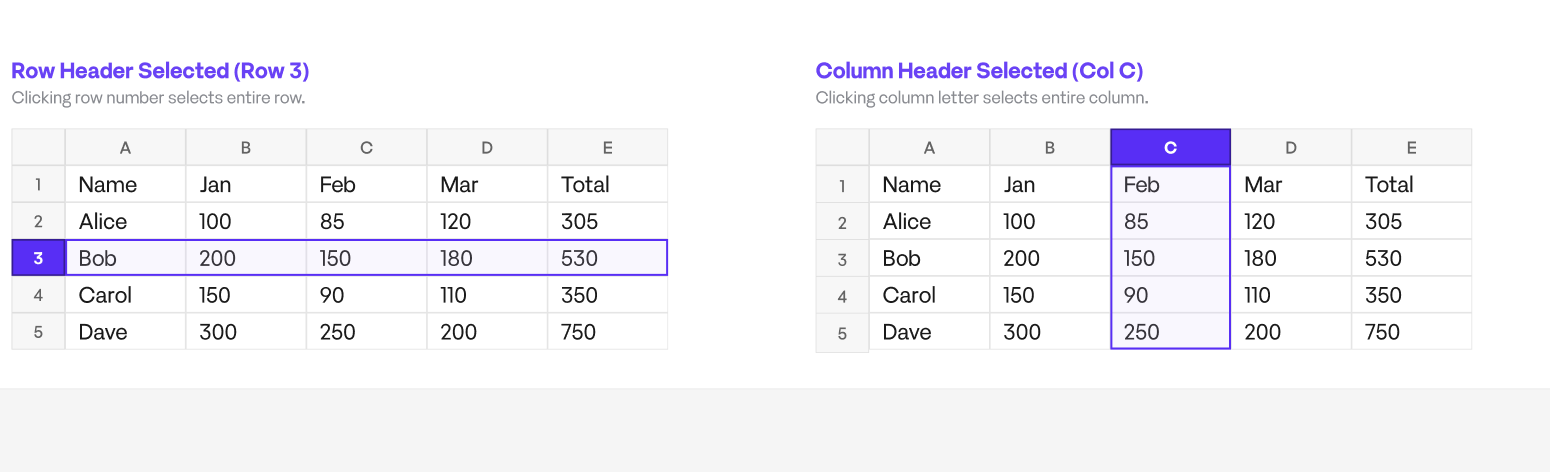
On full-column select (col header click), the INTERSECTING row headers
should reset to default styling: color #00000099 (light) / #FFFFFF8C
(dark), font 500 10px Verdana, no border-top/border-bottom.
We inject CSS targeting .gc-rowHeader-highlight / .gc-rowHeader-hover
(and mirror for .gc-columnHeader-highlight/-hover on row-select) with
!important on background-color, color, font, border-top, border-bottom.
RESULT: background-color and color resets work. font-weight (bold)
and border-bottom are STILL applied despite !important override.
SUSPECT: same root cause as the header hover-class-swap issue you
confirmed earlier (ticket ref: hover class replacing selected/highlight
class on mouseenter) — i.e. these aren’t resolved via the CSS class
alone, some inline style / canvas-drawn property / JS-applied style is
setting bold + border directly on the element or drawing it on canvas,
so no CSS selector (even !important) can win.
ASK:
- Confirm whether bold text + border on intersecting header is set
via CSS class, inline style, or canvas draw. - If inline style/JS — what’s the supported API to override
font-weight and border on row/col header per-selection state
(equivalent to what cellStates.add / selectionBackColor gave us
for cell selection)? - If canvas draw — does spread.refresh() actually re-read our CSS,
or is there a separate header-style API we should be calling
instead of CSS injection entirely?
REPRO:
- Click any column header (full column select).
- Row headers show: bold text + border-bottom, despite our CSS
setting font: 500 10px Verdana !important; border-bottom: none !important;
on .gc-rowHeader-highlight, .gc-rowHeader-hover.
EXPECTED RESULT IN SCREENSHOT