Context menu — DOM structure, hover style source

Posted by: averma on 17 August 2026, 4:19 am EST

  • Posted 17 August 2026, 4:19 am EST - Updated 17 August 2026, 4:24 am EST

    Issue 1: Need exact DOM structure of context menu

    We’re applying custom CSS/JS to theme the cell right-click context menu. Our earlier inspection (via view-source on an older render) showed classes like .gc-ui-contextmenu-scroll-wrapper, .gc-ui-contextmenu-container, .gc-ui-contextmenu-menuitem, .gc-ui-contextmenu-menuitem-content. Our custom CSS/JS targeting these classes is not matching the live-rendered menu — devtools shows the node exists but our document.querySelector calls return null, and computed styles don’t reflect our overrides.

    Please confirm:

    Full DOM tree (top wrapper → item row) as currently generated in v18.2.3, ideally a fresh outerHTML dump of a right-click context menu.

    Is the menu rendered inside an iframe, shadow DOM, or any other isolated context that would block top-document querySelector/CSS from reaching it?

    Are class names stable across versions, or do they change per release (should we target something more stable, e.g. a documented public API/selector)?

    Issue 2: Hover state — border appears on hovered item, need to remove

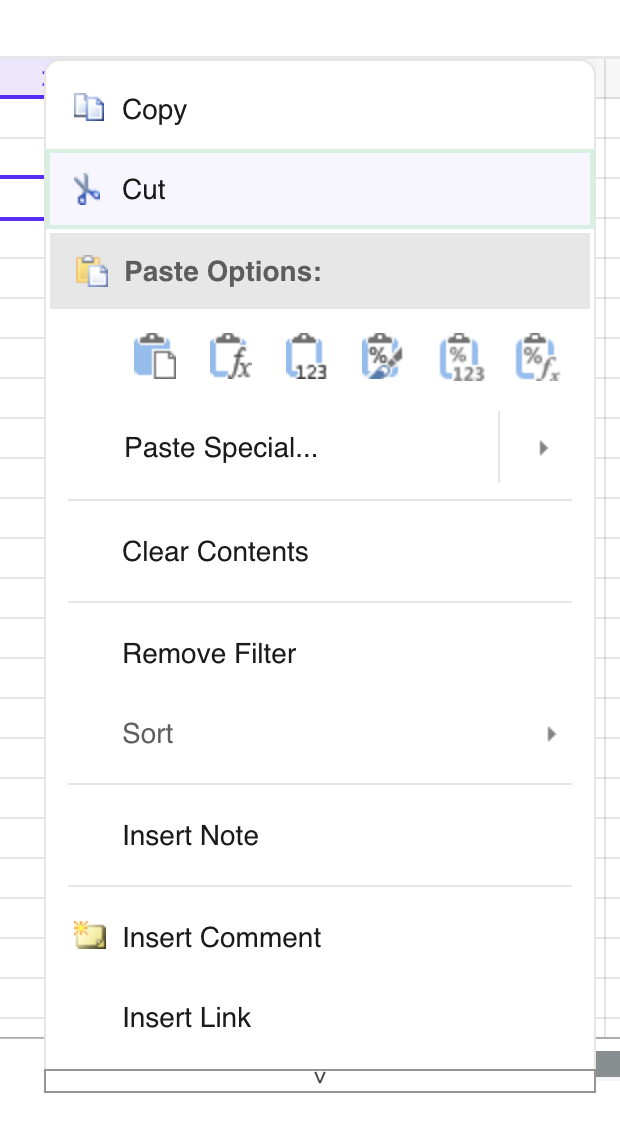
    When hovering a menu item (e.g. “Cut”), a border/outline box renders around it (screenshot attached: hover-border.png). We want hover to be background-color only, no border.

    Please confirm:

    Which class or inline style applies this border (jQuery-UI ui-state-hover/ui-state-active, or SpreadJS-specific)?

    Is there a supported theming API/option to disable it, vs. needing a CSS override?

    Issue 3: Scroll indicator bar at bottom of long menus

    When menu content exceeds viewport height, a bar renders at the bottom (with a “v” chevron) that triggers scroll-down on hover (screenshot attached: scroll-bar.png). We want to remove this — either disable scrolling behavior (auto-expand menu height) or hide the indicator entirely.

    Please confirm:

    Exact class name(s) for the top/bottom scroll indicator elements.

    Any config option to disable menu auto-scroll / force full-height render instead.

    Issue 4: Paste Options group — need flat list instead of icon grid

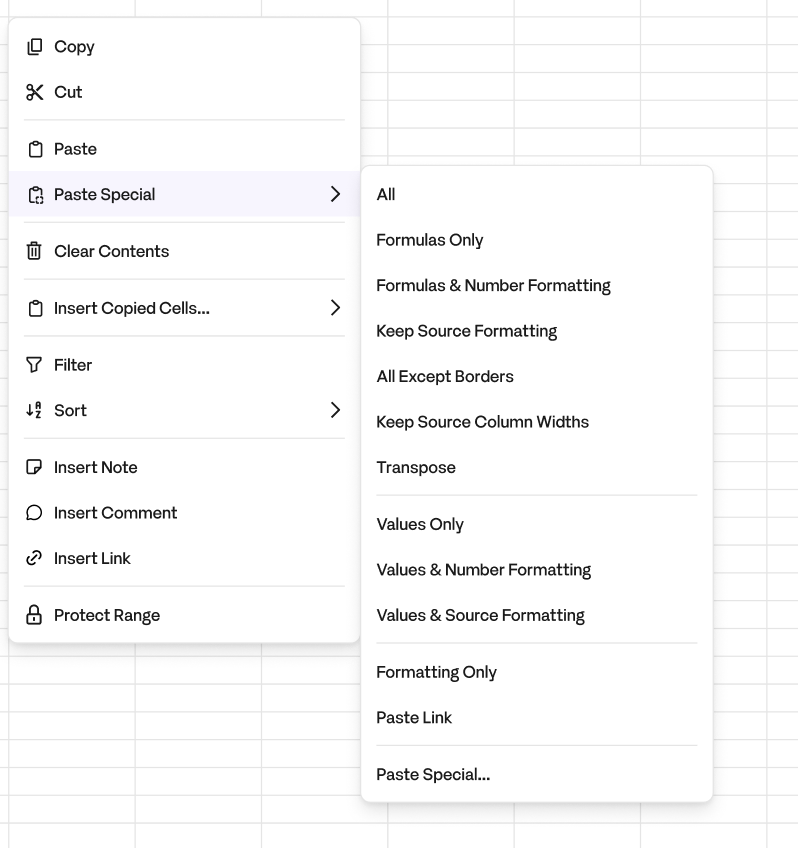
    Default “Paste Options:” renders as a header + row of icon-only buttons (title attr = label, no visible text) — screenshot attached: paste-icon-grid.png. We want it to instead render as a flat list of text items, similar to Google Sheets’ paste menu (screenshot attached: paste-flat-list-target.png) — i.e., a single “Paste” row plus “Paste Special” as a submenu/flyout with each option as its own text row (All, Formulas Only, Formulas & Number Formatting, etc.).

    Please confirm:

    Is this configurable via menuData/contextMenu API (e.g., swapping the group item for individual subMenu entries), or does it require DOM post-processing on our end?

    If there’s a supported way to define custom submenu items with text labels (not just icon grids) for the paste group specifically, please share an example.

    Attached screenshots for present context menu and expected context menu
  • Posted 18 August 2026, 5:53 am EST

    Hi

    Thank you for the detailed write-up and screenshots. Please find our answers below, based on SpreadJS v18.2.3.

    Issue 1 — DOM structure / why querySelector returns null

    The authoritative list of CSS classes is available in the theme stylesheet loaded by your application rather than in the API documentation.

    Please open the CSS file used by your build, for example:

    gc.spread.sheets.excel2013white.18.2.3.css

    Then search for the following marker:

    /-----contextmenu start-----/

    The section between /-----contextmenu start-----/ and /-----contextmenu end-----/ defines the CSS classes used by the context menu and shows the corresponding style rules.

    For SpreadJS v18.2.3, the relevant classes include:

    Element CSS Class

    Menu wrapper .gc-ui-contextmenu-container

    Menu item row .gc-ui-contextmenu-menuitem

    Item content (icon + text) .gc-ui-contextmenu-menuitem-content

    Label / icon .gc-ui-contextmenu-text / .gc-ui-contextmenu-icon

    “Paste Options:” header .gc-ui-contextmenu-group-header

    Paste icon container .gc-ui-contextmenu-groupitems-container

    Paste group item .gc-ui-contextmenu-groupitem

    Hover state .gc-ui-contextmenu-hover

    Scroll wrapper .gc-ui-contextmenu-scroll-wrapper

    Scroll indicator .gc-ui-contextmenu-scroll-indicator

    Regarding why querySelector() returns null: the context-menu elements are created lazily when the context menu is opened and are removed when it is closed. Therefore, they will not be available when the page initially loads.

    You can query the elements while the context menu is open. For example:

    spread.contextMenu.onOpenMenu = function (
        menuData,
        itemsDataForShown,
        hitInfo,
        spread
    ) {
        setTimeout(function () {
            var menu = document.querySelector('.gc-ui-contextmenu-container');
            console.log(menu ? menu.outerHTML : 'not found');
        }, 0);
    
        // Do not return true, as that would replace the built-in menu.
    };

    There is no iframe or Shadow DOM isolation involved here. The menu is rendered in the top-level document of the spreadsheet host, so normal CSS selectors and querySelector() can access it once the menu has been created.

    Please note that the gc-ui-contextmenu-* classes are internal CSS classes and are not part of the versioned, documented public API. Therefore, we recommend treating the /-----contextmenu start-----/ section of the theme CSS as the source of truth for the specific SpreadJS version being used.

    For behavioral customization, we recommend using the documented context-menu APIs such as menuData, ContextMenu.onOpenMenu, MenuView.createMenuItemElement, MenuView.getCommandOptions, MenuView.scrollable, and MenuView.maxHeight.

    Issue 2 — Hover border

    The hover border is controlled by SpreadJS’s theme CSS and is not related to jQuery UI.

    The relevant state class is:

    .gc-ui-contextmenu-hover

    The border you see comes from the base menu-item rule, which defines a 1px solid transparent border, together with the hover styling.

    There is currently no supported theming API specifically for disabling this border. You can override the CSS after loading the SpreadJS theme:

    .gc-ui-contextmenu-hover {
        background: #005326;
        background-image: none;
        font-weight: normal;
        text-shadow: none;
        border: none !important;
        box-shadow: none !important;
        outline: none !important;
    }
    
    .gc-ui-contextmenu-menuitem,
    .gc-ui-contextmenu-menuitem:hover,
    .gc-ui-contextmenu-menuitem.active {
        border: 1px solid transparent !important;
    }

    Issue 3 — Scroll indicator bar

    For the scroll indicator, we recommend using the documented MenuView API rather than modifying the DOM directly.

    You can disable the indicator bars using:

    spread.contextMenu.menuView.scrollable(false);

    If required, you can also increase the maximum menu height:

    spread.contextMenu.menuView.maxHeight(window.innerHeight);

    scrollable(true) is the default behavior and displays the scroll indicators. Setting it to false removes them.

    Issue 4 — Displaying Paste Options as a flat text list

    Yes, this can be customized through menuData without post-processing the DOM.

    The built-in “Paste Options:” section is implemented as a group item. You can remove the built-in paste items and add your own Paste and Paste Special menu items.

    For example:

    var P = GC.Spread.Sheets.ClipboardPasteOptions;
    var cm = spread.contextMenu;
    
    // Remove the built-in paste group/items.
    cm.menuData = cm.menuData.filter(function (m) {
        return !/paste/i.test(m.name || '');
    });
    
    function pasteEntry(text, pasteOption) {
        return {
            text: text,
            name: 'pasteSpecial.' + text,
            command: 'paste',
            workArea: 'viewport',
            commandOptions: {
                pasteOption: pasteOption
            }
        };
    }
    
    cm.menuData.push({
        text: 'Paste',
        name: 'paste.plain',
        command: 'paste',
        workArea: 'viewport'
    });
    
    cm.menuData.push({
        text: 'Paste Special',
        name: 'pasteSpecial',
        workArea: 'viewport',
        subMenu: [
            pasteEntry('All', P.all),
            pasteEntry('Formulas Only', P.formulas),
            pasteEntry(
                'Formulas & Number Formatting',
                P.formulasAndNumberFormatting
            ),
            pasteEntry('Values Only', P.values),
            pasteEntry(
                'Values & Number Formatting',
                P.valuesAndNumberFormatting
            ),
            pasteEntry('Formatting Only', P.formatting),
            pasteEntry('Values & Formatting', P.valuesAndFormatting),
            pasteEntry('All except Borders', P.noBorder)
        ]
    });

    The built-in menu item names can vary slightly between releases. Therefore, we recommend first logging spread.contextMenu.menuData from onOpenMenu and confirming the exact item names before applying the filter.

    If a particular group item continues to use the built-in icon-row renderer, the documented fallback is to create a custom MenuView and override createMenuItemElement() for items belonging to the pasteOptions group, while calling the base implementation for the remaining items.

    Refer to the attached sample: s.zip

    Best regards,

    Priyam

Need extra support?

Upgrade your support plan and get personal unlimited phone support with our customer engagement team

Learn More

Forum Channels