Posted 21 August 2022, 10:59 pm EST
Hi team,
I get a small issue with the combobox. When double click in combobox and select item in the drop down, but the result didn’t change. Could you help me resolve it?
Thank you so much
Forums Home / Spread / SpreadJS
Posted by: honhatan58 on 21 August 2022, 10:59 pm EST

honhatan58
Posted 21 August 2022, 10:59 pm EST
Hi team,
I get a small issue with the combobox. When double click in combobox and select item in the drop down, but the result didn’t change. Could you help me resolve it?
Thank you so much

avinash.pathak
Posted 22 August 2022, 4:39 am EST
Hi,
We are sorry but this is by design. The sheet will not be updated until you exit the editmode because the cell value is still the previous value.
Whatever the changes we made in edit mode will not affect any formulas in the sheet it will only affect after the edit mode gets ended
Regards,
avinash
honhatan58
Posted 22 August 2022, 11:21 pm EST - Updated 3 October 2022, 9:05 am EST
Hi Avinash,
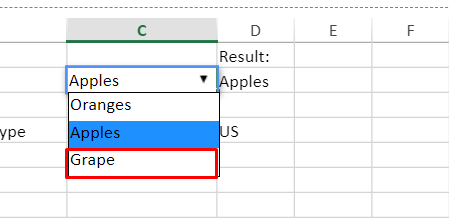
thank your for you information.but i has a question that how can i set id attribute for the item in the dropdown list, and i want to detect the event click in item of dropdown list.
For ex. I want to set id for grape item and event click in this
avinash.pathak
Posted 23 August 2022, 6:40 am EST
Hi,
For this, you may override the activateEditor. Please refer to the following code snippet and attached sample that explains the same.
  let old = GC.Spread.Sheets.CellTypes.ComboBox.prototype.activateEditor;
  GC.Spread.Sheets.CellTypes.ComboBox.prototype.activateEditor = function (
    editorContext,
    cellStyle,
    cellRect,
    context
  ) {
    let editor = old.apply(this, arguments);
    let dropdown = document.querySelector(
      "div[gcuielement='gcDropDownWindow']"
    );
    if (dropdown) {
      dropdown.addEventListener("mousedown", (e) => {
        console.log("mouse down", e.target.innerText);
      });
    }
    return editor;
  };
sample: https://codesandbox.io/s/brave-leaf-tqdxtq?file=/src/index.js
Regards,
Avinash
honhatan58
Posted 24 August 2022, 4:50 am EST
Hi Avinash,
I got it, thank you so much
