Posted 31 August 2026, 4:37 am EST
Hi,
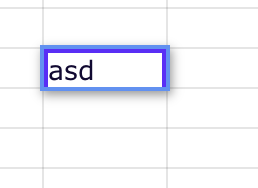
We checked this requirement with our development team. The devs mentioned that, in SpreadJS 19.2.1, the border displayed around the cell while it is in edit mode belongs to the cell type’s editor border container, and its style is currently fixed.
However, you can achieve the requested behavior using the following workaround:
var oldUpdateEditor = GC.Spread.Sheets.CellTypes.Text.prototype.updateEditor;

GC.Spread.Sheets.CellTypes.Text.prototype.updateEditor = function (editorContext, cellStyle, cellRect, context) {
    var result = oldUpdateEditor.apply(this, arguments);
    var borderContainer = editorContext?.parentElement?.parentElement;
    if(borderContainer)
        borderContainer.style.border = "2px solid #5F2BFF";
    return result;
};
With this workaround, the editor border can be changed to the desired custom color, such as #5F2BFF, while the cell is in edit mode. Once editing is completed, the editor and its border container are removed, so the standard selection border is restored automatically.
Additionally, if you need to customize other cell styles specifically while the cell is in edit mode, you can use the Edit cell state (stateType = edit) to configure the desired styles.
Please refer to the following documentation for more information about Cell States:
SpreadJS Cell States Documentation: https://developer.mescius.com/spreadjs/docs/features/cells/cell-states?utm_source=chatgpt.com#site_main_content-doc-content_title
Regards,
Priyam