Posted 11 August 2026, 1:10 am EST
COMPONENT
GC.Spread.Sheets.CellStatesType (active, selected) / sheet.cellStates.add API
VERSION
@mescius/spread-sheets 18.2.3
SUMMARY
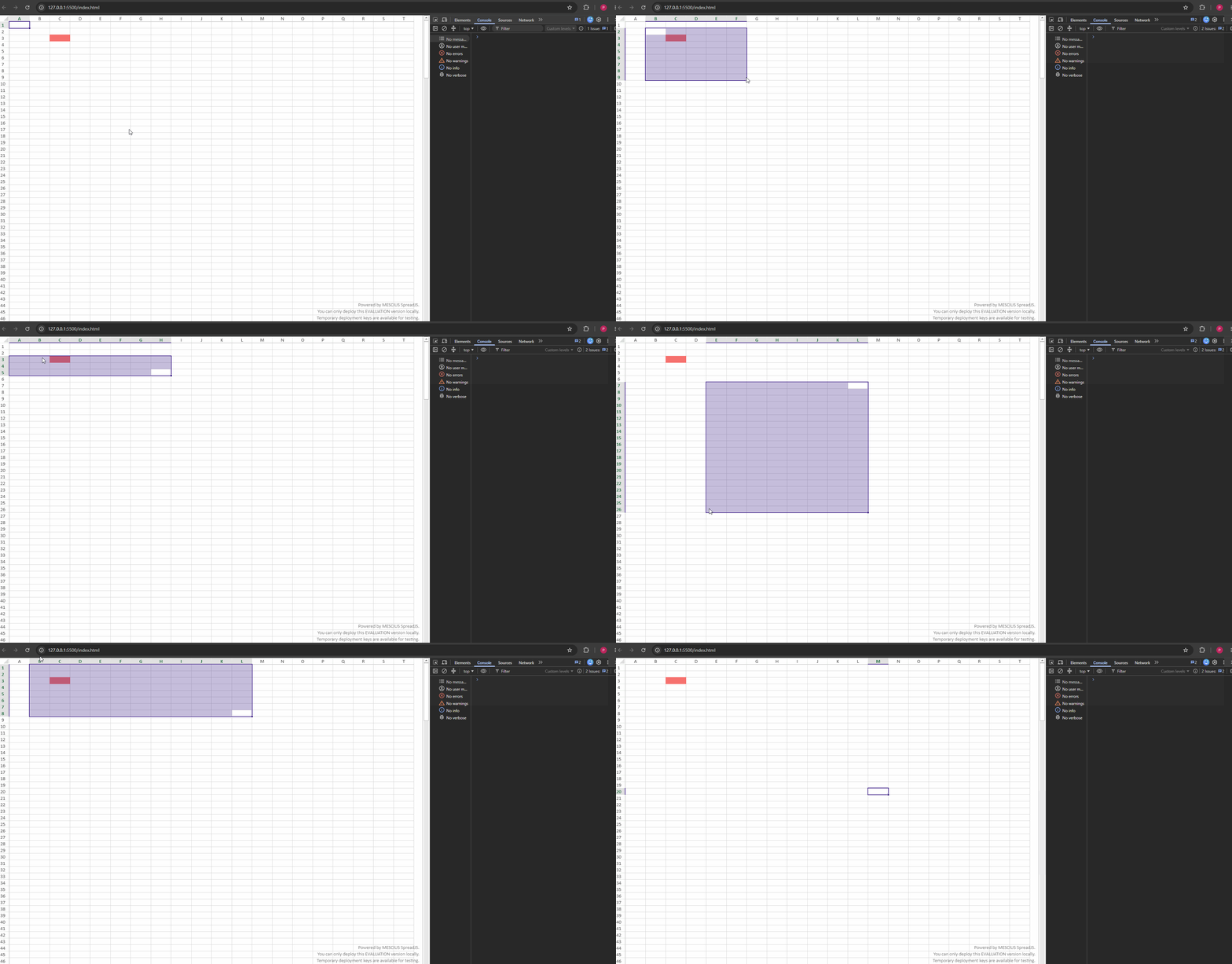
Cell with explicit backColor set via setStyle becomes fully hidden when cell enters
active or selected state, even when cellStates style backColor has an alpha channel
set well below 100%. Expected: cell’s own backColor shows through, tinted by the
overlay color. Actual: overlay fully opaque, cell color invisible while
selected/active.
REPRO STEPS
- Set a cell’s style backColor to solid color, e.g.
:#FF6B6B
const testStyle = new GC.Spread.Sheets.Style();
testStyle.backColor = '#FF6B6B';
sheet.setStyle(2, 2, testStyle, GC.Spread.Sheets.SheetArea.viewport);
2. Register cellStates active/selected styles (colors as currently used in our app):
```js
const activeStyle = new GC.Spread.Sheets.Style();
activeStyle.backColor = isDark ? '#FFFFFF12' : '#EDE6FF';

const selectedStyle = new GC.Spread.Sheets.Style();
selectedStyle.backColor = isDark ? '#40268C4D' : '#D9C7FF26';

const fullRange = new GC.Spread.Sheets.Range(-1, -1, -1, -1);
sheet.cellStates.add(fullRange, GC.Spread.Sheets.CellStatesType.active, activeStyle);
sheet.cellStates.add(fullRange, GC.Spread.Sheets.CellStatesType.selected, selectedStyle);

3. Click cell (2,2) — active state. Observe: red fully hidden.
4. Select range including (2,2) — selected state. Observe: red fully hidden.
5. Note: light-mode active color `#EDE6FF` has no alpha byte at all (fully opaque
   by design) — expected to hide the cell. But dark-mode active (`#FFFFFF12`,
   ~7% alpha) and both selected colors (`#40268C4D` ~30%, `#D9C7FF26` ~15%) DO
   carry alpha, and still fully hide the underlying red — this is the actual bug.
6. Retested with alpha lowered further (down to `#05FF0000`, ~2%) — no visible
   change, overlay remains opaque at all alpha levels tested.
7. Retested with alpha byte moved to the other position (alpha-last vs
   alpha-first) — same opaque result both ways.

EXPECTED
Cell's own backColor should show through the active/selected overlay, blended per
the alpha value set on the cellStates style — consistent with how
`selectionBackColor`/range-selection tint is documented to behave elsewhere.

ACTUAL
Overlay paints fully opaque regardless of alpha value or byte order, completely
masking the cell's own backColor.

QUESTION FOR SPREADJS TEAM
1. Is alpha compositing supported for `cellStates.add` backColor, or does the
   engine always paint it as a full replacement (not a blend)?
2. If supported, confirm exact hex format expected (`#AARRGGBB` vs `#RRGGBBAA`)
   for v18.2.3 specifically — prior ticket response (see [ref old ticket #]) said
   alpha-first, but our testing shows no compositing in either order.
3. Is there a different/recommended API to tint a cell's existing backColor on
   selection while preserving visibility, if cellStates doesn't support it?

ENVIRONMENT
- @mescius/spread-sheets 18.2.3
- React/TS, embedded as Atlassian Forge macro (Confluence)
- Repro is isolated to plain SpreadJS API calls, not app-specific