Posted 1 April 2019, 4:48 am EST - Updated 3 October 2022, 10:55 am EST
Hi
I met a cellpadding saving problem,
After modify the padding of a cell , it works, but the modification was not saved correctly when I export it to excel file.
I can recreate it with your official demo https://www.grapecity.com/en/demos/spread/JS/InspectorSample/
Step to recreat:
- goto https://www.grapecity.com/en/demos/spread/JS/InspectorSample/ and browser will load the demo data
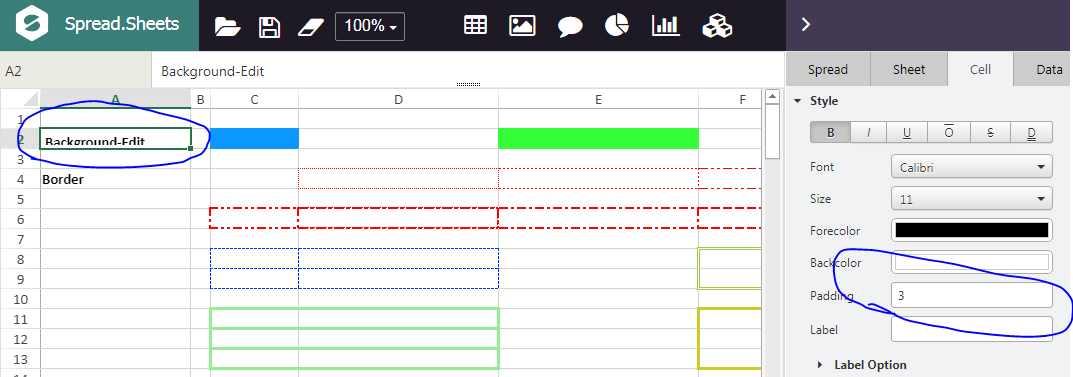
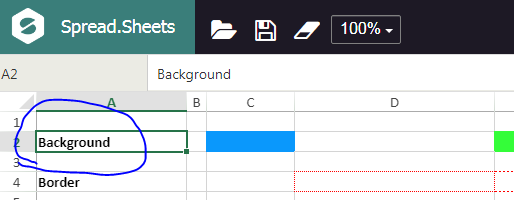
- select cell A2 , now its value is ‘Background’ and no cellpadding offered
- modify A2, set value to ‘Backgournd-Edit’ ,and set cellpadding to 3 , it looks good
- click the ‘export’ button ->choose ‘export excel’ , and save it to local disk (temp.xlxs)
- a)open temp.xlsx with MS Excel, the A2 value is correct , but padding information seems missed
b)or click ‘Import file’ with your demo InspectorSample to load temp.xlxs, same with above, the A2 value is correct , but padding information seems missed
BTW, ‘export JSON’ can save cell padding modification correctly
Anyone can give me some advice?
Thanks