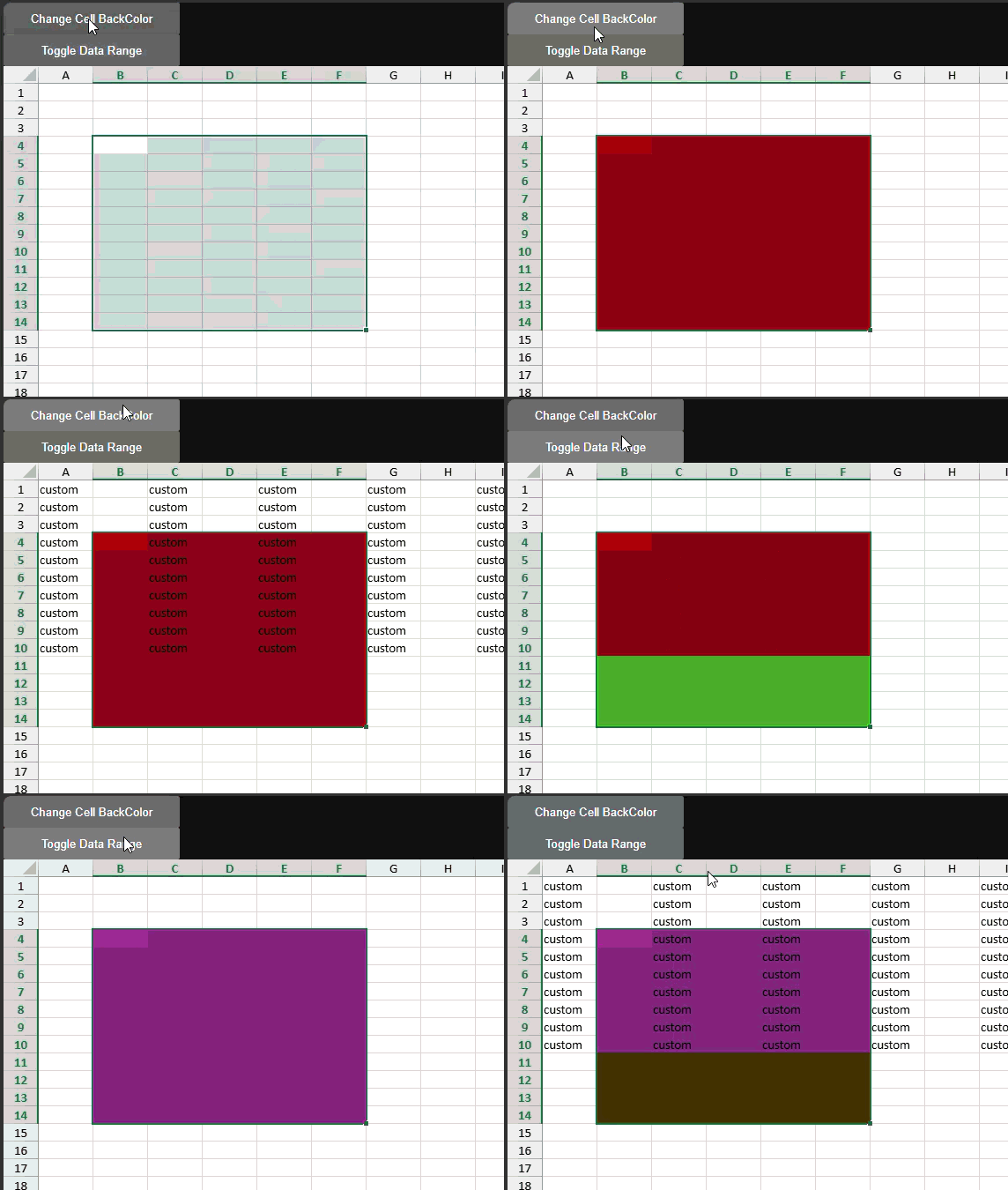
Cell background style not visible after adding a DataRange

Posted by: ichioka.yuji on 9 September 2026, 2:04 am EST

  • Posted 9 September 2026, 2:04 am EST - Updated 9 September 2026, 2:39 am EST

    Hi,

    When using DataRange, the visibility of cell background styles changes depending on whether the style was applied before or after the DataRange is added.

    • Background color applied before adding the DataRange → still visible
    • Background color applied after adding the DataRange → not visible (covered by DataRange)

    A minimal reproducible sample is attached here:

    reactproject1.zip

    I would like to know how to keep cell background colors visible when using DataRange.

    Thank you.

  • Posted 9 September 2026, 8:43 am EST

    Hi,

    We are not sure whether this is the expected behavior, so we have escalated the issue to our concerned team for further investigation.

    The internal tracking ID is SJS-35839.

    We will update you as soon as we receive any further information from the team.

    Regards,

    Priyam

  • Posted 14 September 2026, 8:15 am EST

    Hi,

    The team mentioned that this is the current design.

    If the data range is added first and then setStyle is applied, the setStyle API internally checks whether the current cell is within a data range. If it is, the style is managed by the data range and is not set in the sheet model.

    If setStyle is called first and the data range is added afterward, the data range’s getStyle API returns undefined. The style system then retrieves the style from the sheet model.

    Regards,

    Priyam

  • Posted 14 September 2026, 10:06 pm EST

    Hi Priyam,

    Thank you for clarifying the current design specification.

    I wanted to share with you my intended behavior and the reason for my question:

    • I use DataRange to display simulation results on the worksheet in real time.
    • Users want to highlight certain parts of the simulation output, so they change cell styles (font, foreground color, background color) using a toolbar.
    • The simulation results themselves do not need to be persisted, but the user‑defined cell styles should be saved together with the worksheet.

    Therefore, I would like style changes made on cells inside a DataRange to be reflected in the worksheet model, so they can be persisted.

    In the future, it would be ideal if the IDataProvider interface were extended so that, similar to:

    setValue(row: number, col: number, value: unknown, changes: any[]): boolean


    a corresponding method such as:

    setStyle(row: number, col: number, style: GC.Spread.Sheets.Style, changes: any[]): boolean


    could also be supported.

    Until such functionality becomes available, I am considering the following temporary workaround:

    1. Capture the user’s cell‑style change operation.
    2. Find any DataRange that overlaps with the target cell range and temporarily remove it from the worksheet.
    3. Apply the actual style change to the worksheet so that it is stored in the sheet model.
    4. Re‑add the removed DataRange back to the worksheet.
    5. Suspend worksheet painting during steps 2–4 to avoid flickering.

    Would this approach work as expected?

  • Posted 15 September 2026, 6:40 am EST

    Hi,

    Thank you for providing the additional details about your use case and the proposed workaround.

    We understand that you are using DataRange to display real-time simulation results, while the simulation data itself does not need to be persisted. However, the styles applied by users through the toolbar, such as font, foreground color, and background color, need to be persisted with the worksheet.

    We are currently not sure whether this requirement can be supported, so we have escalated this to our team under the same case SJS-35839.

    We have also shared your proposed workaround with the team to confirm whether it is safe and recommended for your use case, or whether there is another recommended approach to achieve the same requirement.

    We will update you as soon as we receive further information from the team.

    Regards,

    Priyam

Need extra support?

Upgrade your support plan and get personal unlimited phone support with our customer engagement team

Learn More

Forum Channels