
Cell Cursor

Posted by: msmith on 20 May 2026, 12:53 am EST

    • Post Options:
    • Link

    Posted 20 May 2026, 12:53 am EST - Updated 20 May 2026, 12:58 am EST

    Hi team,

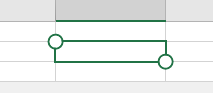
    Can you please advise how to remove the corner ‘bubbles’ for the cell cursor - I’d like show the standard cell cursor thanks. Sorry I cannot find an obvious setting for this.
    Thanks in advance.

  • Posted 21 May 2026, 4:29 am EST

    Hi,

    Apologies for the delayed response.

    Spread supports touch gestures in many areas of the control. The corner “bubbles” you see on the cell cursor are by design for touch-supported setups. They allow users to easily drag and select a range of cells using a touchscreen.

    To turn off these bubbles and show the standard cell cursor, you can set

    fpSpread1.UseOptimizedSelectionForTouch = false;

    Best Regards,

    Kartik

  • Posted 21 May 2026, 6:20 pm EST

    Hi Kartik,

    Perfect! Thank you for your assistance :ok_hand:

    Matt

Need extra support?

Upgrade your support plan and get personal unlimited phone support with our customer engagement team

Learn More

Forum Channels