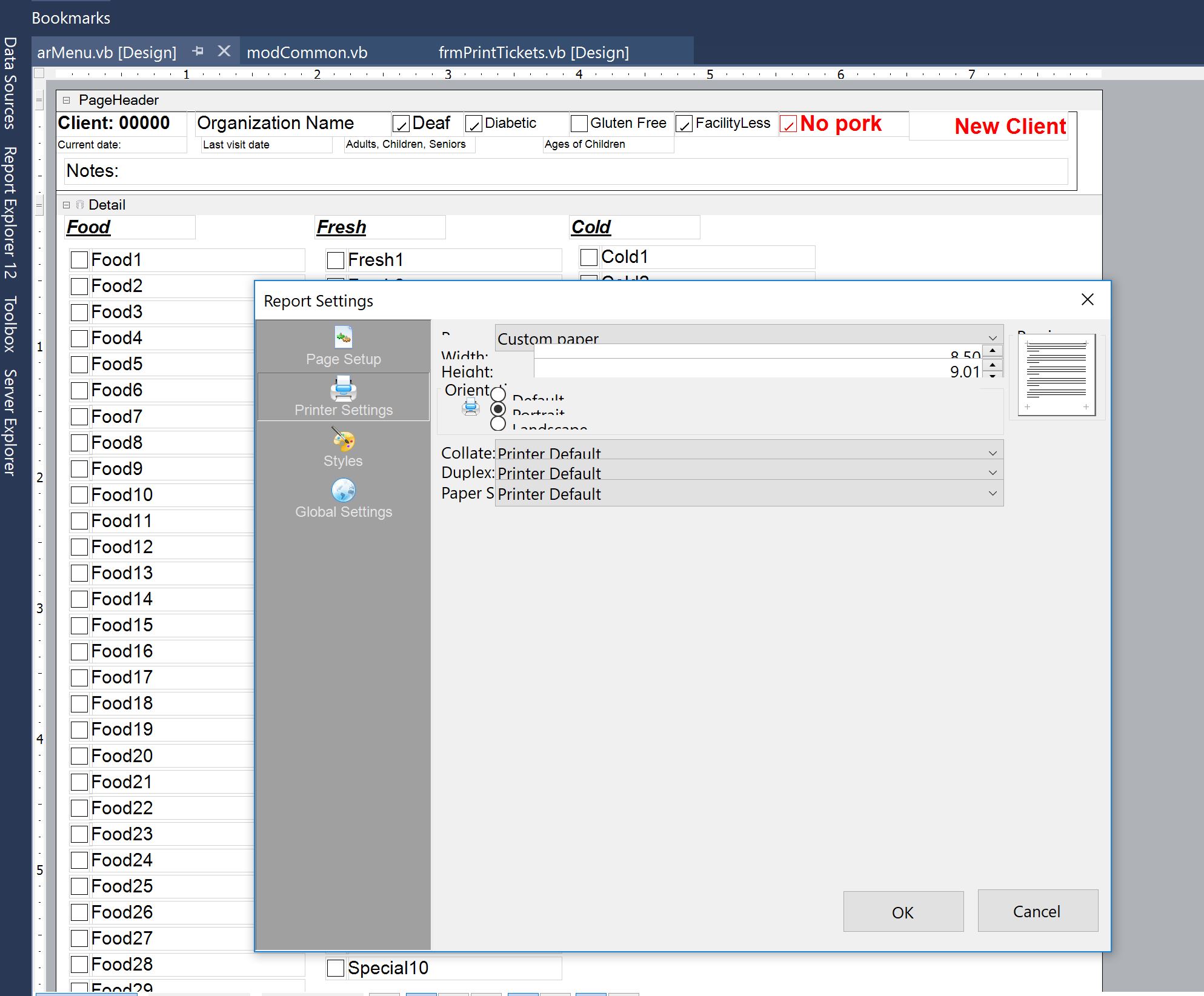
Extra space at the bottom of the detail section

Posted by: BenAndMarsha on 8 April 2018, 1:03 pm EST

    • Post Options:
    • Link

    Posted 8 April 2018, 1:03 pm EST

    In Design mode, the attached unbound report looks fine(The “Food35” checkbox butts up against the footer).

    In Preview mode, or when the report is run, however, there is a lot of white space added after the “Food35” checkbox.

    What’s causing this, and how can I get the “Food35” checkbox to stay butted up against the footer?arMenu.zip

  • Posted 9 April 2018, 4:36 am EST

    Since your query got posted twice, I’ve replied to you on your other post (

    https://www.grapecity.com/en/forums/ar-dev/extra-space-at-the-bottom-). Kindly check.

  • Posted 9 April 2018, 7:32 am EST

    As I’d mentioned, the report is unbound. You can simply remove the Report Data Source from the form (which doesn’t belong there anyway), or I’ve done it and re-attached the forms.

    Thank you for your help.

    arMenuzip.zip

  • Posted 10 April 2018, 3:21 am EST

    Thanks for the modified report file. The output you’re observing is correct because the default height of the paper is 11.69in, however the combined height of the three sections in your report is only 9.01in. The PageFooter section by design gets printed at the bottom of the page, hence the empty space after the detail section. Since this is an unbound report, I would suggest you to use custom paper size and set the height to 9.01 from the Report’s property dialog. This way there won’t be any empty space after the detail section. I’ve attached the modified report file for your reference.

    arMenu_mod.zip

  • Posted 10 April 2018, 11:37 am EST - Updated 30 September 2022, 6:23 pm EST

    Thank you for your help.

    I was unable to make the changes through the dialog, as it has the display issues noted below.

    I applied the changes manually with a text editor and they resolved the problem.

    Should I open a new post for the “Printer Settings Dialog” issue, or can you address it in this post?

    HBH

  • Posted 11 April 2018, 3:23 am EST

    I can address it here, but would request you to create a new post for separate issues in future.

    This is the first time we’ve received an issue regarding the Report Settings dialog layout. Does it occur every time you open this Dialog? Could you try closing Visual Studio and re-opening it?

Need extra support?

Upgrade your support plan and get personal unlimited phone support with our customer engagement team

Learn More

Forum Channels