Posted 14 July 2026, 2:56 am EST
Hello,
I am using Active Reports 13x in my Visual Studio 2017 and Visual studio 2019 environments.
I have two issues.
I use Active Reports (code-based)
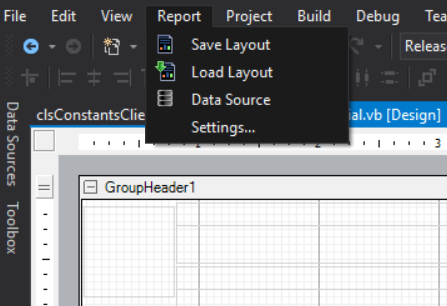
A. In my visual studio (2017 & 2019) I cannot find “Report” menu for Designer screens
I have checked few help articles but none worked.
B. In a report design, I have designed the report in A4 paper size, Landscape orientation. All controls are well within the paper margin. Still my report prints one blank page.
I have attached my designer file and code-behind.
If Report Setting front-end menu not available, Where can i alter/Edit designer lines ?
What is causing the second blank page.?
(I have found a line in designer file which was showing paper kind as legal - I modified it as A4 - in the attached file)
Thanks
Hemanth Kelkarfeereceipt.zip