


- Document Solutions for PDF JS Overview
- Key Features
- Licensing and Redistribution
- Quick Start
- Memory Management
- Features
- Snippet Helpers
- Samples
- Tutorials
- API Reference
- Release Notes
Work with SVG files
SVG (Scalable Vector Graphics) is a vector image format that allows graphics to be rendered at any size without loss of quality. DsPdfJS provides APIs to load, render, and generate SVG documents.
Render SVG to PNG
You can render an SVG image to a bitmap and save it as a PNG image. In DsPdfJS, this is done by loading an SVG file into an SvgDocument object and drawing it onto a BmpContext.
The BmpContext class provides several methods for rendering SVG content:
drawSvg – draws the SVG document using its viewport position.
drawSvgContent – draws the SVG content using the content bounds.
drawSvgToContentRect – draws and scales the SVG content to fit a specified rectangle.
drawSvgToRect – draws and scales the SVG viewport to fit a rectangle.
To render an SVG image to PNG:
Load the SVG file using the SvgDocument.load method.
Create a BmpContext to provide the drawing surface.
Draw the SVG document using the drawSvg method (or another SVG drawing method if resizing or positioning is required).
Save the resulting bitmap as a PNG image.
The following code example shows how to render an SVG image to a PNG file.
Note: The examples on this page use helper functions from the Snippet Helpers module. These utilities are provided only to simplify the examples and are not part of the DsPdfJS API.
const svgDoc = SvgDocument.load(await Util.loadFile("images/ImageAlign.svg"));
svgDoc.sansSerifFont = Font.getPdfFont(StandardPdfFont.Helvetica);

const rect = svgDoc.measure(0, 0);
const ctx = new BmpContext(rect.width, rect.height, 2, "GhostWhite");
ctx.drawSvg(svgDoc, -rect.x, -rect.y);

const imgBytes = ctx.bitmap.saveAsPng();
Util.saveFile("svgToBitmap.png", imgBytes, 'image/png');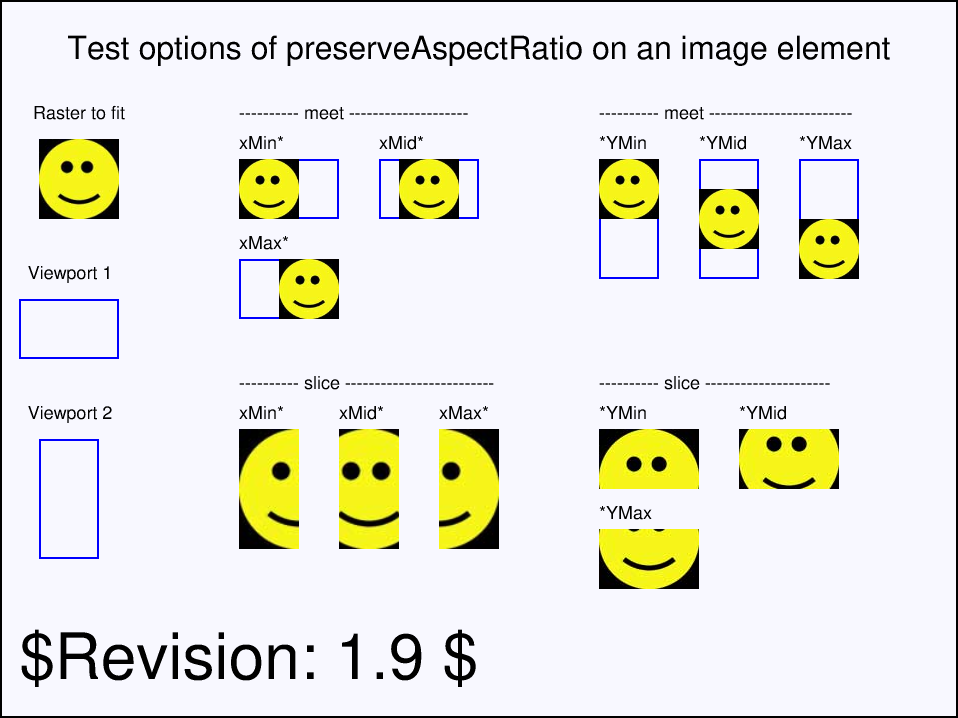
You can also render compressed SVG files (.svgz) by loading them using SvgDocument.loadGz.
const svgDoc = SvgDocument.loadGz(await Util.loadFile("images/Ducky.svgz"));
const ctx = new BmpContext(600, 600, 1, "MintCream");
ctx.drawSvg(svgDoc, 0, 0);

const imgBytes = ctx.bitmap.saveAsPng();
Util.saveFile("drawSvgZ.png", imgBytes, 'image/png');
Render Graphics and Text to SVG
In addition to rendering existing SVG files, DsPdfJS allows you to generate SVG documents programmatically by drawing graphics and text using the SvgContext class. The SvgContext records drawing operations and converts them into an SvgDocument, which can then be saved or processed further.
Graphics elements such as shapes, gradients, and transformations can be drawn using the same drawing APIs used for bitmap contexts. Text can be rendered either as SVG text elements or as vector paths. This behavior is controlled by the drawTextAsPath property of the drawing context.
To render graphics and text to an SVG document:
Create an instance of the SvgContext class to define the SVG drawing surface.
Draw graphics and text using drawing methods such as drawRect, drawEllipse, or drawLayout.
Optionally control text rendering behavior using the drawTextAsPath property.
Convert the recorded drawing operations into an SvgDocument using the toSvgDocument method.
Save the resulting SVG document.
const segoeFont = Font.load(await Util.loadFile("fonts/segoeuib.ttf"));

const ctx = new SvgContext(800, 600, {
    shapeRendering: ShapeRendering.CrispEdges
});

const lgBr = new LinearGradientBrush({
    startColor: "Turquoise",
    startPoint: { x: 0, y: 0 },
    gradientStops: [{ color: "MediumVioletRed", offset: 0.5 }],
    endColor: "SeaGreen",
    endPoint: { x: 1, y: 0 }
});

ctx.drawRect(5, 5, 790, 590, {
    radius: 20,
    lineColor: "DarkSlateBlue",
    lineWidth: 6,
    lineStyle: DashStyle.DashDot,
    lineCap: PenLineCap.Square,
    fillBrush: lgBr
});

ctx.translate(100, 50);
ctx.rotate(30);
ctx.drawText({
    text: "Hello World!",
    font: segoeFont,
    bold: true,
    foreColor: "Yellow",
    fontSize: 70
}, 0, 0);

ctx.pushGroup("id", "myEllipse");

ctx.resetTransform();
ctx.translate(400, 400);
ctx.rotate(-30);
const hb = new HatchBrush({
    style: HatchStyle.Backslashes,
    foreColor: "White"
});
ctx.drawEllipse({ width: 300, height: 200 }, {
    fillBrush: hb,
    lineColor: "Red",
    lineWidth: 3
});

ctx.popGroup();

ctx.title = "Simple SVG";

const svgDoc = ctx.toSvgDocument();
Util.saveFile("createSvg.svg", svgDoc.save(), 'image/svg+xml');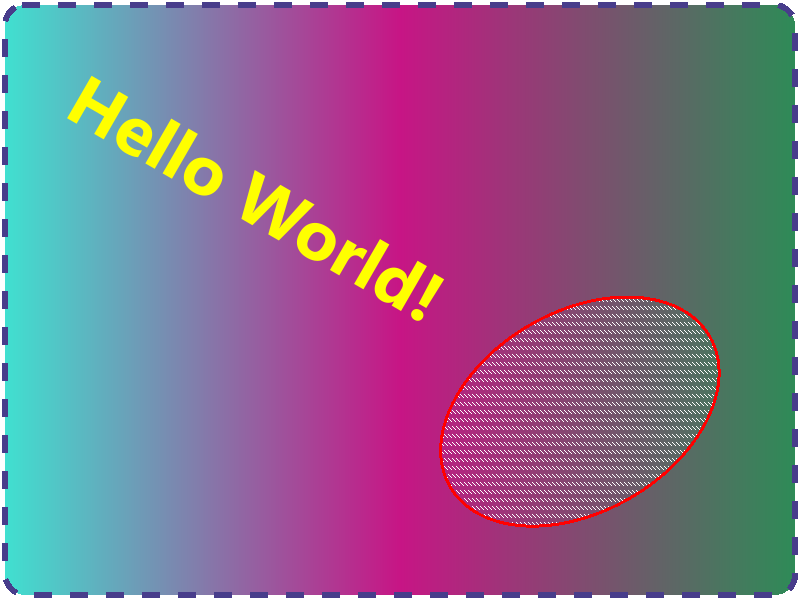
The following example demonstrates how text can be rendered as SVG text elements or converted to vector paths.
const ctx = new SvgContext(900, 500);

const fmt = new Format({
    font: Font.load(await Util.loadFile("fonts/segoeui.ttf")),
    fontSize: 67,
    foreColor: "Green"
});

const tl = new Layout({
    maxWidth: 300,
    runs: [{
        text: "The quick brown fox jumps over the lazy dog.",
        format: fmt
    }]
});

// Render text as SVG text elements
ctx.drawTextAsPath = false;
ctx.drawLayout(tl, 100, 10);

// Render text as vector paths
ctx.drawTextAsPath = true;
ctx.drawLayout(tl, 500, 10);

const svgDoc = ctx.toSvgDocument();
Util.saveFile("textToSvg.svg", svgDoc.save(), 'image/svg+xml');
Render PDF Page as SVG
DsPdfJS allows you to export a PDF page to the SVG format. SVG is a vector format, so the resulting image can be scaled without loss of quality.
The PdfPage class provides several methods for exporting a page as SVG:
saveAsSvg – saves the page as SVG data in a byte array.
saveAsSvgDocument – returns an SvgDocument instance that can be inspected or modified before saving.
saveAsSvgGz – saves the page as compressed SVG data (.svgz).
To render a PDF page as SVG:
Load the PDF document using PdfDocument.load.
Access the desired page from the document’s pages collection.
Call the saveAsSvg method to generate the SVG data.
Save the resulting byte array to a file.
The following code example shows how to export a PDF page as an SVG file.
const doc = PdfDocument.load(await Util.loadFile("Wetlands.pdf"));
const page = doc.pages.getAt(0);

const svgBytes = page.saveAsSvg();
Util.saveFile("pdfPageToSvg.svg", svgBytes, "image/svg+xml");
Save SVG to Byte Array
When working with SVG documents generated using SvgContext, you can save the resulting SvgDocument as a byte array. This allows you to store the SVG file, send it over a network, or process it further.
The SvgDocument class provides the following methods:
save – saves the SVG document to a UTF‑8 encoded byte array.
saveGz – saves the SVG document as compressed SVG (.svgz) data.
To save an SVG document to a byte array:
Create or obtain an SvgDocument.
Call the save method to generate the SVG data.
Save or process the returned byte array.
The following code example shows how to save an SVG document to a byte array.
const ctx = new SvgContext(400, 200);

ctx.drawRect(20, 20, 360, 160, {
    lineColor: "DarkBlue",
    lineWidth: 4,
    fillColor: "LightSkyBlue"
});

const svgDoc = ctx.toSvgDocument();

const svgBytes = svgDoc.save();
Util.saveFile("saveSvg.svg", svgBytes, "image/svg+xml");