C1.C1Report.4.8.dl Issue in New 2025V2 ComponentOne

Posted by: priyadharshini.selvaraju on 25 February 2026, 5:49 am EST

  • Posted 25 February 2026, 5:49 am EST

    I have downloaded the new version (2025V2) of the ComponentOne for the V4.8 .NET framework. While compiling , C1.C1Report.4.8.dll is not loading properly. The Same DL we have on the old version, there it works but in the new version , this problem arises. what should be done when using 2025V2? How can i solve this ?

  • Posted 25 February 2026, 9:19 am EST - Updated 25 February 2026, 9:24 am EST

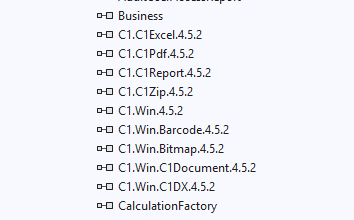
    ‘Could not load file or assembly ‘C1.C1Report.4.8’ or one of its dependencies. Operation is not supported. (Exception from HRESULT: 0x80131515)’

    New Version :

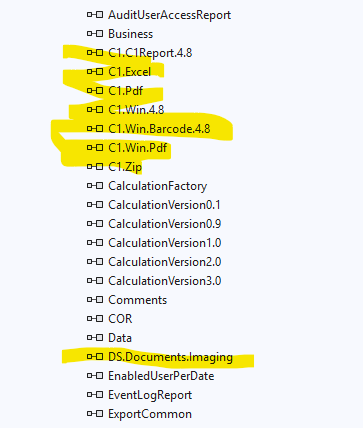
    Old Version :

  • Posted 26 February 2026, 4:47 am EST

    Hello,

    To use C1Report, the required DLLs are the following:

    • C1.C1Report.4.8
    • C1.Excel
    • C1.Pdf
    • C1.Win.4.8
    • C1.Win.Barcode.4.8
    • C1.Win.Pdf
    • C1.Zip
    • DS.Documents.Imaging

    It seems you’re missing “DS.Documents.Imaging” assembly in the project. Please add it from ‘C:\Program Files (x86)\MESCIUS\ComponentOne\WinForms\bin\v4.8’ folder and let us know if it resolves the issue.

    Sample: Report_Sample.zip

    If the issue persists, please update the attached sample with your implementation or share a stripped-down sample of your project that replicates the behavior.

    Also, please share the exact version of C1 controls, the directory from which you are referencing the DLLs and C1 components used in the project.

    Regards,

    Uttkarsh.

  • Posted 27 February 2026, 11:53 am EST - Updated 27 February 2026, 11:58 am EST

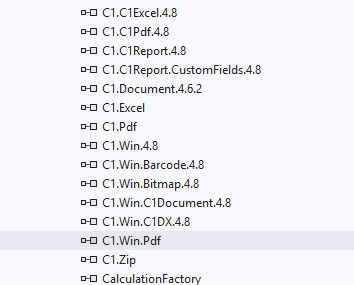
    I modified the project as following:

    Still the same problem …

    I checked all dlls and they are from version 4.8.20252.xxx (From Winforms/bin/v4.8/…)

  • Posted 2 March 2026, 5:22 am EST

    Hello,

    In your project, every ComponentOne control, component, or API you use may require its corresponding assembly reference. If any required DLL is missing, the application can throw a load exception at compile time or runtime.

    In the sample we previously shared, only the C1Report object is used, and all necessary assemblies are already referenced there, which is why it runs without issues.

    To properly diagnose the problem in your case, we need to review the specific C1 controls, components, and APIs being used in your project. Please do one of the following:

    • Update the sample project we shared earlier to reproduce the issue, or
    • Provide a stripped-down version of your project that still demonstrates the problem.

    This will allow us to analyze the assembly references and identify what is causing the loading failure.

    Regards,

    Uttkarsh.

  • Posted 4 March 2026, 4:21 am EST

    We are upgrading the ComponentOne controls among other things is a system with many projects. This project that currently fails is a service that among other thins is creating exports and reports in PDF and EXCEL formats. The reports are plug-in dlls but the executions is done by the service.

    We found out that a problem is the licenses.lic file. The old current content:

    C1.C1Pdf.C1PdfDocument, C1.C1Pdf.4.5.2

    C1.C1Rdl.Rdl2008.C1RdlReport, C1.C1Report.4.5.2

    C1.C1Preview.C1MultiDocument, C1.C1Report.4.5.2

    C1.C1Preview.C1PrintDocument, C1.C1Report.4.5.2

    C1.C1Report.C1Report, C1.C1Report.4.5.2

    C1.C1Excel.C1XLBook, C1.C1Excel.4.5.2

    C1.Win.C1Document.C1SSRSDocumentSource, C1.Win.C1Document.4.5.2

    We updated the license file to this:

    C1.C1Pdf.C1PdfDocument, C1.C1Pdf.4.8

    C1.C1Rdl.Rdl2008.C1RdlReport, C1.C1Report.4.8

    C1.C1Preview.C1MultiDocument, C1.C1Report.4.8

    C1.C1Preview.C1PrintDocument, C1.C1Report.4.8

    C1.C1Report.C1Report, C1.C1Report.4.8

    C1.C1Excel.C1XLBook, C1.C1Excel.4.8

    C1.Win.C1Document.C1SSRSDocumentSource, C1.Win.C1Document.4.8

    When we removed all the lines it compiled but that means that we will not have any App_Licenses.dll created.

    There is also a dummy form used to be able to create and det a license dll that we had to remove - could not load the dll.

    We looked into the sample file for PDF file creation and you are using a .gclicx file.

    154b86e3-6b5b-4b2e-acdc-91d24d249879;-8585241724854775808;Q3JlYXRlUGRm;MTU0Yjg2ZTMtNmI1Yi00YjJlLWFjZGMtOTFkMjRkMjQ5ODc5,MzgxMDg0ODdYWFhYWFhYWDA0MQ,Sk1QUg,RmFsc2U,ODExNg,RmFsc2U,MA,MA,djIwMzAuMw,;0lgHxEAHWK82rhMHaaVu5ANiFdNXPlwpIYRcqnsdqCtC3ZO/CrOAbBiQLEGGp07ZJG7170MWgS8nJ+2ev/Y9b953fRD/+94/FH7gBfTRIdIKpcoLZSYtscnUAjk+k1CREHWUVQpehE5N+EmzYhFuntdGRZW7FosXGfzkGqKKEyk

    How does this work? What do we have to change?

    We are a development team with our own licenses and the final build is done on a build server with its own license.

    The source code is in GITHUB and the creation of a new version is done by CCNet that checks out the code, compile and build installation kits.

    The system consist of services, Web Service, Web and a Windows application that share different dlls.

    How shall we handle the new license function in our system or do we have to use the older 2025v1 version instead?

    We have a special source folder with all components that we use and that the references points to that folder making sure we use the same components on all our PCs and server. So can you pls share how the new license management works?

  • Posted 5 March 2026, 12:54 pm EST

    Hello,

    We are working on your query and will get back with more information soon.

    Regards,

    Uttkarsh.

  • Posted 6 March 2026, 5:09 am EST

    Hi,

    Thank you for sharing the contents of the licenses.licx file. You are correct that the entries in the licenses.licx file needed to be updated to match the upgraded C1.Win.*.4.8 DLLs.

    Regarding licensing, we would like to clarify that there are two different licensing concepts involved. One is Design-time licensing (licenses.licx file), and the other is Runtime licensing (.gclicx file)

    If you are using a .NET Framework 4.8.1 or earlier project, these projects support the design-time licensing model. In such cases, your existing projects should already contain a licenses.licx file, and if a valid license key is activated on your machine, the project should build and run without any issues.

    For .NET Core (or .NET) projects, design-time licensing using the licenses.licx file is not supported. Therefore, we introduced a proprietary runtime licensing mechanism that uses the .gclicx file.

    This runtime licensing model is also compatible with .NET Framework 4.8 C1 controls. Though, these controls can continue to work using only the licenses.licx file as well. You can also verify this by testing our sample project by deleting the .gclicx file. The project still builds and runs correctly on our end, using only the licenses.licx file.


    Furthermore, the issue you mentioned do not appear to be related to licensing. If it were a licensing issue, you would typically see a license nag screen or a specific exception related to licensing.

    Based on the information provided, the issue seems more likely to be caused by a version mismatch between the C1 assemblies, a missing DLL reference, or a project-specific configuration problem.

    To investigate this further, please provide a sample project or update the project we shared with the exact DLLs used in your project, the licenses.licx file, and a sample report with some dummy data that reproduces the issue. This will allow us to review the setup and assist you more effectively.

    In case you need to share some confidential data, you can also create a new support case on our private support portal and continue the discussion there - https://developer.mescius.com/my-account/my-support


    Note: The C1Report component you are using is legacy and is no longer supported. It was replaced by C1FlexReport long back, which is the currently supported reporting solution in ComponentOne.

    Best Regards,

    Kartik

Need extra support?

Upgrade your support plan and get personal unlimited phone support with our customer engagement team

Learn More

Forum Channels