FooterRow C1GridView 2025v2 399

Posted by: enrique.pv-ext on 27 April 2026, 4:27 am EST

  • Posted 27 April 2026, 4:27 am EST - Updated 27 April 2026, 4:33 am EST

    Hi,

    Migrate from 2010v1 to 2025v2 399 in ASP.NET WebForms NET Framework 4.8.1.

    Using C1GridView from C1.Web.Wijmo.Controls.48.dll

    Using C1ReportViewer from C1.Web.Wijmo.Controls.48.dll

    Changes C1WebReport to C1ReportViewer control.

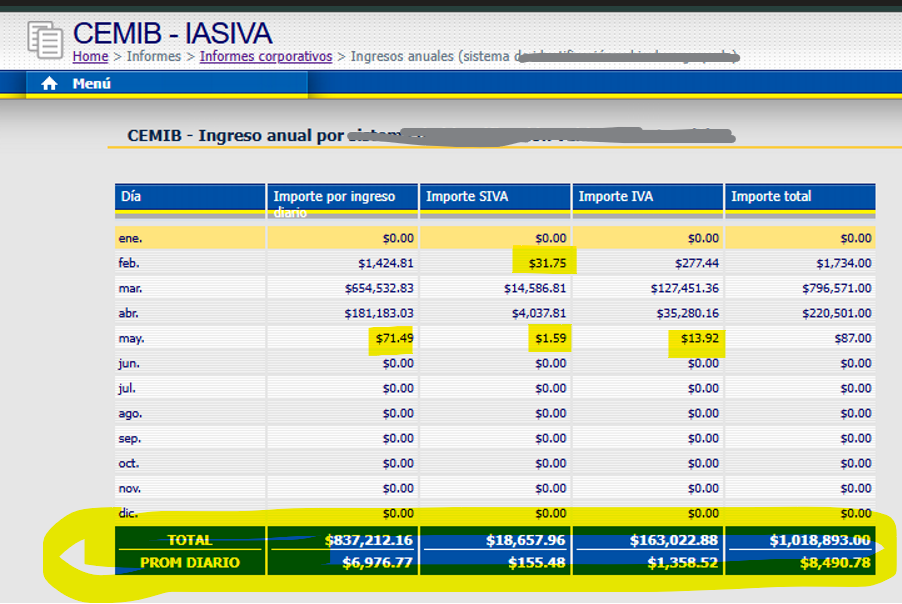
    I use FooterRow:

           C1GridView1.FooterRow.Cells[0].HorizontalAlign = HorizontalAlign.Left;
           C1GridView1.FooterRow.Cells[0].Text = string.Format("<table style='text-align:center;' style width=\"100%\"><tr><td style='border-bottom: 1px solid white'><label ID=\"lblfooterColumn1.{2}\" >{0}</label></td></tr><tr><td><label  ID=\"lblfooterColumn2.{2}\" >{1}</label></td></tr></table>", "TOTAL", "PROM DIARIO", 0);
    
         decimal total = 0;
         for (int i = 1; i <= C1GridView1.Columns.Count - 1; i++)
         {
    
             foreach (DataRow dr in _dataSources.Tables[0].Rows)
             {
                 decimal amount = (decimal)dr[i];
                 total += amount;
             }
             decimal promDiario = monthsUsed > 0 ? total / (monthsUsed * 30) : 0;
             C1GridView1.FooterRow.Cells[i].HorizontalAlign = HorizontalAlign.Center;
             C1GridView1.FooterRow.Cells[i].Text = string.Format("<table style='text-align:right;' style width=\"100%\"><tr ><td style='border-bottom: 1px solid white'><label ID=\"lblfooterColumn1.{2}\" >{0}</label></td></tr><tr><td><label  ID=\"lblfooterColumn2.{2}\" >{1}</label></td></tr></table>", (string.Format("{0:C}", total)), (string.Format("{0:C}", promDiario)), i);
             total = 0;
         }

    In old version, the footer is visible

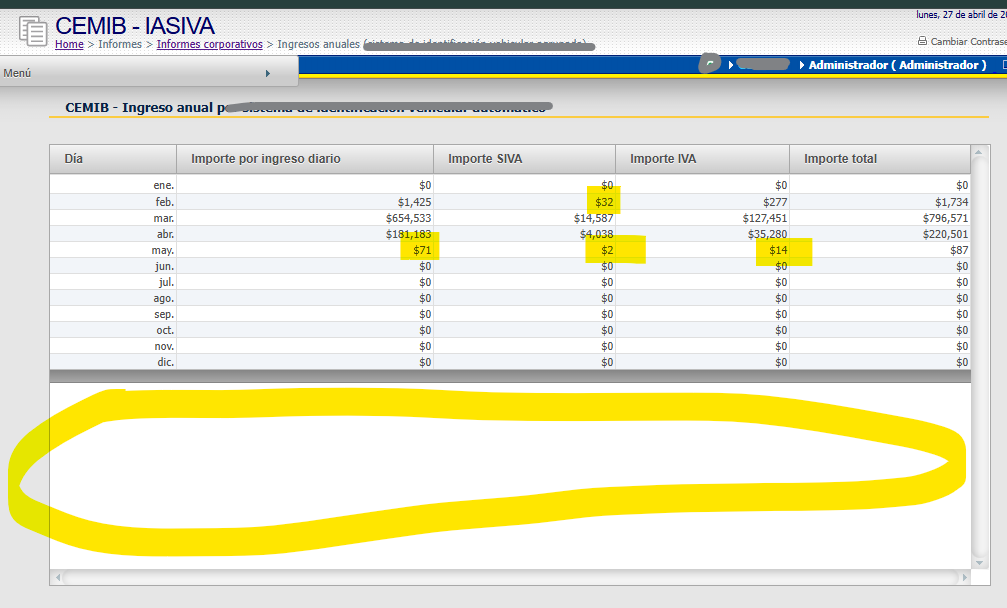
    New version not appears

    any suggestions ?

    I change DataFormatString=“c0” to DataFormatString=“c2”, for view 2 decimals

  • Posted 27 April 2026, 6:49 am EST

    Hello Enrique,

    In 2025v2, footers are displayed once you set the ‘ShowFooter’ property to ‘true’ and configure the column’s ‘Aggregate’ property.

    If you need to display custom values in the footer, you can use the ‘FooterTemplate’. Both approaches have been demonstrated in the attached sample (see GridView_FooterSample.zip).

    Please let us know if you encounter any issues.

    Regards,

    Uttkarsh.

  • Posted 27 April 2026, 7:54 am EST

    Thanks,

    how - to add 2 new rows in Footer ?

    first row for TOTAL

    Second row for PROM. DIARIO

                decimal total = 0;
                for (int i = 1; i <= C1GridView1.Columns.Count - 1; i++)
                {
    
                    foreach (DataRow dr in _dataSources.Tables[0].Rows)
                    {
                        decimal amount = (decimal)dr[i];
                        total += amount;
                    }
                    decimal promDiario = monthsUsed > 0 ? total / (monthsUsed * 30) : 0;
    
                                   C1GridView1.FooterRow.Cells[i].Text = BuildFooterCellHtml(
                              total.ToString("C"),
                              promDiario.ToString("C"),
                              i
                    );
    
    
                    total = 0;
                }
    
      private string BuildFooterCellHtml(string topValue, string bottomValue, int index)
      {
          var topValueEncoded = System.Web.HttpUtility.HtmlEncode(topValue);
          var bottomValueEncoded = System.Web.HttpUtility.HtmlEncode(bottomValue);
    
          return $@"<table style='text-align:right; width:100%;'>
              <tr>
                  <td style='border-bottom: 1px solid white'>
                      <label id='lblfooterColumn1.{index}'>{topValueEncoded}</label>
                  </td>
              </tr>
              <tr>
                  <td>
                      <label id='lblfooterColumn2.{index}'>{bottomValueEncoded}</label>
                  </td>
              </tr>
            </table>";
      }


  • Posted 27 April 2026, 9:22 am EST - Updated 27 April 2026, 10:28 am EST

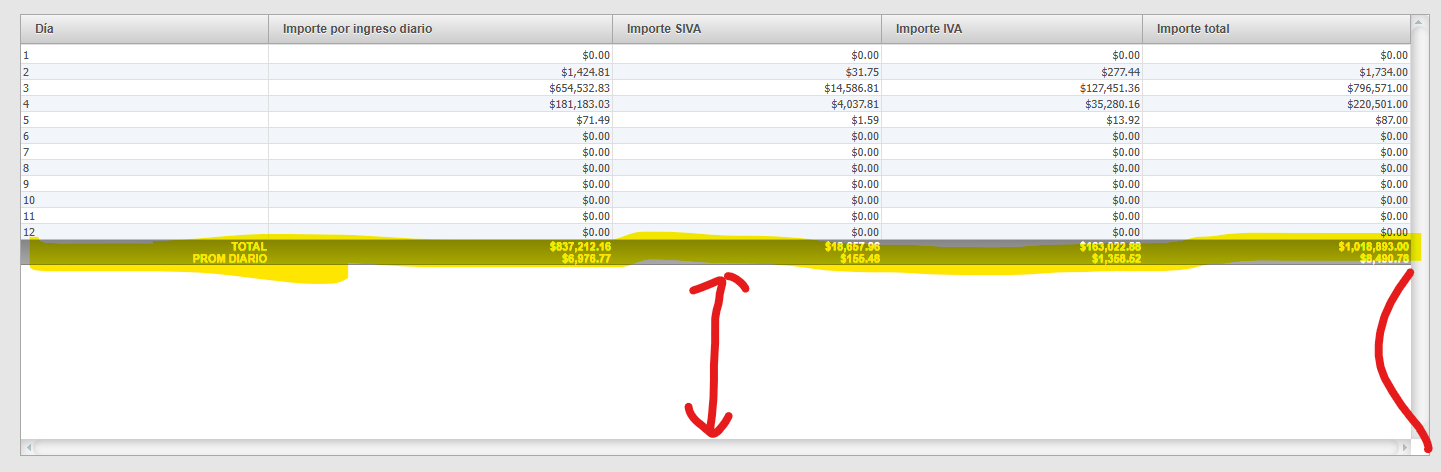
    I try, and I get the footer but

    1. how to change sytle ??
    2. adjust gridview to the footer

    My code now:

    
                        <Columns>
                            <cc1:C1TemplateField SortExpression="MonthNumber">
                                <ItemTemplate>
                                    <%# Eval("MonthNumber") %>
                                </ItemTemplate>
                                <FooterTemplate>
                                    <asp:Label ID="lblMonthFooterTotal" runat="server" Text="TOTAL" />
                                    <br />
                                    <asp:Label ID="lblMonthFooterAverage" runat="server" Text="PROM DIARIO" />
                                </FooterTemplate>
                                <ItemStyle CssClass="GridText" />
                            </cc1:C1TemplateField>
    
                            <cc1:C1TemplateField HeaderText="Amount" SortExpression="Amount">
                                <ItemTemplate>
                                    <%# Eval("Amount", "{0:C}") %>
                                </ItemTemplate>
                                <FooterTemplate>
                                    <asp:Label ID="lblAmountFooterTotal" runat="server" />
                                    <br />
                                    <asp:Label ID="lblAmountFooterAverage" runat="server" />
                                </FooterTemplate>
                                <ItemStyle CssClass="GridNumber" />
                            </cc1:C1TemplateField>
    
                            <cc1:C1TemplateField HeaderText="SIVAAmount" SortExpression="SIVAAmount">
                                <ItemTemplate>
                                    <%# Eval("SIVAAmount", "{0:C}") %>
                                </ItemTemplate>
                                <FooterTemplate>
                                    <asp:Label ID="lblSivaFooterTotal" runat="server" />
                                    <br />
                                    <asp:Label ID="lblSivaFooterAverage" runat="server" />
                                </FooterTemplate>
                                <ItemStyle CssClass="GridNumber" />
                            </cc1:C1TemplateField>
    
                            <cc1:C1TemplateField HeaderText="IVAAmount" SortExpression="IVAAmount">
                                <ItemTemplate>
                                    <%# Eval("IVAAmount", "{0:C}") %>
                                </ItemTemplate>
                                <FooterTemplate>
                                    <asp:Label ID="lblIvaFooterTotal" runat="server" />
                                    <br />
                                    <asp:Label ID="lblIvaFooterAverage" runat="server" />
                                </FooterTemplate>
                                <ItemStyle CssClass="GridNumber" />
                            </cc1:C1TemplateField>
    
                            <cc1:C1TemplateField HeaderText="TotalAmount" SortExpression="TotalAmount">
                                <ItemTemplate>
                                    <%# Eval("TotalAmount", "{0:C}") %>
                                </ItemTemplate>
                                <FooterTemplate>
                                    <asp:Label ID="lblTotalFooterTotal" runat="server" />
                                    <br />
                                    <asp:Label ID="lblTotalFooterAverage" runat="server" />
                                </FooterTemplate>
                                <ItemStyle CssClass="GridNumber" />
                            </cc1:C1TemplateField>
                        </Columns>

    and c#

    
            private void ConfigureGridViewColumns()
            {
                #region Months Available
    
                int monthsUsed = (from myRow in _dataSources.Tables[0].AsEnumerable()
                                  where myRow.Field<decimal>("TotalAmount") > 0
                                  select myRow).Count();
                Session["monthsAvailable"] = monthsUsed;
    
                #endregion
    
                SetFooterLabelText("lblMonthFooterTotal", "TOTAL");
                SetFooterLabelText("lblMonthFooterAverage", "PROM DIARIO");
    
                SetAmountFooter("Amount", "lblAmountFooterTotal", "lblAmountFooterAverage", monthsUsed);
                SetAmountFooter("SIVAAmount", "lblSivaFooterTotal", "lblSivaFooterAverage", monthsUsed);
                SetAmountFooter("IVAAmount", "lblIvaFooterTotal", "lblIvaFooterAverage", monthsUsed);
                SetAmountFooter("TotalAmount", "lblTotalFooterTotal", "lblTotalFooterAverage", monthsUsed);
            }
    
            private void SetAmountFooter(string columnName, string totalLabelId, string averageLabelId, int monthsUsed)
            {
                if (_dataSources == null || _dataSources.Tables.Count == 0)
                {
                    return;
                }
    
                var table = _dataSources.Tables[0];
                decimal total = 0;
    
                foreach (DataRow row in table.Rows)
                {
                    total += row.Field<decimal>(columnName);
                }
    
                var average = monthsUsed > 0 ? total / (monthsUsed * 30) : 0;
    
                SetFooterLabelText(totalLabelId, total.ToString("C"));
                SetFooterLabelText(averageLabelId, average.ToString("C"));
            }
    
            private void SetFooterLabelText(string controlId, string text)
            {
                if (C1GridView1.FooterRow == null)
                {
                    return;
                }
    
                var label = C1GridView1.FooterRow.FindControl(controlId) as Label;
                if (label == null)
                {
                    return;
                }
                label.Text = Server.HtmlEncode(text ?? string.Empty);
            }

    using C1TemplateField instead of C1BoundField

    using ItemTemplate and

    <%# Eval("Amount", "{0:C}") %>
    , format 0:C

    using FooterTemplate

    <FooterTemplate>
         <asp:Label ID="lblAmountFooterTotal" runat="server" />
         <br />
         <asp:Label ID="lblAmountFooterAverage" runat="server" />
     </FooterTemplate>

    any suggestions for style, adjust, and good patterns&practices for my code for footer ?

    thanks all

  • Posted 28 April 2026, 1:42 am EST

    Hello Enrique,

    For both styling and positioning of the footer, you’ll need to rely on CSS.

    1. How to change the style

    You can target the “wijmo-wijgrid-footerrow” class to style the footer row (you can also use FooterStyle, but CSS gives you more flexibility):

    #<%= C1GridView1.ClientID %> .wijmo-wijgrid-footerrow {
        background-color: indianred !important; /* your desired color */
        font-weight: bold;
    }
    1. Adjusting the GridView so the footer stays at the bottom

    There isn’t a built-in way to achieve this directly. However, you can approximate it using CSS by allocating the remaining height to the tbody, so the footer appears at the bottom:

    #<%= C1GridView1.ClientID %> {
        display: block;
        height: 300px;
        border-collapse: collapse;
    }
    
    /* Header and footer behave like fixed sections */
    #<%= C1GridView1.ClientID %> thead,
    #<%= C1GridView1.ClientID %> tfoot {
        display: table;
        width: 100%;
        table-layout: fixed;
    }
    
    /* Scrollable body */
    #<%= C1GridView1.ClientID %> tbody {
        display: block;
        height: 200px;
    }
    
    /* Keep column widths aligned */
    #<%= C1GridView1.ClientID %> tbody tr {
        display: table;
        width: 100%;
        table-layout: fixed;
    }

    For implementation, please refer to the attached sample: GridView_FooterSample_Mod2.zip

    Regards,

    Uttkarsh.

  • Posted 28 April 2026, 3:00 am EST

    Thanks!

    any suggestions for good patterns&practices for my code for footer ?

  • Posted 28 April 2026, 8:14 am EST

    Hello Enrique,

    Your current approach using FooterTemplate is correct. A few recommendations:

    • Use FooterTemplate for layout and keep calculations in code-behind (avoid setting raw HTML in FooterRow.Cells).
    • Use CSS (e.g., .wijmo-wijgrid-footerrow) for styling instead of inline formatting.

    Improve layout control (instead of "br ")

    Instead of:

    <label ... />
    <br />
    <label ... />

    Use a container for better styling:

    <div class="footer-cell">
        <asp:Label ... />
        <asp:Label ... />
    </div>

    Then control layout via CSS:

    • spacing
    • alignment
    • borders

    This gives much more flexibility and consistency.

    Regards,

    Uttkarsh.

Need extra support?

Upgrade your support plan and get personal unlimited phone support with our customer engagement team

Learn More

Forum Channels