C1Report ThreadAbortException 2025v2 399

Posted by: enrique.pv-ext on 8 April 2026, 5:52 am EST

    • Post Options:
    • Link

    Posted 8 April 2026, 5:52 am EST

    Hi,

    Migrate from 2010v1 to 2025v2 399 in ASP.NET WebForms NET Framework 4.8.1.

    Using C1ReportViewer from C1.Web.Wijmo.Controls.48.dll

    Changes C1WebReport to C1ReportViewer control.

    I have C1ReportViewer control in my custom ASCX.

    I use

            private void ExportUsingHandler(C1ReportV48.C1Report report, int loggedUserId, string format)
            {
                string cacheKey = "REPORT_" + Guid.NewGuid().ToString("N");
    
                // guardar en cache
                HttpRuntime.Cache.Insert(
                    cacheKey,
                    report,
                    null,
                    DateTime.Now.AddMinutes(5),
                    System.Web.Caching.Cache.NoSlidingExpiration
                );
    
                // token firmado
                var token = SecureTokenHelper.Generate(loggedUserId, cacheKey);
                var encodedToken = HttpUtility.UrlEncode(token);
                var normalizedFormat = NormalizeHandlerFormat(format);
    
                var script = $@"window.open('/WebHandler/ReportDownload.ashx?token={encodedToken}&format={normalizedFormat}', '_blank');";
                ScriptManager.RegisterStartupScript(Page, GetType(), "ExportReportHandler", script, true);
            }

    Custom ReportDownload.ashx use C1Report and RenderToStream method. All is OK.

    But in output I get

    Excepción producida: ‘System.Threading.ThreadAbortException’ en mscorlib.dll

    Subproceso anulado.

    The reason: reportservice.ashx

          case "dialog":
              context.Response.ContentType = "text/x-html";
              context.Response.Write(GetDialogTemplateContent((string)args["name"]));
              context.Response.End();
              break;

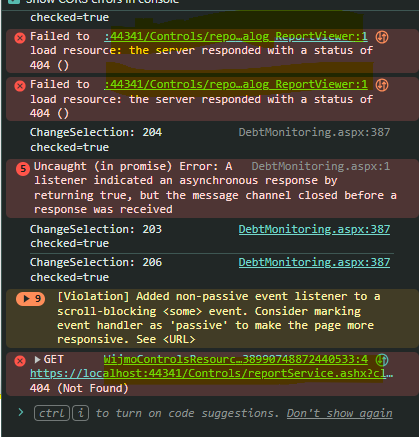
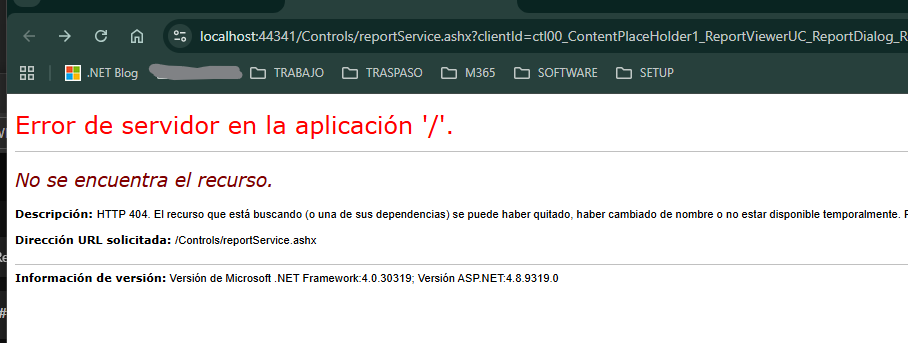
    Why command = dialog in reportservice.ashx is called ? In my handler ashx, not use ReporViewer control, only C1Report.

    thanks

  • Posted 8 April 2026, 9:32 am EST

    Hi Enrique,

    The ThreadAbortException is not coming from your custom ReportDownload.ashx—your export code looks fine.

    This is an internal error and can be safely ignored. In .NET Framework, Response.End() internally calls Thread.Abort(), which raises a ThreadAbortException by design. This is expected and not an actual error.

    The quickest way to handle this is to ignore it in your global error handler:

    // Global.asax
    protected void Application_Error(object sender, EventArgs e)
    {
        var ex = Server.GetLastError();
        if (ex is System.Threading.ThreadAbortException)
            return; // expected from Response.End()
    
        // your normal error logging
    }

    If you have a physical reportservice.ashx file in your project (you can check the root folder), you can also avoid this by replacing:

    context.Response.End();

    with:

    context.Response.Flush();
    context.ApplicationInstance.CompleteRequest();

    CompleteRequest() skips the remaining pipeline without calling Thread.Abort(), so the exception won’t occur.

    Hope this helps.

    If your setup is different, feel free to share a sample that reproduces the issue so we can investigate further.

    Regards,

    Uttkarsh.

  • Posted 9 April 2026, 5:40 am EST - Updated 9 April 2026, 5:45 am EST

  • Posted 13 April 2026, 5:11 am EST

    Hello Enrique,

    Yes, ‘reportService.ashx’ is an internal handler used by C1ReportViewer. Could you please clarify the exact issue you are experiencing with the following exception?

    “System.Threading.ThreadAbortException” in mscorlib.dll

    We are also able to observe this exception, but it does not affect the behavior—everything works correctly on our end. This is an internal exception and can generally be ignored.

    However, if you are facing any specific issue related to this, please let us know so we can investigate further and suggest the best way forward.

    At our end, we do not face any 404 error, please refer to the images attached: images.zip

    It would also help if you could share a stripped-down sample that reproduces the issue.

    Regards,

    Uttkarsh.

  • Posted 16 April 2026, 10:02 am EST - Updated 17 April 2026, 2:23 am EST

    The message

    Excepción producida: System.Threading.ThreadAbortException' en mscorlib.dl

    appears in Output Windows in Visual Studio 2022.

    Not throws exception in Application_Error.

    Application_Error not called for ThreadAbortException in reportService.ashx

    Better replacing

    context.Response.End();

    void Application_Error(object sender, EventArgs e)
    {
        var ex = Server.GetLastError();
    
        if (ex is ThreadAbortException)
        {
            var context = HttpContext.Current;
            var path = context?.Request?.Path;
    
            if (path != null && path.EndsWith("ReportService.ashx", StringComparison.OrdinalIgnoreCase))
            {
                Server.ClearError();
                return;
            }
        }
    
        logger.Error("Unhandled error", ex);
    }
  • Posted 17 April 2026, 3:15 am EST

    Hi Enrique,

    Thank you for the update. If applying that change resolves the behavior in your environment, then you may proceed with that implementation.

    If you have further questions or require a deeper investigation, please provide a complete, runnable sample application that reproduces the exception. We require a reproduction project to perform any further analysis or provide additional feedback.

Need extra support?

Upgrade your support plan and get personal unlimited phone support with our customer engagement team

Learn More

Forum Channels