Posted 19 February 2026, 8:03 am EST - Updated 19 February 2026, 8:41 am EST
Hi,
Migrate from 2010v1 to 2025v2 399 in ASP.NET WebForms NET Framework 4.8.1.
Using C1GridView from C1.Web.Wijmo.Controls.48.dll
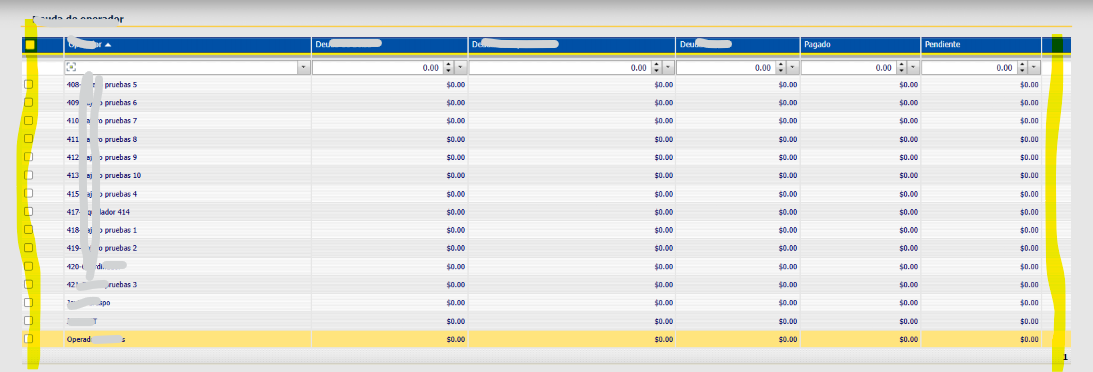
Using C1CheckBoxField column:
Old version 2010v1
New version 2025v2 399
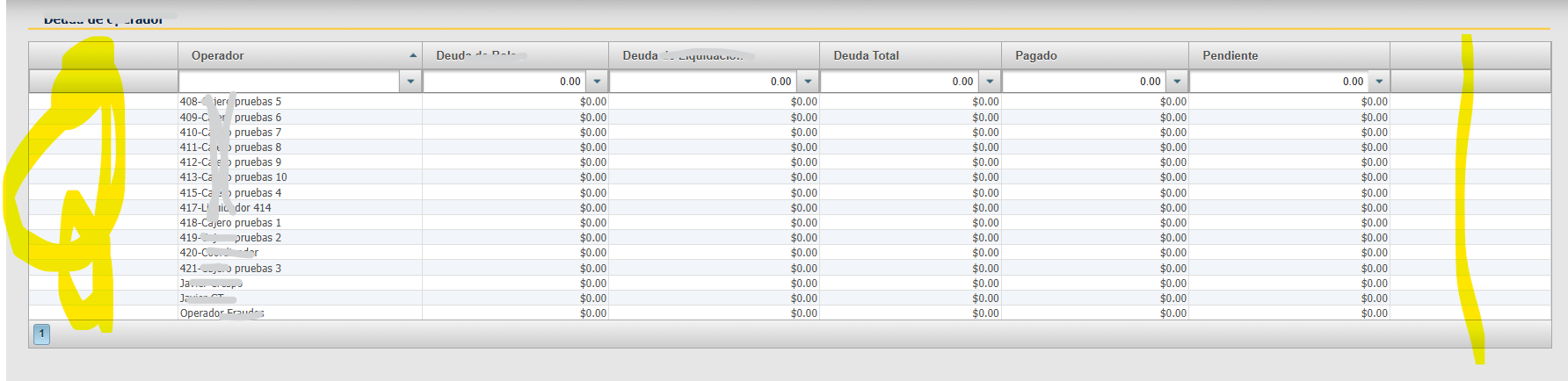
In 2025v2 399 version, it’s not appears Checkbox Column!
Create columns dynamically using code, not markup
                <cc1:C1GridView ID="C1GridView1" Width="100%"
                    runat="server"
                    AllowPaging="True" PageSize="30"
                    AllowSorting="True" ShowFilter="True"
                    AutogenerateColumns="False"
                    OnPageIndexChanging="C1GridView1_PageIndexChanging"
                    OnSorting="C1GridView1_Sorting"
                    OnSorted="C1GridView1_Sorted"
                    OnFiltering="C1GridView1_Filtering"
                    OnRowCreated="C1GridView1_RowCreated"
                    OnRowDataBound="C1GridView1_RowDataBound">
                    <Columns>
                    </Columns>
                </cc1:C1GridView>
In ConfigureGridColumns method:
case ColumnsC1GridView1.SELECTION:
                            var check = new C1CheckBoxField();
                            check.AllowSizing = false;
                            check.ShowFilter = false;
                            check.ReadOnly = false;
                            check.ItemStyle.Width = 10;
                            this.C1GridView1.Columns.Add(check);
                            break;

                        case ColumnsC1GridView1.DEBT_PAYMENT:
                            col = new C1ButtonField();
                            col.AllowSizing = false;
                            col.CommandName = "DEBT_PAYMENT";
                            col.ButtonType = ButtonType.Image;
                            col.ImageUrl = "~/App_Themes/Content/Imagenes/editing.gif";
                            col.ItemStyle.Width = 10;
                            this.C1GridView1.Columns.Add(col);
                            break;
RowCreated event, create CheckBox for Header
   protected void C1GridView1_RowCreated(object sender, C1GridViewRowEventArgs e)
   {
       Logger.Debug("C1GridView1_RowCreated");
       try
       {
           if (e.Row.RowType == C1GridViewRowType.Header ) //&& this._textsShown != null)
           {
               var textos = this._textsShown;

               var check = new CheckBox();
               check.ID = "selectionHeader";
               check.Attributes["onclick"] = "CheckAll(this);";
               check.Checked = AllSelected;
               e.Row.Cells[(int)ColumnsC1GridView1.SELECTION].Controls.Add(check);

               e.Row.Cells[(int)ColumnsC1GridView1.BAG_DEBT].ToolTip = (string)this._textsShown[4];
               e.Row.Cells[(int)ColumnsC1GridView1.OPERATOR].ToolTip = (string)this._textsShown[3];
           }
any suggestions for use C1CheckBoxField in GridView ?
thx a lot