Posted 10 January 2026, 10:16 am EST - Updated 10 January 2026, 10:27 am EST
VS2022 Toolbox issue
Posted by: morourke on 10 January 2026, 10:16 am EST
-

morourke
-
morourke
Posted 11 January 2026, 5:55 am EST
I am curently running VS2022 Version 17.14.23. Targetting Net8
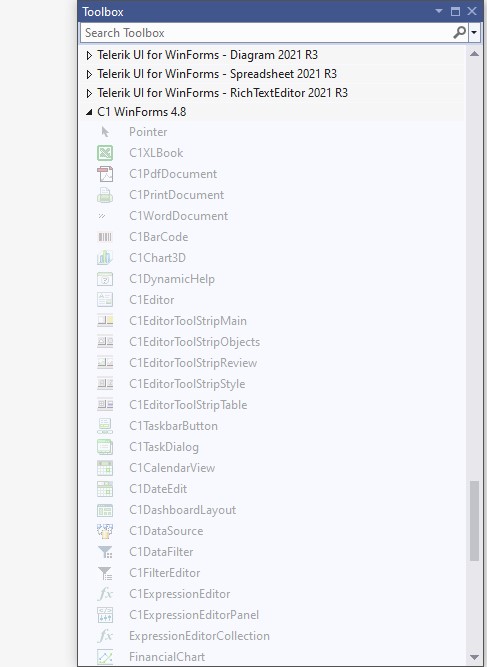
Although I have purchased previous versions of I have downloaded and installed 2025.v2(740). Doing so knocked out the earlier versions. I can put up with that as I am moving all projects up to Net8. However despite spending hours I cannot get the components to appear in the toolbox, nor in any way drag them onto a form. They do appear grayed out; but even then I think the version is incorrect.
The instalation path base is: C:\Program Files (x86)\MESCIUS\ComponentOne\WinForms\bin
Any assistance appreciated.
Regards
Michael O’Rourke[ -

uttkarsh.matiyal

Posted 12 January 2026, 8:38 am EST
Hello Michael,
This is a breaking change introduced by Microsoft. Starting with .NET 6/8, third-party controls are available only via NuGet packages. Please refer to the following documentation for more details:
https://developer.mescius.com/componentone/docs/win/online-studio/addingnuget
So, if you want to use FlexGrid in your project, you need to add C1.Win.FlexGrid NuGet package from nuget.org to your project.Regards,
Uttkarsh. -
morourke
Posted 12 January 2026, 5:31 pm EST
Hi,
Thanks for the assist. I just don’t kow anymore if I need the hassle. I’m trying to retire and stuck with a few clients who I don’t wqant to abandon. So I have to decide if I am going to go through the whole nightmare of updating the myriad of components on my development machies or just go and find a good Irish pub.
Regards
Mick -
uttkarsh.matiyal
Posted 13 January 2026, 9:35 am EST
Hello Mick,
I completely understand your concerns around migration. It can certainly feel overwhelming at times. That said, these changes have been introduced to simplify development and ensure better compatibility with newer technologies going forward.
With .NET 8, you only need to add the required ComponentOne NuGet packages to your project. NuGet automatically references all necessary assemblies, and once the package is restored, the controls appear in the Visual Studio toolbox and can be drag-dropped onto the form as usual. I’ve attached a short video demonstrating this process (see (addNugetPackage.zip)[https://drive.mescius.io/download?file=ExternalShare/WinForms/Videos/addNugetPackage.zip]) for reference.
And for what it’s worth, the Irish pub option does sound very tempting as well
 .
.Regards,
Uttkarsh