Using FlexGrid.SaveExcel and hosted controls

Posted by: tom.galczynski on 14 January 2026, 10:39 am EST

    • Post Options:
    • Link

    Posted 14 January 2026, 10:39 am EST - Updated 14 January 2026, 10:45 am EST

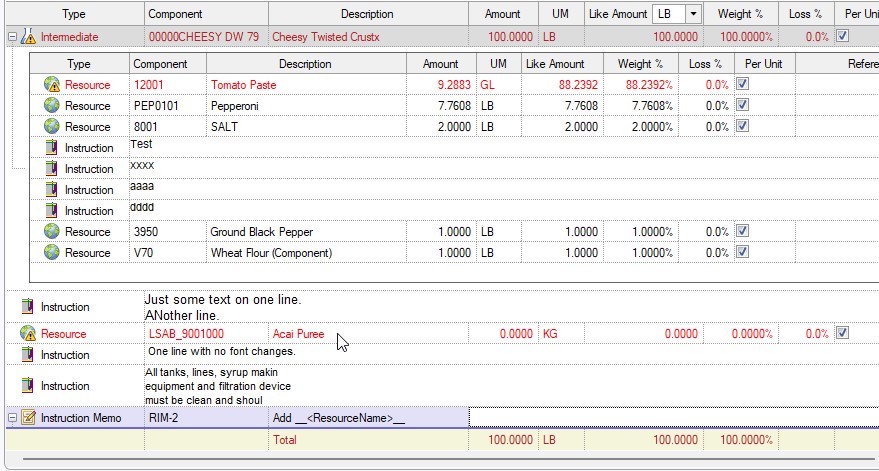
    Hello! We are using a winforms C1 FlexGrid which contains some rows that have a hostedcontrol, essentially another flexgrid. (I have included an image of such a grid with the row’s hostedcontrol expanded.) When we use SaveExcel, for the row with the hosted control all we get in the spreadsheet is the grid row. We would like to be able to also get the hostedcontrol rows as shown in the image. Is that possible?

    We are using Visual Basic.Net, C1Win.C1Flexgrid 4.8.20241.664

    Thanks for your help!

  • Posted 15 January 2026, 4:51 am EST

    Hi,

    this is only possible if you first save the grid to excel, then open the excel file with e.g. C1Excel (I think for your older version it should be https://www.nuget.org/packages/C1.C1Excel, but for recent C1 versions you should probably use https://www.nuget.org/packages/C1.Excel/ for newer versions). Using C1Excel, you could add the content of the hosted controls.

    As you use another C1FlexGrid for the detail data, you might save this grid to another excel file, then merge them with C1Excel.

    Starter code:

    C1XLBook excelBook = new C1XLBook();
    excelBook.Load ("sample.xlsx");
    
    ...Modify sheet....
    
    excelBook.Save ("result.xslx");

    Hope this gives a hint on how to start…

    Best regards

    Wolfgang

  • Posted 15 January 2026, 9:24 am EST

    Hello Tom,

    The content of hosted controls is not exported to Excel because FlexGrid has no knowledge of the embedded controls. Additionally, Excel itself does not support embedding arbitrary UI controls within a row, so only the parent grid row is exported when using SaveExcel.

    In scenarios like this, the recommended approach is to flatten the data structure before or during export, which aligns with what Wolfgang suggested. A possible workflow would be:

    1. Export the main FlexGrid to Excel.
    2. Load the generated file into a C1XLBook object

      (https://developer.mescius.com/componentone/docs/win/online-excel/overview).
    3. For each hosted (child) FlexGrid:

      a. Export the child grid to Excel.

      b. Load the exported child grid’s excel content into a C1XLBook object.

      c. Copy the child rows into the main worksheet at the appropriate location

      (https://developer.mescius.com/componentone/docs/win/online-excel/copysheets).

    This approach effectively converts the parent–child UI hierarchy into a structure that Excel can represent.

    Please let us know if this helps. If your requirement is different, or if our understanding is not fully accurate, it would be helpful to know how these hosted controls are implemented (for example, whether you are using RowDetails) and if there are any additional requirements.

    If possible, sharing a small sample project would allow us to provide a more precise solution.

    P.S. Thank you, Wolfgang, for your inputs.

    Regards,

    Utkarsh

  • Posted 15 January 2026, 10:49 am EST

    Yes, Wolfgang and Utkarsh, this helps a lot. Wanted to confirm that there was no “magic” FileFlag enum we were missing. :slight_smile: Also thanks for the suggestions as to how to implement.

    Cheers,

    Tom

Need extra support?

Upgrade your support plan and get personal unlimited phone support with our customer engagement team

Learn More

Forum Channels