Localization of C1PrintPreviewControl and C1PrintDocument in .NET 8

Posted by: wknauf on 31 December 2025, 6:47 am EST

  • Posted 31 December 2025, 6:47 am EST - Updated 31 December 2025, 6:52 am EST

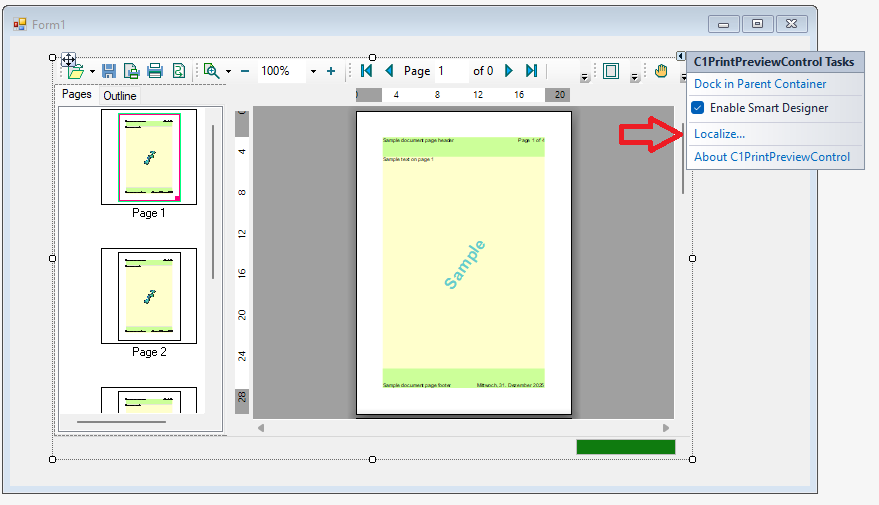
    In NET framework 4.8 projects, we could localize C1PrintPreviewControl and C1PrintDocument by invoking this designer action:

    In .NET 8 projects, this action is missing. The old localization files still work, but you cannot edit them.

    Is there any way to open the localization editor?

    Attached is a sample with a .NET 4.8 project (contains also a sample localization) and a NET 8 project.

    PrintPreviewLocalization.zip

    This will be my last support question for this year ;-). Happy new year!

    Best regards

    Wolfgang

  • Posted 31 December 2025, 9:05 am EST

    Hi Wolfgang,

    The localization editor is not yet available in .NET8. We are getting in touch with the development team to see if there are any plans to include it and will let you know the updates as soon as possible.

    [Internal Tracking ID: C1WIN-34867]

    A very happy new year to you as well.

    Best Regards,

    Kartik

  • Posted 7 January 2026, 1:25 am EST

    Hi Wolfgang,

    As per the development team, there are currently no plans to provide a design-time localization editor for .NET 8+.

    So, for now, the only workaround would be to use a sample .NET Framework project to edit the pre-configured localizations you already have from the .NET Framework days.

    Best Regards,

    Kartik

  • Posted 7 January 2026, 6:12 am EST - Updated 7 January 2026, 6:17 am EST

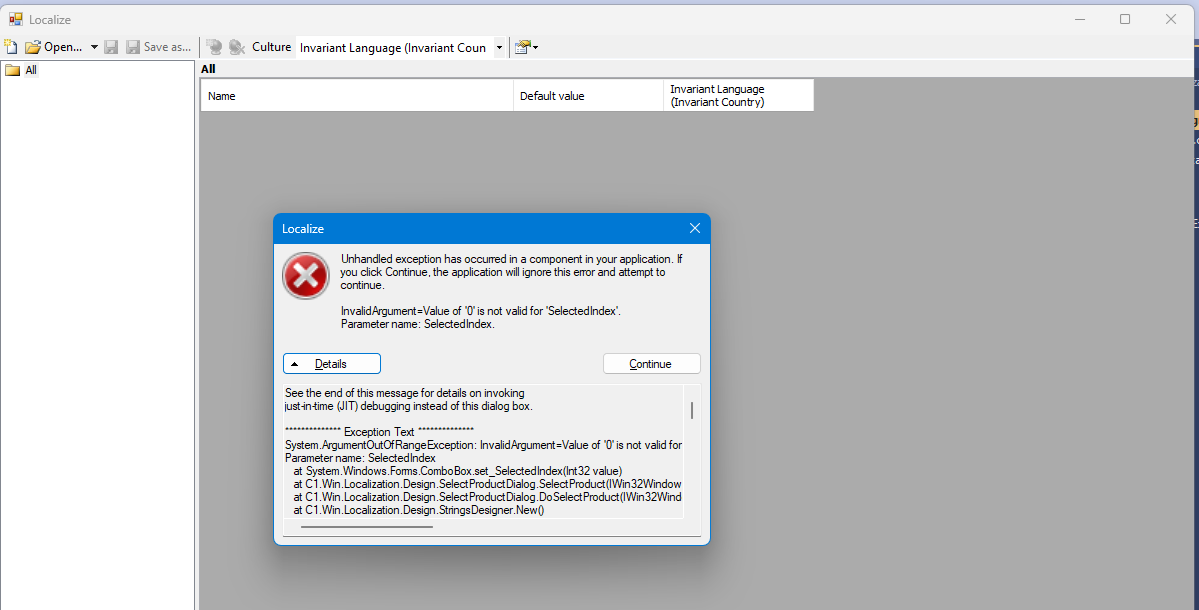
    While trying to restore this localization feature in our real project, I found another problem: If you use a SDK style project file and set the targetframework to “net48”, the localization editor is empty. If you click the “Create new translation” button, an exception is shown:

    This is the exception:

    System.ArgumentOutOfRangeException: InvalidArgument=Value of '0' is not valid for 'SelectedIndex'.
    Parameter name: SelectedIndex
       at System.Windows.Forms.ComboBox.set_SelectedIndex(Int32 value)
       at C1.Win.Localization.Design.SelectProductDialog.SelectProduct(IWin32Window owner, String formCaption, go products, gn initialValue)
       at C1.Win.Localization.Design.SelectProductDialog.DoSelectProduct(IWin32Window owner, String formCaption, go products, gn initialValue)
       at C1.Win.Localization.Design.StringsDesigner.New()
       at System.Windows.Forms.ToolStripItem.RaiseEvent(Object key, EventArgs e)
       at System.Windows.Forms.ToolStripButton.OnClick(EventArgs e)
       at System.Windows.Forms.ToolStripItem.HandleClick(EventArgs e)
       at System.Windows.Forms.ToolStripItem.HandleMouseUp(MouseEventArgs e)
       at System.Windows.Forms.ToolStrip.OnMouseUp(MouseEventArgs mea)
       at System.Windows.Forms.Control.WmMouseUp(Message& m, MouseButtons button, Int32 clicks)
       at System.Windows.Forms.Control.WndProc(Message& m)
       at System.Windows.Forms.ToolStrip.WndProc(Message& m)
       at System.Windows.Forms.NativeWindow.Callback(IntPtr hWnd, Int32 msg, IntPtr wparam, IntPtr lparam)

    Attached is a sample project.

    PrintPreviewLocalization48SDKStyle.zip

    So it seems the localization does not work for SDK style projects?

    Best regards

    Wolfgang

  • Posted 7 January 2026, 7:19 am EST

    I managed to resolve this by adding an old .NET 4.8 framework project (not sdk style) to our solution and adding a dummy form with a C1PrintPreviewControl on it. Fortunately the localization editor finds the original localization that is of course placed in another project.

    So my requirement is worked around, but maybe you could take a look at the problem with sdk style .NET 4.8 projects and fix this.

    Best regards

    Wolfgang

  • Posted 8 January 2026, 3:36 am EST

    Hi Wolfgang,

    Thank you for sharing further details. We could see the issue you mentioned with an SDK-style project. We have shared the observations with the development team to get their insights on it and will let you know the updates as soon as possible.

    [Internal Tracking ID: C1WIN-34883]

    Best Regards,

    Kartik

Need extra support?

Upgrade your support plan and get personal unlimited phone support with our customer engagement team

Learn More

Forum Channels