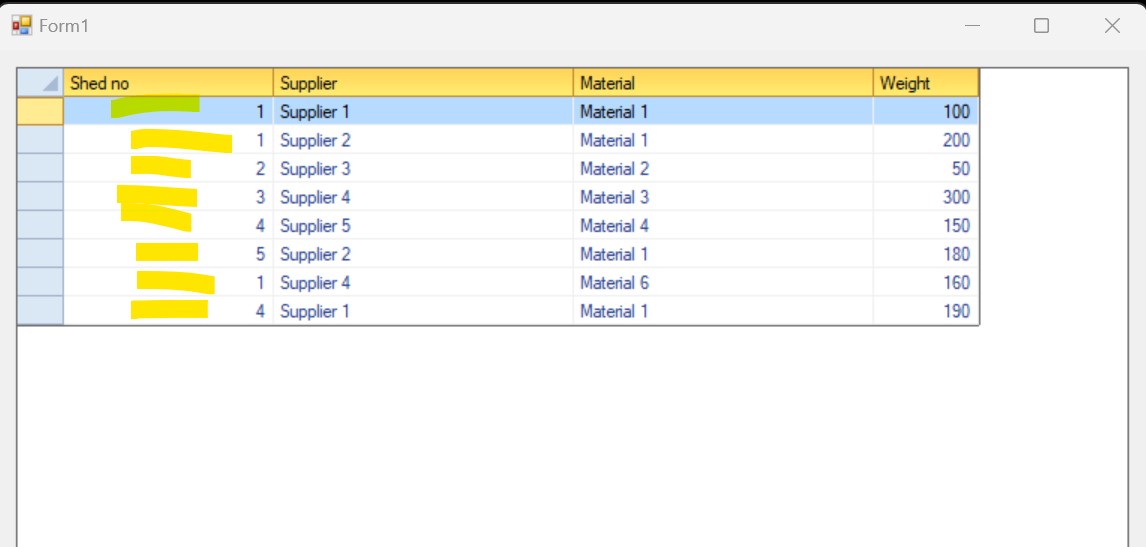
Filter for each Combobox in the row of the C1Flexgrid

Posted by: saidnai on 23 January 2026, 10:35 am EST

  • Posted 23 January 2026, 10:35 am EST - Updated 23 January 2026, 10:40 am EST

    Hi,

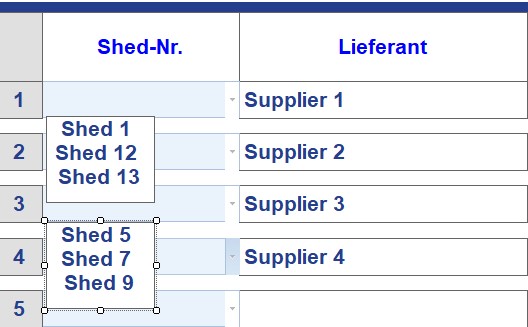
    I have a Flexgrid with 2 columns. The first column is a combobox that shows the shed list where the material of the supplier is stored. The second column shows the supplier name.

    Question:

    Is it possible for each row to show in the combobox only the sheds where the material of the supplier that is in the second cell?

    The code that i use actually to show the hole sheds for the combobox is as follow:

    Public Sub CbShedList()

    Try

    'Dim CBStock As New System.Windows.Forms.ComboBox

    Dim Odbcda As New Odbc.OdbcDataAdapter("SELECT Shed_ID, Shedname FROM tShed Order by Shedname ", connectionString)

    odbcDataSet1 = New DataSet

    Odbcda.Fill(odbcDataSet1, “SonderfreigabeList”)

    Dim dt1 As DataTable = odbcDataSet1.Tables(“SonderfreigabeList”)

    Dim datamapSF As New ListDictionary

    'Create DataMap for Column 1

    For i As Integer = 0 To dt1.Rows.Count - 1

    datamapSF.Add(dt1.Rows(i)(0), dt1.Rows(i)(1))

    Next

    Dim style1 As CellStyle = DGGA.Styles.Add(“comboSF”)

    style1.DataMap = datamapSF

    'Set style of Column 8

    DGGA.Cols(1).Style = style1

     Catch ex As Exception
         MsgBox("Error 'CbShedList' :" & vbCrLf & ex.ToString, MsgBoxStyle.Critical)
     End Try
    

    End Sub

    Best regards

    Said
  • Posted 26 January 2026, 5:45 am EST

    Hi,

    instead of creating a style for the column containing a list of all sheds: you could create a custom style for each supplier and set this style to the grid cell of the supplier (see https://helpcentral.componentone.com/nethelp/c1flexgrid/C1.Win.C1FlexGrid.4~C1.Win.C1FlexGrid.C1FlexGridBase~SetCellStyle(Int32,Int32,CellStyle).html) . For this custom style, you would set an individual data map containing only the sheds for this supplier.

    Hope this gives an idea how to solve it. If not: feel free to ask for details.

    Best regards

    Wolfgang

  • Posted 27 January 2026, 8:22 am EST

    Hello,

    Thank you for reaching out to Mescius Support.

    To achieve dynamic filtering—where the ComboBox options in one cell depend on the value of another cell (such as Supplier), you may want to avoid using a single, grid-wide column style. Instead, you can consider applying a CellStyle() to individual cells right before the user starts editing.

    As Wolfgang suggested, the approach is to use the SetCellStyle method. By handling the BeforeEdit event, you can check the Supplier value for the current row, retrieve only the related Sheds for that Supplier, and create a DataMap specifically for that cell. This helps keep the dropdown list relevant to each row in the grid.

    Here is the sample code snippet to implement this:

     Private Sub DGGA_BeforeEdit(sender As Object, e As RowColEventArgs) Handles DGGA.BeforeEdit
         ' Only run for Column (Shed-Nr)
         If e.Col = 1 Then
             Try
                 ' Get Supplier from Column 2 of the same row
                 Dim supplierName As String = DGGA.Item(e.Row, 2).ToString()
    
                 ' Get the specific data for this supplier
                 Dim dtFiltered As DataTable = GetFilteredShedList(supplierName)
    
                 ' Create a Dynamic DataMap
                 Dim dataMapSF As New ListDictionary
                 For Each row As DataRow In dtFiltered.Rows
                     dataMapSF.Add(row("Shed_ID"), row("Shedname"))
                 Next
    
                 ' Apply unique style to this specific cell only
                 Dim cellStyleName As String = "DynamicStyle_" & e.Row
                 Dim styleUpdate As CellStyle
    
                 If DGGA.Styles.Contains(cellStyleName) Then
                     styleUpdate = DGGA.Styles(cellStyleName)
                 Else
                     styleUpdate = DGGA.Styles.Add(cellStyleName)
                 End If
    
                 styleUpdate.DataMap = dataMapSF
                 DGGA.SetCellStyle(e.Row, e.Col, styleUpdate)
    
             Catch ex As Exception
                 ' Handle errors
             End Try
         End If
     End Sub
     Public Function GetFilteredShedList(supplierName As String) As DataTable
         'Return Filtered ShedList as per Supplier Name
         'Sample Filtering Shed based on supplier 
         Dim dtSheds As New DataTable()
         dtSheds.Columns.Add("Shed_ID", GetType(Integer))
         dtSheds.Columns.Add("Shedname", GetType(String))
    
         If supplierName = "Supplier 1" Then
             dtSheds.Rows.Add(101, "Shed 1")
             dtSheds.Rows.Add(102, "Shed 12")
         ElseIf supplierName = "Supplier 2" Then
             dtSheds.Rows.Add(201, "Shed 3")
             dtSheds.Rows.Add(202, "Shed 4")
         
    
         End If
         Return dtSheds
     End Function
    

    Thanks, Wolfgang, for your solution.

    We have also attached a sample project FlexgridComboboxIssue__2_.zip for your reference. Please have a look at it, and if you face an issue, feel free to reach out.

    Regards,

    Prabhat Sharma.

    FlexgridComboboxIssue__2_.zip

  • Posted 27 January 2026, 8:39 am EST - Updated 27 January 2026, 8:44 am EST

    Dear Prabhat,

    I was making a sample project that can be as workround than i saw your answer. Thanks for that and also to Wolfgang.

    My Data is coming the SQL-Server. You can see the attached sample adjusted with (MDB).

    Can you please have a look at it. I also wrote some comments for better understanding. Even it is similar to your code.

    Best regards

    Said

    HGMatVerbrauch.rar

  • Posted 28 January 2026, 8:59 am EST

    Hello,

    Thank you for sharing your sample.

    As we suggested before, to achieve the dynamic filtering more efficiently, it is better to use the BeforeEdit event in combination with pre-created styles. This allows you to intercept the editing process and apply a specific list of values without repeatedly querying the database during the edit.

    Our suggested approach involves pre-loading unique CellStyles for each supplier found in your data. By storing these styles in a dictionary and assigning them during the BeforeEdit event, the dropdown will only display the sheds associated with that specific Supplier ID. Additionally, the LeaveCell event ensures the cell returns to its normal style once editing is finished.

      Private supplierStyles As New Dictionary(Of String, CellStyle)
    
      Public Sub DGGShedist()
        Dim dtMain As DataTable = DirectCast(DGGL.DataSource, DataTable)
        If dtMain Is Nothing Then Exit Sub
    
        Dim uniqueSuppliers = dtMain.AsEnumerable().Select(Function(r) r.Field(Of Object)("Supplier_ID").ToString()).Distinct()
    
        For Each sID In uniqueSuppliers
            If Not supplierStyles.ContainsKey(sID) Then
                Dim dtSheds As DataTable = GetFilteredShedListFromDB(sID)
                Dim dataMapS As New ListDictionary
    
                For Each row As DataRow In dtSheds.Rows
                    dataMapS.Add(row("Shed_ID"), row("Shedno").ToString())
                Next
    
                Dim styleName As String = "Style_Supplier_" & sID
                Dim suppStyle As CellStyle = DGGL.Styles.Add(styleName)
                suppStyle.DataMap = dataMapS
                supplierStyles.Add(sID, suppStyle)
            End If
        Next
    End Sub
    
    Private Sub DGGL_BeforeEdit(sender As Object, e As RowColEventArgs) Handles DGGL.BeforeEdit
        If e.Col = 2 Then
            Dim supplierID As String = DGGL.Item(e.Row, 3).ToString()
            If supplierStyles.ContainsKey(supplierID) Then
                DGGL.SetCellStyle(e.Row, e.Col, supplierStyles(supplierID))
            End If
        End If
    End Sub
    
    Public Function GetFilteredShedListFromDB(supplierID As String) As DataTable
        Dim dtSheds As New DataTable()
        Dim sqlFiltered As String = "SELECT DISTINCT Sheds.Shed_ID, Sheds.Shedno FROM Sheds " &
                                    "INNER JOIN Stock ON Sheds.Shed_ID = Stock.Shed_ID " &
                                    "WHERE Stock.Supplier_ID = ? ORDER BY Sheds.Shedno"
        Try
            Using conn As New OleDbConnection(connectionString)
                Using cmd As New OleDbCommand(sqlFiltered, conn)
                    cmd.Parameters.AddWithValue("?", supplierID)
                    New OleDbDataAdapter(cmd).Fill(dtSheds)
                End Using
            End Using
        Catch ex As Exception
            MsgBox("Error fetching sheds: " & ex.Message)
        End Try
        Return dtSheds
    End Function
    
    Private Sub DGGL_LeaveCell(sender As Object, e As EventArgs) Handles DGGL.LeaveCell
        If DGGL.Col = 2 Then
            DGGL.SetCellStyle(DGGL.Row, DGGL.Col, DGGL.Styles.Normal)
        End If
    End Sub
    

    We have also updated the sample project for your reference. Please have a look at it.

    If you need any further help, please feel free to ask.

    Regards,

    Prabhat Sharma.

    HGMatVerbrauch_Mod.zip

  • Posted 30 January 2026, 10:41 am EST

    Dear Prabhat,

    This is exactly a good sample to work aroung. Thanks for it.

    Just one thing, when running the shed Combobox will show the ID and not the shed no.

    The shed no like “Shed 23” or “Shed 24” should be show to the end user.

    Best regards

    Said

  • Posted 2 February 2026, 1:56 am EST

    Hello,

    Thank you for the feedback!

    To show Shed_No instead of Id, we can create a CellStyle with a Universal Map for lookup. This map acts like a translator for the entire column. It sees the ID in the data but displays the Name to the user. We will apply this map to the column as the default style so the names are always visible.

    Here is the sample code implementation :

    ’ Create a Unique Style for the Shed Column if it doesn’t exist

    If Not DGGL.Styles.Contains(“ShedColumnStyle”) Then

    Dim cs As CellStyle = DGGL.Styles.Add(“ShedColumnStyle”)

    cs.DataMap = GetUniversalShedMap()

    Else

    ’ Update the map in case data changed

    DGGL.Styles(“ShedColumnStyle”).DataMap = GetUniversalShedMap()

    End If

    With DGGL

    .Cols(2).Caption = “Shed no”

    .Cols(2).Style = DGGL.Styles(“ShedColumnStyle”)

    'Get map for look up

    Public Function GetUniversalShedMap() As ListDictionary

    Dim map As New ListDictionary()

    Dim dtSheds As New DataTable()

    Dim sqlAllSheds As String = “SELECT Shed_ID, Shedno FROM Sheds ORDER BY Shedno”

    Using conn As New OleDbConnection(connectionString)

    Using cmd As New OleDbCommand(sqlAllSheds, conn)

    Dim adapter As New OleDbDataAdapter(cmd)

    adapter.Fill(dtSheds)

    End Using

    End Using

    ’ Populate the dictionary: Key = Shed_ID, Value = Shedno

    For Each row As DataRow In dtSheds.Rows

    map.Add(row(“Shed_ID”), row(“Shedno”).ToString())

    Next

    Return map

    End Function

    Private Sub DGGL_LeaveCell(sender As Object, e As EventArgs) Handles DGGL.LeaveCell

    If DGGL.Col = 2 Then

    'Set Back the default column style “ShedColumnStye”

    DGGL.SetCellStyle(DGGL.Row, DGGL.Col, DirectCast(Nothing, CellStyle))

    End If

    End Sub

    We have attached the modified sample project for your reference.

    Regards,

    Prabhat Sharma.

    HGMatVerbrauch_modified.zip

  • Posted 2 February 2026, 7:40 am EST

    Dear Prabhat,

    Thank you for the reply.

    After comparaison the sample attached is not the modified one.

    Best regards

    Said

  • Posted 2 February 2026, 9:20 am EST

    Hello Said,

    We re-downloaded the sample and checked that it is updated with the latest code.

    Please let us know if you face any issues when running the sample.

    Regards,

    Prabhat Sharma.

Need extra support?

Upgrade your support plan and get personal unlimited phone support with our customer engagement team

Learn More

Forum Channels