C1Label text not accessible via Selenium / Appium

Posted by: andreas_hron on 5 December 2025, 1:28 pm EST

  • Posted 5 December 2025, 1:28 pm EST

    I ran into an issue while trying to automate testing of WinForms applications with Selenium / Appium / WinAppDriver.

    C1Label seems not to expose the text or properties through standard Windows UI Automation. This means:

    Inspect.exe cannot see the label text.

    AccessibleName, AccessibleDescription, and AccessibleRole have no effect.

    Selenium / Appium cannot read the text via .Text or GetAttribute(“Name”) like it is possible with the standard label control.

    Is there a solution?

  • Posted 8 December 2025, 8:37 am EST

    Hello,

    We created a simple sample and used inspect.exe to check for the Name, ClassName, AccessibleName and AccessibleRole properties and were able to see the correct values. Please see the attached video for the same. ([https://drive.mescius.io/download?file=ExternalShare/WinForms/Videos/behavior_SeleniumAppiumTesting_Winforms.zip])

    Could you please provide the exact steps required to set up the environment and reproduce the incorrect behavior you are observing on your end?

    Regards,

    Uttkarsh.

  • Posted 11 December 2025, 5:28 am EST - Updated 11 December 2025, 5:34 am EST

    Hi Uttkarsh,

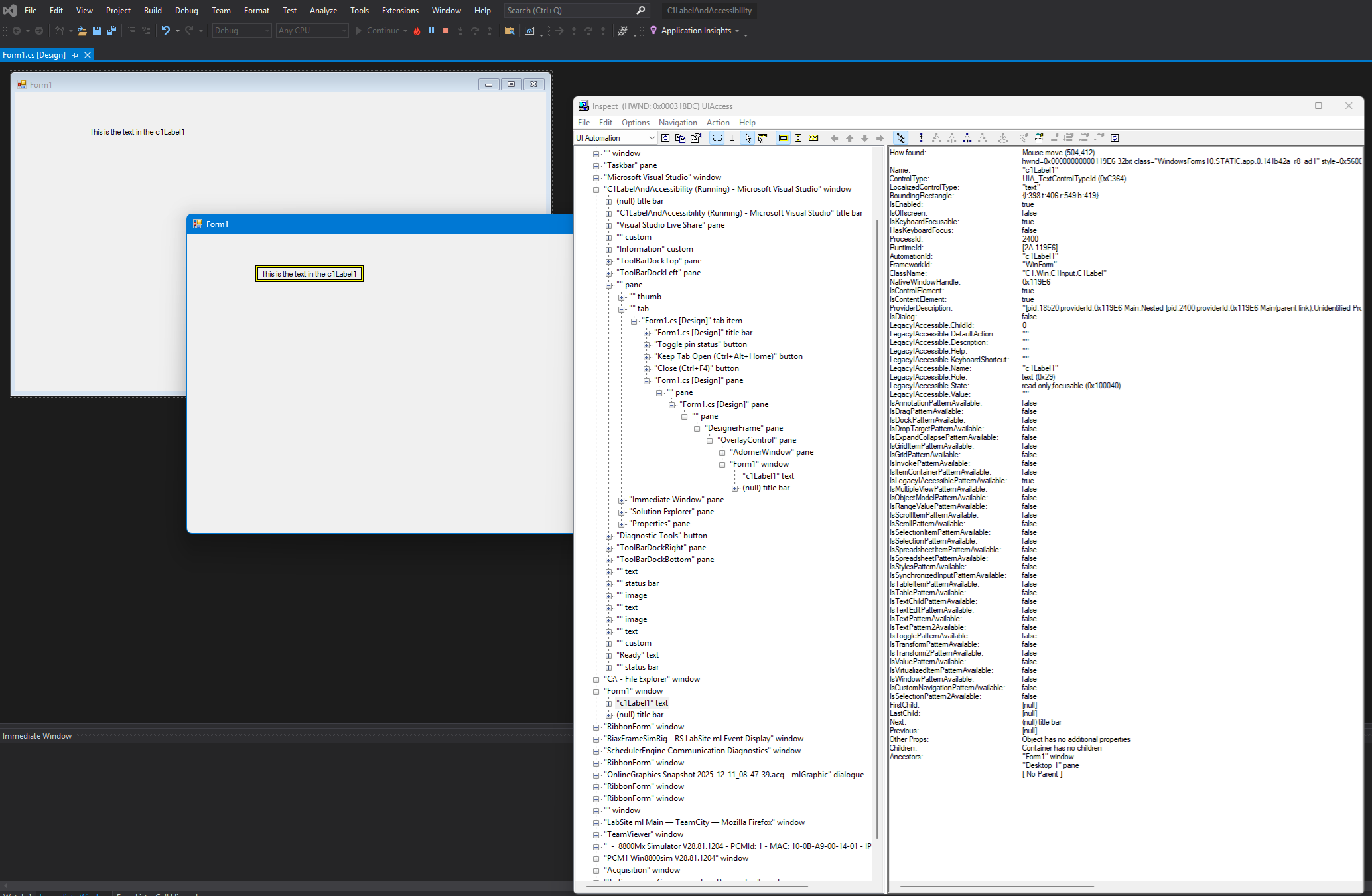
    Thank you for the video. It confirms my findings: In the Accessible interface displayed by Inspect, there is no property for reading the text content of the C1 control. To make this clear, I changed the text to “This is the text in the C1Label1” (see attached screenshot). This cannot be found in Inspect.

    It is very easy to reproduce: Place a C1Label on a Winform, set the “TextDetached” property to True so that text can be entered. Then assign any text to the “Text” property and run the project.

    Reading the Text property is essential for our UI tests. Until the problem is solved, we will have to continue using the standard label. Here, the text is accessible via the “Name” attribute.

    Regards,

    Andreas

  • Posted 12 December 2025, 6:52 am EST

    Hello Andreas,

    Thank you for the details. We can observe the behavior.

    We have escalated it to the development team for further insights. [Internal Tracking ID: C1WIN-34804]

    We’ll get back once we have more information.

    Regards,

    Uttkarsh.

Need extra support?

Upgrade your support plan and get personal unlimited phone support with our customer engagement team

Learn More

Forum Channels