Sorting issue of null value

Posted by: mothydharan on 14 September 2017, 12:12 pm EST

  • Posted 14 September 2017, 12:12 pm EST

    Hi,

    We have used the flex grid in our react -redux application and we have an issue with sorting of null values.The grid columns has null values and when we sort those columns the null values are not getting considered

    In asc/desc the null values are always sorted at the last.Can you please help me to sort the null values also?Either move all the null values to the top when asc/desc.

    If we replace the null values by blank, the sorting works as expected.But we cannot change the data to empty as the null and empty values are treated differently.

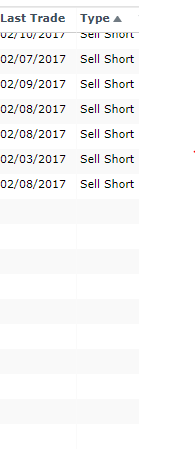
    Please see the attachment of sorting of columns in asc/desc

    Thank you

  • Posted 14 September 2017, 12:13 pm EST

    Hello,

    You can use sortConverter method for accounting null values in sorting. Please refer to the fiddle for the same.

    Thanks,

    Manish Kumar Gupta

  • Posted 14 September 2017, 12:13 pm EST

    Hi Manish Gupta,

    Thank you for sharing the fiddle with sortConverter. The above fiddle is not sorting the ‘Type’ column alphabetically,but it is moving the null values to top and bottom of the column upon sorting.I have attached the screenshot of the fiddle (you have shared) where the data is not getting sorted alphabetically.Can you please help me to sort the column values along with null values?

  • Posted 14 September 2017, 12:13 pm EST

    Hi,

    We are sorry for the inconvenience. Please find the updated fiddle that implements the same.

    Thanks,

    Manish Kumar Gupta

  • Posted 14 September 2017, 12:13 pm EST

    Hi Manish Gupta,

    Thank you for the fiddle and your time for looking into the issue.But the above fiddle is not handling the dropdown column values while sorting the data as the value is getting sorted based on the dataMapBindKey and not the dataMapBindValue. Please see the attached screenshot after i have placed the logic provided by you.

  • Posted 14 September 2017, 12:13 pm EST

    Hi Manish,

    I am also having a similar issue, do we have any solution for this?

    Thanks

    Rasika

  • Posted 14 September 2017, 12:13 pm EST

    Hi Mothydharan/ Rasika,

    We are sorry, we are unable to replicate the issue at our end. Please refer to the fiddle that implements the same.

    If the issue persists, please modify the fiddle depicting your issue.

    Thanks,

    Manish Kumar Gupta

  • Posted 14 September 2017, 12:13 pm EST

    Hi Manish,

    Thank you for your response. Kindly see the below fiddles of dropdown and number sorting which depicts the issues.

    1. Dropdown issue: http://jsfiddle.net/mothydharan/db4jj1cj/9/

    2. Number sorting issue : http://jsfiddle.net/mothydharan/db4jj1cj/6/

    Thank you

    Mothy

  • Posted 14 September 2017, 12:13 pm EST

    Hi Manish Gupta,

    Are you able to reproduce the issue? Do you have any update on the same?

    Thank you

  • Posted 14 September 2017, 12:13 pm EST

    Hi Mothy,

    We are sorry for the delay in the response.

    Thank you for the fiddle.

    Here are the solutions for the above-mentioned issues:

    Regarding DataMap sorting,

    You need to provide dataMap value for sorting in sortConverter method. For your reference, please refer to the updated fiddle http://jsfiddle.net/mkgupta911/db4jj1cj/11/

    Regarding Number sorting issue:

    You need to assign a large negative value to value if item.value is null. Please refer to the updated fiddle for the same.

    http://jsfiddle.net/mkgupta911/db4jj1cj/10/

    Thanks,

    Manish Kumar Gupta

  • Posted 15 September 2017, 5:29 am EST

    Thank you Manish Gupta. It helped me to resolve the issue.

  • Posted 29 January 2018, 3:08 pm EST

     this.cvPaging.sortComparer = (a: string, b: string) => {
                this.userLanguage = 'en');
                if (a === null) {
                    a = '';
                }
                if (b === null) {
                    b = '';
                }
                if (typeof a !== 'string') {
                    a = String(a);
                }
                if (typeof b !== 'string') {
                    b = String(b);
                }
                return a.localeCompare(b, this.userLanguage);
            };
    
Need extra support?

Upgrade your support plan and get personal unlimited phone support with our customer engagement team

Learn More

Forum Channels