MultiSelect Control Item Source

Posted by: epeters on 9 April 2018, 10:58 am EST

    • Post Options:
    • Link

    Posted 9 April 2018, 10:58 am EST

    We have an application that uses the MultiSelect control as part of a grid filter. The item source that we are using is a 4x3 multidimensional array. Each item in the array consists of 3 items: itemCheck, label and value which we mapped to the properties: checkedMemberPath, displayMemberPath and selectedValuePath respectfully. This would allow us to specify default selections when the user comes to the web page.

    Here is the array we are using as the item source: [

    {“itemChecked”:“true”,“label”:“Scheduled”,“value”:“Scheduled”},

    {“itemChecked”:“true”,“label”:“Executed”,“value”:“Executed”},

    {“itemChecked”:“true”,“label”:“Report Completed”,“value”:“Report Completed”},

    {“itemChecked”:“false”,“label”:“Closed”,“value”:“Closed”}]

    Last week we updated to the version 5.20181.436 and with the same array we get the error “Array Expected”.

    Is this an error in the control or was the implementation changed?

  • Posted 10 April 2018, 5:41 am EST

    We are unable to reproduce the error at our end.

    Here are our implementation steps:-

    1. Create a MultiSelect control
    2. Initialize with the sample array data you provided
    3. Initialized the properties as you mentioned

    Please let us know if there are any additional steps to reproduce the error or edit the following example to reflect your problem.

    https://stackblitz.com/edit/angular-8a6u7u

  • Posted 10 April 2018, 10:20 am EST - Updated 3 October 2022, 8:31 pm EST

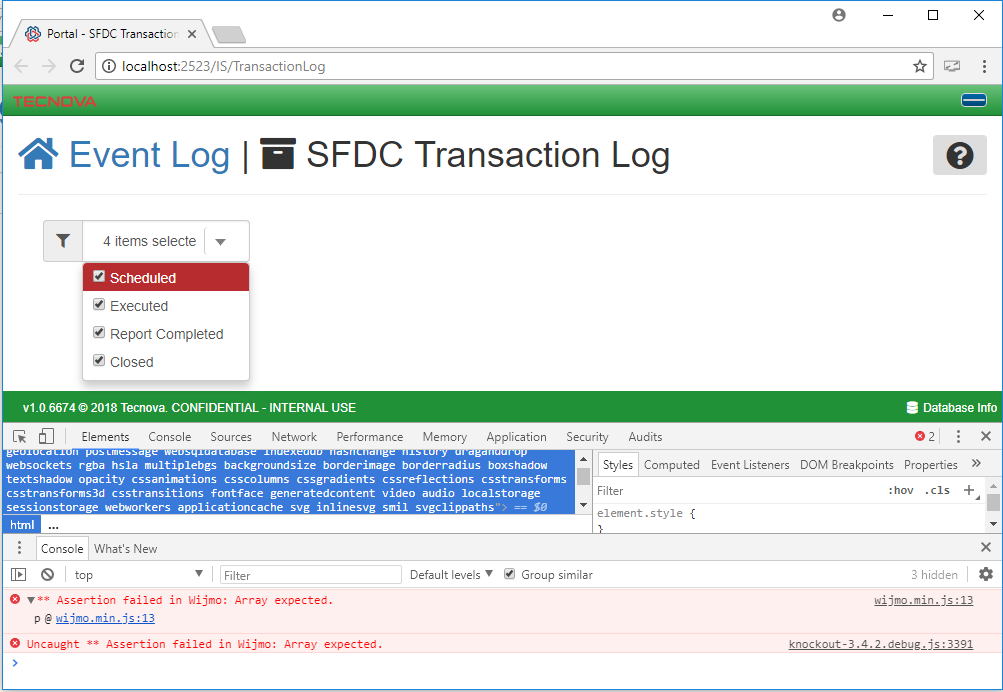
    Thank you for looking into this. I moved the control to a page by itself and still get the same error however the data is loading in the drop down but it seems that the itemChecked value is ignored. If you look at the example you posted, the itemChecked value is also ignored; all items are checked when only 3 are supposed to be checked. So let me give you more details.

    I am using ASP.NET MVC 5 with bundling. In addition to wijmo I am using the following libraries:

    • jquery v2.2.4
    • jquery validate v1.17.0 & jquery validate unobtrusive
    • js-cookie v2.0.0
    • bootstrap v3.3.7
    • knockout v3.4.2
    • moment js v2.20.1

    I have also attached the view that contains the control and a snip of the error as seen in Chrome.

  • Posted 10 April 2018, 10:20 am EST

    Sorry the zip of the view didn’t attach in the last postTransactionLog.zip

  • Posted 11 April 2018, 7:16 am EST

    Hi Eric,

    To make it working, you need to replace following code snippet:

    self.auditStatusFilter = ko.observable("");
    ``` with 
    

    self.auditStatusFilter = ko.observable();

    
    Since, checkedItems dataType is array while you are assigning string(""). That is why error is thrown. 
    
    ~Manish
  • Posted 12 April 2018, 10:43 am EST

    That worked perfectly. Thank you for taking the time to look into my issue.

    Eric

Need extra support?

Upgrade your support plan and get personal unlimited phone support with our customer engagement team

Learn More

Forum Channels