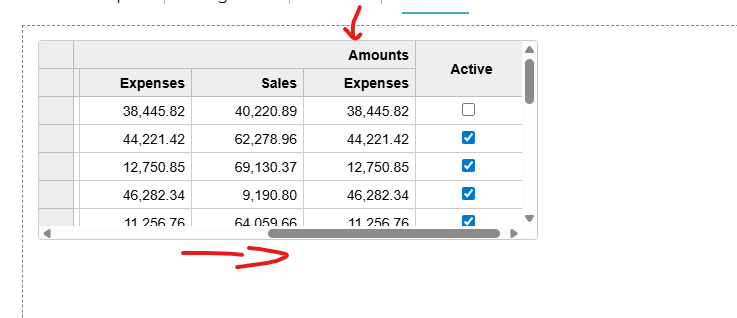
Merged headers text not displayed

Posted by: tdnooij on 9 January 2026, 1:13 pm EST

  • Posted 9 January 2026, 1:13 pm EST - Updated 9 January 2026, 1:22 pm EST

    Hi all,

    If the merged header spans across a visible area, the header text is not visible. Is there a way to adjust the header to ensure it is always displayed within the table while scrolling?

    Unfortunately, CodeMine doesn’t work, so I don’t have a demo. However, if you use the merged headers demo and multiply the Sales and Expenses columns with max-width: 400px;, you will see what I’m trying to illustrate.

    Ps. I use React configuration

  • Posted 12 January 2026, 1:14 am EST

    Hi,

    The best way to resolve this issue would be to use the following CSS for header cells in flexgrid -

    .wj-flexgrid .wj-header.wj-cell {
      display: flex;
      align-items: center;
      justify-content: center;
    }

    You can modify the above CSS to target the specific header cells also, if needed, by adding a custom class on the target cell, as demonstrated in the attached sample(‘v-center’ class is added on the Country header cell in the sample).

    Columns and rows are virtualized in the Flexgrid, so the above CSS will always keep the header visible during horizontal scrolling.

    Please note that, this method might work only when virtualization of columns is enabled in the grid, which is already enabled by default and is controlled by the ‘virtualizationThreshold’ property.

    Please refer to the attached sample for the same. In case, you face any issues, please let us know.

    Regards

    grid sample.zip

Need extra support?

Upgrade your support plan and get personal unlimited phone support with our customer engagement team

Learn More

Forum Channels